
Resume & ATS
Jobscan review 2027: is it worth it, and 7 alternatives
Jobscan began as a resume scanner and now sells a job search suite: match reports, an AI rewrite, a tracker, a LinkedIn optimizer, job matches and auto-apply credits. This review reads its plan screen, its cancellation policy and its reviews as they stood on 15 November 2026, says when it is worth paying for, then ranks seven alternatives on criteria stated before the list.
Is Jobscan worth it in 2027, and what is the best alternative?
Jobscan is worth it on the free plan (5 scans a month) and on the quarterly plan at $29.98 a month if its match report is the tool you use most. The monthly plan at $49.95 is the weakest buy: no trial and a 2-day refund window. The best alternative is Lumyhired, which finds the jobs, scores each one, tailors your resume and a cover letter to it and tracks the application, from €5 a week after 7 free days of Pro with no card. For a free tracker, Teal. For the closest copy of the scan, SkillSyncer at $14.95 a month.
Lumyhired publishes this page and ranks itself first, so weigh the criteria against what you need. Published 27 September 2026, updated 15 November 2026; every price was read on the vendor’s own page that day.
Jobscan review: is it worth it in 2027?
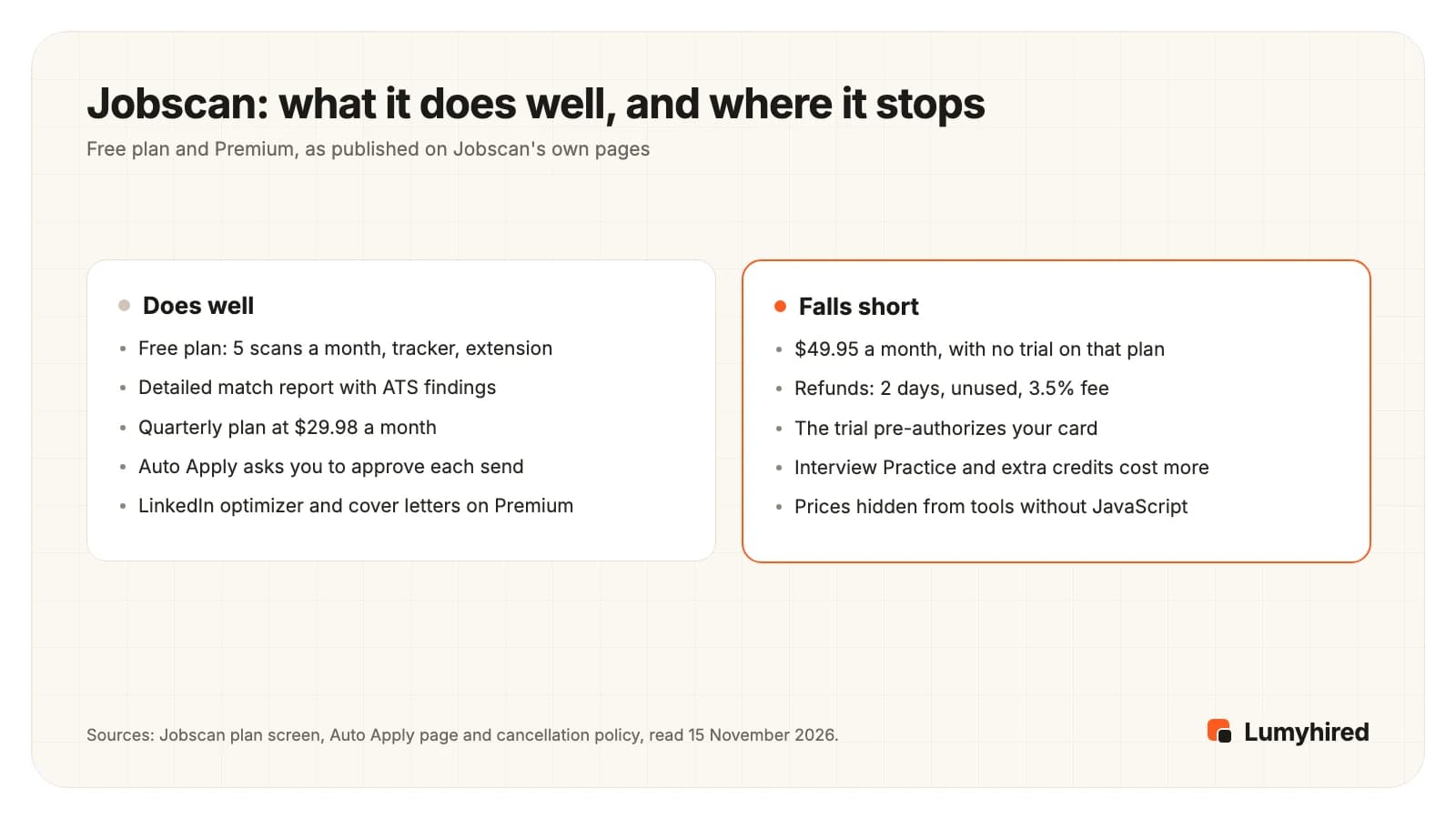
Jobscan is worth paying for in one situation: you send a steady number of applications, you want a detailed match report on each posting, and you take the quarterly plan at $89.95 every 3 months, which works out to $29.98 a month. If you scan five postings a month or fewer, the free plan covers you and paying adds little. The monthly plan at $49.95 is the hardest to defend: it has no trial, it is the highest monthly rate of any tool on this page, and Jobscan’s refund rule gives you 2 calendar days.
The product has grown since our first read in September. On 15 November 2026 the plan screen, opened logged out, listed for the free plan 5 resume scans a month, 5 ATS and recruiter findings, a job tracker, post-interview thank-you notes, a resume builder, a resume manager and the Chrome extension. Premium adds unlimited scans and AI optimizations, an AI cover letter generator, an AI bullet generator, a LinkedIn optimizer, unlimited keyword comparisons, AI Job Match, a synonym detector, ATS-friendly templates, 2 free Auto Apply credits a month, and 20% off further Auto Apply credits and Interview Practice. The same screen says “1,000,000+ job seekers rely on Jobscan”.
Two of Jobscan’s headline claims come without a method. The homepage promises “3x more interview callbacks” and its FAQ says it helps job seekers “land 3X more interviews” and halve their search time. Neither gives a sample, a comparison group or a date, so this review does not use them.
What does Jobscan do in 2027?
Six tools sit behind one login. The first is the reason most people sign up; the last two arrived in 2026 and change what an “alternative” has to cover.
- The match report. You paste a posting and upload a resume; Jobscan returns a match rate with the hard skills, soft skills and job titles it did not find, plus formatting problems. The homepage says it detects the applicant tracking system on each posting and adjusts its advice to that system. Its FAQ recommends aiming for a 75% match and warns that going higher can mean stuffing the resume with keywords, which is sound advice.
- AI optimizations and the builder. On Premium, Jobscan suggests rewrites against the posting, generates bullets and cover letters, and keeps your versions in a resume manager.
- The tracker and the extension. “Jobscan: Job Search Tracker” saves postings from Indeed, LinkedIn and Glassdoor into the tracker and runs a scan from the listing. On the Chrome Web Store it had 10,000 users and a 4.3 rating from 45 ratings, last updated 12 October 2026.
- The LinkedIn optimizer. A scan of your profile against the roles you target. It is a Premium feature, and on the quarterly trial it unlocks only once the trial ends.
- AI Job Match. Jobs matched to your resume, labelled Top Match or Good Match. Jobscan’s pages do not say where these jobs come from or which countries they cover.
- Auto Apply and Interview Practice. Auto Apply fills and sends applications from your resume, and its page says “Nothing submits without your approval”: each application goes through a review step first. It is paid by the credit, one per job. Interview Practice is a mock interview that Jobscan describes as an optional add-on outside the standard subscription.
So the old shortcut, “Jobscan does not find jobs”, no longer holds. What it does not say is where its matches come from, and a resume report built on English job ads is of limited use if you apply in France. If mock interviews are the part you want, the interview tools are compared in the Final Round AI alternatives.
How much does Jobscan cost, and can you get a refund?
Free at $0 forever, Quarterly at $89.95 every 3 months, or Monthly at $49.95 every month, read on the plan screen on 15 November 2026, with sales tax added according to your billing address. Those are the same prices we read on 27 September 2026.
- The trial is quarterly only. The 7-day free trial comes with the quarterly plan. Jobscan places a pre-authorization charge on your card at sign-up, which its policy says is refunded, and bills the quarter when the trial ends unless you cancel. The monthly plan has no trial.
- Refunds are narrow. The cancellation policy limits refunds to members who dispute a charge within 2 calendar days of the billing period start and who did not use the service in that period. Requests are decided case by case, and a 3.5% fee of the original payment applies. Cancelling does not issue a refund on its own.
- Data goes with the plan. The plan screen’s FAQ says that when a subscription expires you lose access to paid features “and all data associated with those features”. Export what you need before the last day.
- Add-ons cost extra. Auto Apply credits sell at 5 for $8.50, 10 for $15 or 25 for $35, with 2 free credits a month on Premium. Interview Practice is priced separately, with 20% off for Premium members.
The prices are also awkward to find. jobscan.co/pricing sends a browser to app.jobscan.co/plan, an address inside the product, where the plans render once JavaScript runs. A request without JavaScript received a 403 challenge page on 15 November 2026. That is one reason many roundups quote $49.95 secondhand, with no date. Over three months, the monthly plan costs $149.85 and the quarterly plan $89.95 for the same features.
What do Jobscan users complain about?
Billing, much more than the product. On 15 November 2026 Jobscan’s Trustpilot page showed a TrustScore of 4.3 from 347 reviews: 82% five-star, 3% four-star, 1% three-star, 3% two-star and 11% one-star. Trustpilot adds that Jobscan has not invited customers to review recently, and that it replied to 71% of negative reviews.
The one- and two-star reviews from 2026 that we read fall into three groups:
- Trials and plan length. A review posted on 29 September 2026 says a one-week trial became a paid plan after about four days and that a one-month choice was billed as three months, with no refund offered. Jobscan replied on 15 October that it had followed up privately.
- Cancelling. A review from 23 August 2026 says cancelling took a long exchange of emails. One from 28 July 2026 reports a charge the reviewer did not authorize; Jobscan replied asking for details.
- Fit for specialist roles. A review from 13 October 2026 says the scan misread the technical vocabulary of the reviewer’s field and suits general or entry-level searches better.
Read together with the 2-day refund rule, the practical advice is simple: if you start the trial, put the end date in your calendar, and if you pay monthly, cancel the day you stop scanning. Four reviews are anecdotes, and 82% five-star is a strong score; the pattern matters because it matches the written policy.
First decide which part of Jobscan you are replacing
Most people use one or two of Jobscan’s tools and pay for all of them. Which alternative is right depends on which ones those are.
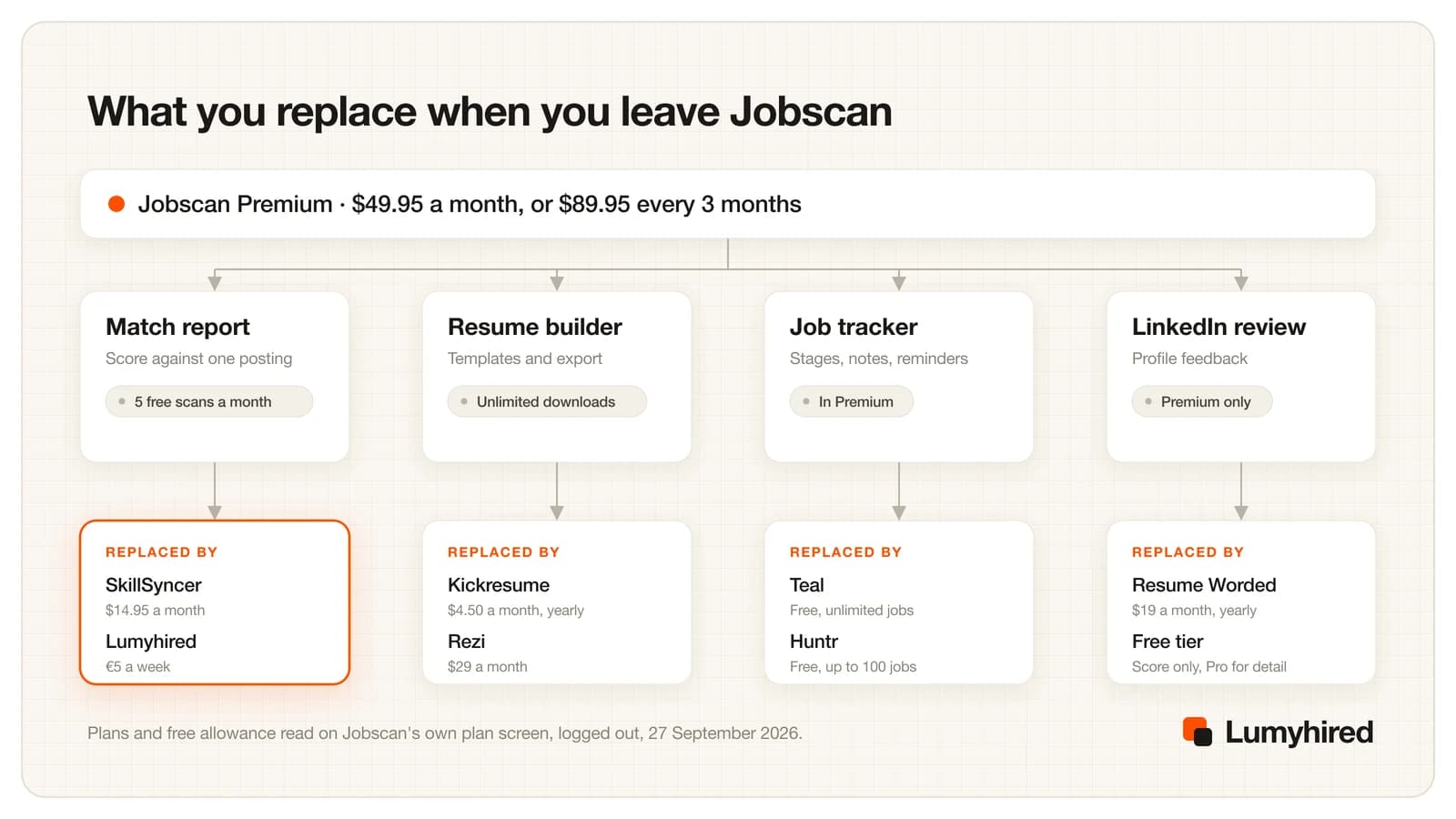
Read the figure as a shopping list. If you only ever pasted postings into the match report, SkillSyncer gives the same shape of answer at $14.95 a month. If the tracker was the point, Teal and Huntr both give you one free. If you were using three or more parts, one tool that covers the loop saves more than any single swap, which is the case for the first entry below.
How we ranked these Jobscan alternatives
We did not run a scored output test, so nothing here claims one match report is more accurate than another. The order rests on what each vendor publishes on its own pages, read on 15 November 2026, against six criteria in this order of weight:
- Covers the loop in one subscription. Finds the job, tailors the resume and letter to it, checks the file, tracks the application and prepares the interview, with no add-on to buy.
- Published price. The cost is readable on a public page before an account or a card.
- A trial or free allowance stated to the unit. A number of scans, resumes, jobs or days, with no card where possible.
- Cost of a month of real use. The monthly rate, and the per-month rate of the cheapest commitment.
- English and French. Job sources and resume language for people applying in France as well as in English.
- Export a parser can read. A text-based PDF or a DOCX, not an image.
This page puts its publisher first and states the criteria so you can reweight them. Someone who values a LinkedIn optimizer or an extension above everything would put Jobscan itself back on top. If you have already narrowed the choice to Jobscan and Lumyhired, the one-to-one comparison is at Lumyhired versus Jobscan, which says where Jobscan is the better buy.
The 7 best Jobscan alternatives in 2027
| Tool | Match report | Rewrite | Tracker | Finds jobs | Free | Cheapest paid |
|---|---|---|---|---|---|---|
| Jobscan (reviewed) | Match rate, missing skills, ATS and recruiter findings | AI optimizations on Premium | Yes, free, plus extension | AI Job Match; auto-apply on credits | 5 scans a month | $29.98/mo on quarterly |
| Lumyhired | 0 to 100% match per job, 10-point CV check | Yes, from the full posting | Yes, version kept with the job, reminders | Yes, 10+ sources incl. Indeed, LinkedIn and France Travail | 7 days of Pro, no card; free extraction preview | €5/week (≈ €21.67/mo) |
| Teal | Top 5 keywords free, all on Teal+ | AI bullets, 5 credits free | Yes, unlimited | Job board, US and Canada places | Unlimited resumes and tracking | $26.33/mo on 90 days |
| SkillSyncer | 2 scans a week free | 10 AI credits a week free | Yes, free | Not on its pricing page | 1 resume, 2 scans a week | $11.62/mo on quarterly |
| Huntr | Basic scoring free, advanced on Pro | Per suggestion, with a reason | 100 jobs free, unlimited on Pro | Job matching on Pro | 2 tailored resumes, 100 jobs | $26.66/mo on 6 months |
| Rezi | Keyword targeting per posting | Writes a bullet per missing keyword | Not on its pricing page | Not on its pricing page | 1 resume, 3 PDF downloads | $29/mo, or $149 once |
| Resume Worded | Own writing rules; posting match on Pro | Line-by-line feedback, you edit | Not on its Pro page | No | Score with feedback | $19/mo on yearly |
| Kickresume | ATS checker on Premium only | AI Writer on Premium | Not in its plans | Not in its plans | 4 templates, unlimited downloads | €8/mo on yearly |
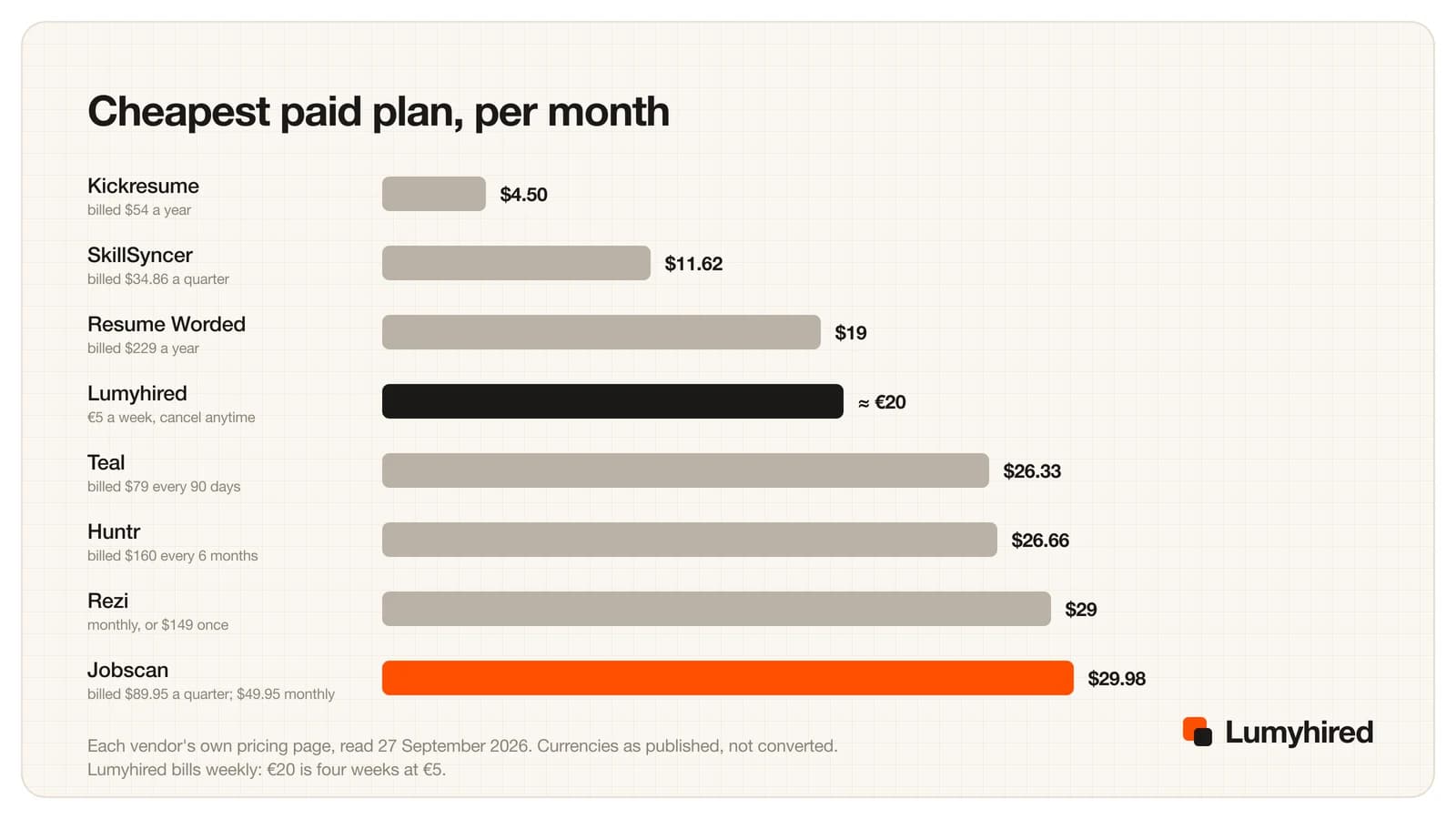
Jobscan’s quarterly rate sits at the top of the cheapest rates, and its monthly plan costs $20 more than the next most expensive option in the chart. Every alternative here is cheaper per month on its cheapest terms; the question is which part of Jobscan each one actually replaces.
1. Lumyhired
Best for: Replacing the scan, the rewrite and the tracker, with the jobs found for you, in English or French
Replaces: Match report, rewrite, tracker and cover letter, plus a job feed.
Price: Every new account gets 7 days of Pro free, with no card and nothing charged when they end. Then weekly plans €5 (Starter), €8 (Pro) and €13 (Hunt), cancel anytime, first 3 days refundable.
What it does well
- One account covers the loop: a feed gathered from more than 10 sources (France Travail, Welcome to the Jungle, Indeed, LinkedIn, Glassdoor and employer career sites on Greenhouse, Lever, Ashby and Workable, among others), a match score from 0 to 100% on each job, a resume rewritten against the full posting, a 10-point CV check, and a tracker that keeps each version beside its job.
- Postings older than 3 days are hidden by default, so the feed favours roles still open to fresh applicants. A switch shows the older ones, and saved jobs stay visible.
- A cover letter written for the same posting from your resume, and interview preparation inside the tracker: likely questions, what to brush up and what to ask. Jobscan sells Interview Practice as a separate add-on.
- The trial asks for no card: 7 days of Pro, and nothing is charged when they end. Jobscan’s 7-day trial comes only with the quarterly plan and starts with a pre-authorization on your card.
- English and French throughout. France Travail and Welcome to the Jungle are in the feed, and the tailored resume can be written in French as well as English, Spanish, German, Arabic or Portuguese. No other tool in this list searches a French job board.
2. Teal
Best for: The strongest free replacement for the tracker and the keyword check
Replaces: The tracker, and a thinner version of the match report.
Price: Free Forever: unlimited resumes, unlimited job tracking, 10 resume templates, the top 5 keywords per posting, Basic analysis, 5 AI bullet credits, 2 summary credits, 2 cover letter credits. Teal+ $13 every 7 days, $29 every 30 days or $79 every 90 days, no card to start.
What it does well
- If you used Jobscan mainly for the tracker, Teal replaces it at no cost, with unlimited resume versions and unlimited tracked jobs.
- Attach a posting and Teal highlights its keywords beside your resume. You make every edit yourself, so nothing changes unless you choose it.
- Teal+ starts with no credit card, the cheapest way to find out whether you like it. Jobscan’s trial pre-authorizes your card.
Worth knowing
- Free keyword matching stops at the top 5 keywords and analysis is marked Basic, so per posting it says less than Jobscan’s report. The free AI bullet credits fell from 10 to 5 between October and November 2026.
- Its job board listed “10,000+ Jobs”, and typing Paris into its location box suggested only US and Canadian towns. Outside North America you find the role elsewhere and save it with the extension.
- Paying $13 every 7 days is the most expensive way to buy Teal+, about twice the 90-day rate per week.
Source: https://www.tealhq.com/pricing
3. SkillSyncer
Best for: The closest like-for-like scanner at under a third of the price
Replaces: The match report, almost exactly.
Price: Free: 1 resume built and exported as PDF, 2 job match scans a week, 10 AI credits a week, 10 saved scans, job tracker. Premium $14.95 a month, or $11.62 a month billed $34.86 quarterly. No yearly plan listed.
What it does well
- The swap that changes least. Paste a posting, get a match score and a missing-keyword list, the same shape of output Jobscan gives.
- $14.95 a month is under a third of Jobscan’s $49.95 monthly rate, and the quarterly plan is $11.62 a month.
- Two scans a week comes to about 8 a month, more than Jobscan’s 5, and a job tracker is included on the free plan.
Worth knowing
- Two scans a week still runs out if you apply every day.
- Its FAQ says to sign up for the free tier, with no card, so there is no anonymous first look at your file.
- DOCX export and live match scoring as you type are Premium. No refund terms on its pricing page, only “cancel anytime”.
Source: https://skillsyncer.com/pricing
4. Huntr
Best for: Approving each AI edit one at a time before it lands on the resume
Replaces: The tracker, plus the rewrite Jobscan leaves mostly to you.
Price: Free: unlimited base resumes, 2 job-tailored resumes, 2 application packets, tracking for up to 100 jobs, unlimited autofills, Chrome Job Clipper. Pro $40 a month, $90 every 3 months ($30 a month) or $160 every 6 months ($26.66 a month).
What it does well
- Jobscan tells you what is missing. Huntr proposes the edit, with a short reason, and you accept, change or ignore each one.
- The free plan tracks up to 100 jobs and includes 2 tailored resumes, enough to judge the output before paying.
- Pro on the 6-month plan is $26.66 a month, below Jobscan’s quarterly rate of $29.98.
Worth knowing
- Pro at $40 a month is only $9.95 below Jobscan’s monthly rate. The saving appears on the longer plans.
- The free plan’s AI credits are “a small number”, with no figure, and the pricing page states no refund terms.
Source: https://huntr.co/pricing
5. Rezi
Best for: Keyword targeting inside the builder, or paying once
Replaces: The match report and the builder, in one screen.
Price: Free: 1 resume, 1 AI interview, 3 PDF downloads. Pro $29 a month. Lifetime $149 one time. 100% money-back guarantee within 30 days of purchase on Pro and Lifetime.
What it does well
- Reads the posting, lists the keywords it did not find, and ticks each one off as you cover it, with no switching between scanner and editor.
- The $149 Lifetime plan is the only one-time payment here. It costs less than three months of Jobscan’s monthly plan ($149.85) and never renews.
- The 30-day money-back guarantee is the longest refund window in this list. Jobscan’s is 2 days.
Worth knowing
- For each missing keyword it can write a new bullet containing that keyword and place it under a job. That is the feature most likely to put a line on your resume you cannot defend in an interview.
- The free tier is 1 resume and 3 PDF downloads, about one application’s worth.
- Lifetime leaves out the free monthly expert review that Pro includes, per its FAQ.
Source: https://www.rezi.ai/pricing
6. Resume Worded
Best for: Line-by-line bullet feedback with a LinkedIn profile review beside it
Replaces: The LinkedIn optimizer, and a writing critique Jobscan does not give.
Price: Free account with a resume score and feedback. Pro $49 a month, $33 a month billed $99 quarterly, or $19 a month billed $229 a year.
What it does well
- Reviews your LinkedIn profile as well as your resume. Jobscan puts its LinkedIn optimizer in Premium, and on the quarterly trial only after the trial ends.
- Comments on individual bullets for specificity, impact and measurable results, so you get a reason with the score.
- At $19 a month on the yearly plan, it is the cheapest way in this list to keep a LinkedIn review running.
Worth knowing
- Its monthly rate of $49 is within a dollar of Jobscan’s $49.95, so the saving only appears on the yearly plan.
- The main score comes from its own writing rules. Matching a resume to one posting is the Targeted Resume report, a Pro feature.
- The Pro page states no refund terms, only “Cancel anytime”. Its LinkedIn section promises feedback to “generate 5x more jobs, leads and opportunities”, with no method given.
Source: https://resumeworded.com/get-pro
7. Kickresume
Best for: Design-led templates and a mobile app at the lowest yearly price
Replaces: The builder, not the scan.
Price: Free: 4 resume and 4 cover letter templates, 1 website template, 20,000 pre-written phrases, unlimited downloads. Premium €24 a month, €18 a month billed €54 every 3 months, or €8 a month billed €96 a year, shown in euros to a visitor in France. 14-day money-back guarantee.
What it does well
- €8 a month on the yearly plan, about $8.84 at the ECB rate of 13 November 2026, is the lowest monthly rate in this list.
- Free downloads are unlimited, which no other free tier here offers.
- Premium adds 40+ templates, the AI Writer, an ATS Resume Checker, LinkedIn and PDF import, and iOS and Android apps.
Worth knowing
- The ATS Resume Checker is a Premium feature, so the cheapest plan here does not replace the scan you used Jobscan for.
- Its plans list no job tracker and no job search. The site footer links to a separate free tracker and a job board, which the pricing page does not describe.
- Heavily styled layouts are a common cause of broken text extraction, so the design strength cuts both ways.
What you give up by leaving Jobscan
Four things go with Jobscan when you cancel, and they are worth weighing honestly.
- The most detailed single report in this group. One view gives a match rate, hard skills, soft skills, job titles it did not find and formatting problems. SkillSyncer is the closest in shape, and nothing here reproduces all of it in one screen.
- A LinkedIn optimizer and an extension. Resume Worded reviews LinkedIn profiles, and Teal and Huntr have free extensions that save jobs into their trackers. If filling application forms in the browser was the part you valued, Simplify’s free Copilot does that, and its rivals are compared in the Simplify alternatives.
- Auto-apply with a review step. Jobscan’s Auto Apply sends nothing without your approval, which is more careful than most auto-apply products.
- A free plan you already know. Five scans a month at $0 forever is a real allowance. If you scan fewer than five postings a month, the honest advice is to keep the free plan and spend nothing.
None of these tools acts on the filter people picture when they say ATS, either. Greenhouse’s auto-reject help article, updated 30 January 2026, describes automatic rejection based on a candidate’s answer to a yes/no or multiple-choice question the employer set up, such as work authorisation. What a scanner buys you is a file that extracts cleanly and wording that a recruiter’s search and quick read will catch. The mechanics are in the guide to how ATS filters actually screen resumes, and the wider scanner comparison is in the best ATS resume tools.
Which Jobscan alternative fits your situation?
You want the jobs found, the resume and letter written for each, and the application tracked. Lumyhired, in English or French, 7 days of Pro free with no card, then from €5 a week.
You only ever used the match report. SkillSyncer at $14.95 a month, or $11.62 on the quarterly plan. Same shape of output, under a third of the price.
You only ever used the tracker. Teal free, with unlimited resumes and tracked jobs, or Huntr free for up to 100 jobs.
You want the rewrite proposed edit by edit. Huntr, starting with its 2 free tailored resumes.
You want to pay once. Rezi Lifetime at $149, with a 30-day money-back guarantee.
You want the lowest price of all. Kickresume at €8 a month on the yearly plan, if you accept that its ATS checker is Premium and its plans include no job search.
You want your LinkedIn profile reviewed too. Resume Worded, at $19 a month on the yearly plan.
You want the match report and nothing else changes. Stay on Jobscan, on the quarterly plan rather than the monthly one.
One caveat on switching for volume. Cheaper scans tempt people into scanning more postings and applying to all of them. In Huntr’s Q1 2026 report, covering 139,927 applications from 25,635 job seekers, people who sent 11 to 20 applications got interviews at 9.25% per application, against 2.58% for those who sent 100 or more, and tailored resumes converted at 4.23% against 2.07% for untailored ones. Huntr sells one of the tools ranked above and its users are not a random sample, so treat these as correlations from vendor data. The numbers behind a sensible weekly target are in how many jobs to apply to, and the tailoring tools are compared in the best AI for resume tailoring.
Frequently asked questions
Is Jobscan worth it in 2027?
Is Jobscan legit?
How much does Jobscan cost in 2027?
Does Jobscan have a free trial, and can I get a refund?
Does Jobscan find jobs or auto-apply now?
Is there a free alternative to Jobscan?
Jobscan vs Lumyhired: which should you use?
Is there a Jobscan alternative that works in French?
Where Lumyhired fits
Lumyhired gathers offers from more than 10 sources, France Travail and Welcome to the Jungle among them, gives each a match score from 0 to 100%, and hides postings older than 3 days by default. You upload a master resume once; it is rewritten for the posting you pick under rules that keep titles, dates, employers and numbers fixed, checked on 10 points, and filed in a tracker with follow-up and interview reminders, interview preparation and a cover letter written for the same job. Every new account gets 7 days of Pro free with no card. After that, plans are €5, €8 and €13 a week on the pricing page, cancel anytime, with the first 3 days refundable.
The free tool with no account is the ATS preview, which shows in your browser what a parser extracts from your file. Run it on a resume exported from Jobscan before you decide anything. The full ATS resume checker is part of the plans and of the free Pro days. Against Jobscan specifically, the feature-by-feature version is at Lumyhired versus Jobscan.
Sources
Every page below was opened on 15 November 2026. Jobscan’s plan screen and Teal’s pricing page need a browser, so both were read in one. User counts and ratings are the vendors’ own figures or the store’s. Review dates are the dates shown on Trustpilot. Jobscan does not say where its job matches come from, so this page makes no claim about their coverage.
- Jobscan, plan screen at app.jobscan.co/plan (reached from jobscan.co/pricing), read logged out in a browser 15 November 2026: Free, Quarterly $89.95 with a 7-day trial, Monthly $49.95, feature lists, FAQ, “1,000,000+ job seekers”
- Jobscan, homepage (ATS detection claim, “3x more interview callbacks”, Auto Apply, Job Match, LinkedIn Optimization), read 15 November 2026
- Jobscan, Auto Apply page (review step before each submission, credit packs, Greenhouse, Lever, Workable and 20+ ATS), read 15 November 2026
- Jobscan, Cancellation Policy (2 calendar days, unused service, case by case, 3.5% fee, trial pre-authorization), read 15 November 2026
- Trustpilot, Jobscan reviews (TrustScore 4.3, 347 reviews, not invited recently, 71% of negative reviews replied to), read 15 November 2026
- Chrome Web Store, Jobscan: Job Search Tracker (10,000 users, 4.3 from 45 ratings, version 2.2.11 updated 12 October 2026), read 15 November 2026
- Teal, pricing page, read in a browser 15 November 2026 (the site refuses our fetcher)
- SkillSyncer, pricing page, read 15 November 2026
- Huntr, pricing page, read 15 November 2026
- Rezi, pricing page and FAQ, read 15 November 2026
- Resume Worded, Pro upgrade page, read 15 November 2026
- Kickresume, pricing page (prices in euros for a visitor in France), read 15 November 2026
- Huntr, Job Search Trends Q1 2026: 139,927 applications from 25,635 job seekers (vendor data, not a random sample)
- Greenhouse, Auto-reject help article, last updated 30 January 2026
- European Central Bank, euro reference rate for the US dollar, 13 November 2026, the latest before 15 November (1 EUR = 1.1052 USD)
- Lumyhired plans, free days and free tools: our own product; prices match the pricing page.
Corrections: if you work at any tool named above and something here is out of date, write to us and we will correct it and change the date.
Read next
- Teal Review and 7 Teal Alternatives (2027)
Is Teal worth it? Free plan, Teal+ prices and limits read on 15 November 2026, then seven Teal alternatives ranked with verified prices.
- Huntr Review and 7 Huntr Alternatives (2026)
Huntr reviewed: free plan, Pro prices, its own numbers against the app stores, how to export your data, and seven alternatives ranked.
- Resume Worded Review and 7 Alternatives (2026)
What the Resume Worded score measures, its prices and refund rule, and seven alternatives ranked with prices read on 15 October 2026.
- Best ATS Resume Tools in 2026: 7 Compared
Seven ATS resume tools ranked on what each one actually checks, with every price and free allowance read on 25 September 2026.
- Best AI for Resume Tailoring in 2026
Nine tailoring tools ranked on six criteria, from reading the full posting to keeping your facts, with prices read 18 September 2026 and a prompt that audits itself.
- How to Pass ATS Filters in 2026
What Greenhouse, Workday, Teamtailor, Lever and iCIMS say their software does to your resume, the one mechanism that rejects automatically, and where the 75% myth came from.