
Career Guides
Simplify review and 7 Simplify alternatives in 2027
Simplify Jobs is the company behind Simplify Copilot, the Chrome extension that fills in job applications, with job matches, a resume builder, a tracker and a paid tier called Simplify+. This page reviews what each part does and costs, from Simplify’s own pages read on 15 November 2026, including the refund and privacy rules most reviews skip, then ranks seven alternatives. The math and calculator apps that share the name are a different product and are not covered here.
What is the best Simplify alternative in 2027?
Lumyhired ranks first because it does the part Simplify leaves to you: it finds jobs across more than 10 sources, scores each one, rewrites your resume and a cover letter for it and tracks the application, from €5 a week after 7 free days of Pro with no card. Each application you send is one you chose and read. For the closest like-for-like swap, Jobright. For free autofill plus a tracker, Huntr. Simplify+ itself costs $19.99 a week, $39.99 a month or $89.99 for 3 months.
Published 15 November 2026. Lumyhired publishes this page and ranks itself first, so weigh the criteria against what you need. Every price was read on the vendor’s own page that day.
What is Simplify Jobs, and what does the free plan include?
Simplify Jobs is a San Francisco company that describes itself, on its Chrome Web Store listing, as a team of fewer than 10 people. Its products share one account: the Simplify Copilot extension, which fills in application forms; Job Matches and a job board; a resume builder; a job tracker connected to Gmail; and an iOS app sold through the App Store. Its homepage also lists curated lists of new-grad roles, internships and startup openings.
Simplify’s help center splits the product in two. On 15 November 2026, the free side included:
- Copilot autofill on the fields it supports, with a review before you submit the application yourself.
- The resume builder: create, import, edit and export a resume by hand.
- One uploaded resume, which you can replace after confirming.
- Cover letters and answers you write yourself, reusing content saved in your profile.
- The job tracker and the Gmail integration, including matched conversations and suggested status updates.
Job Matches, the personalized feed, covers ten countries: the United States, Canada, the United Kingdom, Australia, France, Germany, India, Ireland, Italy and Spain. The job board next to it is a search you filter yourself. The help center does not say where the listings come from or how fresh they are.
On the size of the user base, two numbers sit on the same page. The Chrome Web Store counted 500,000 users for Simplify Copilot on 15 November 2026, with a 4.8 rating from 3.9K ratings. The description written by Simplify says the extension is “used by 1,000,000+ job seekers” and has helped submit over 100 million applications. The store figure is the one Google displays; the others are Simplify’s own. When we read the same listing on 15 October 2026 for our Teal review, it showed 600,000 users.
How does Simplify Copilot autofill work, and which ATS does it support?
Copilot reads the employer’s application form and fills the fields it supports from your Simplify profile, which the privacy policy describes as your resume, education and employment history, skills, work authorization and, if you saved them, demographic answers. You review the result and submit the application yourself. Autofill starts from the page of the application form.
Simplify does not publish a full list of supported systems. Its Chrome Web Store listing names Workday, Lever and Greenhouse “and more”, across “thousands of job boards and ATS platforms”, with “no limits, free forever”. On a form it does not support, you are back to typing. The only way to know whether the employers you target are covered is to open their forms with the extension running.
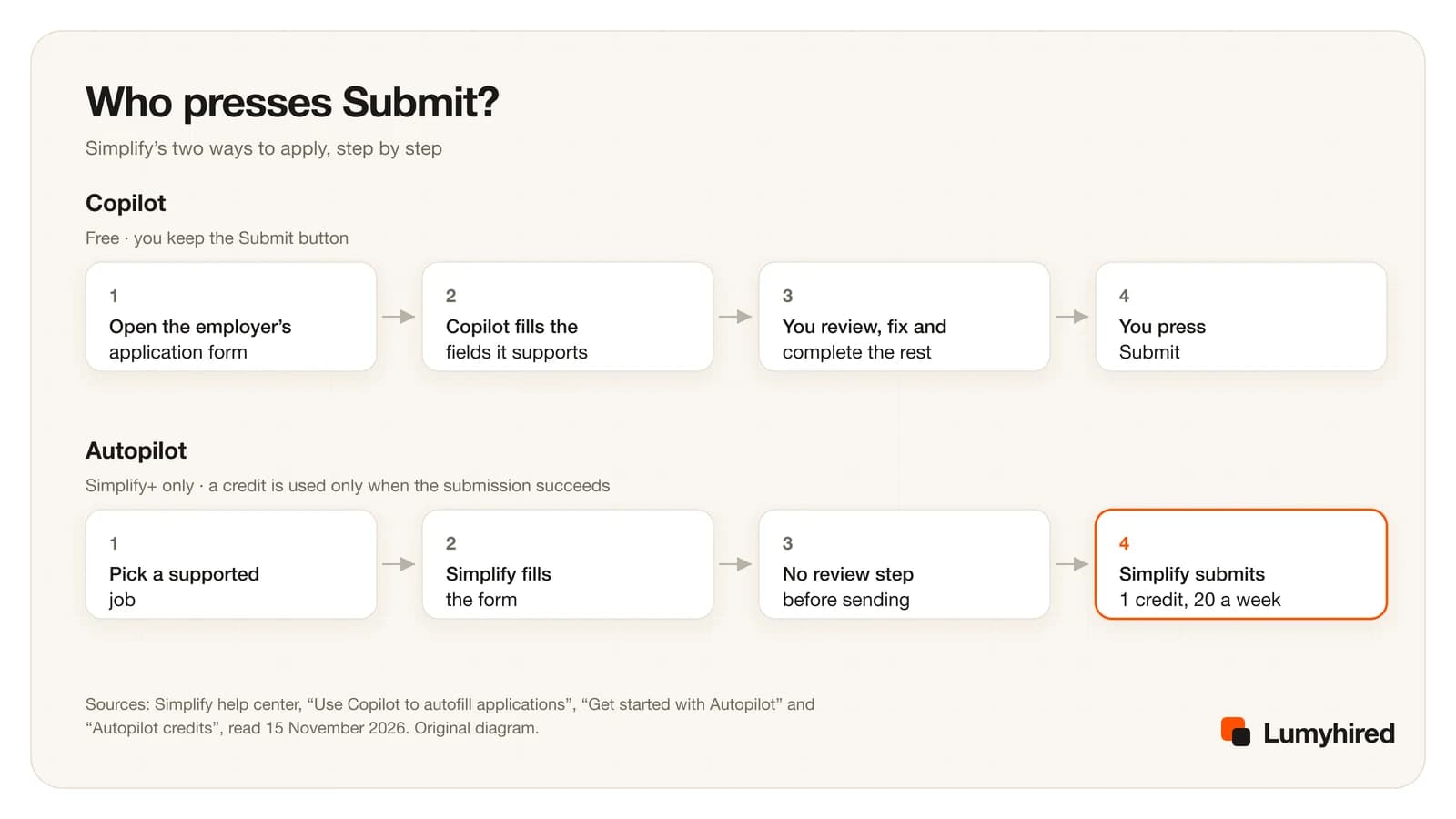
Autopilot is the other mode, and it changes who sends the application. It is included with every Simplify+ plan: you choose a supported job and Simplify fills out and submits the application for you. The help center is explicit that there is “no review step before submission”. Simplify+ includes 20 Autopilot credits a week; a credit is used only when an application is submitted successfully, failed or cancelled runs are free, and unused credits do not roll over.
Two details deserve attention before you turn it on. Autopilot can enter the one-time codes some employers email during an application, using a forwarding address run by a separate service called Letterfern. And it sends whatever your profile and default resume say, so a stale answer saved months ago goes out unread. If you want to see every field before it leaves, stay on Copilot.
How much does Simplify+ cost in 2027?
$19.99 for 1 week, $39.99 for 1 month or $89.99 for 3 months on the web, each renewing until you cancel, read on 15 November 2026. Simplify notes that App Store prices and promotional plans can differ and that the checkout total is what counts. Resume Review and Salary Negotiation are separate purchases outside the subscription.
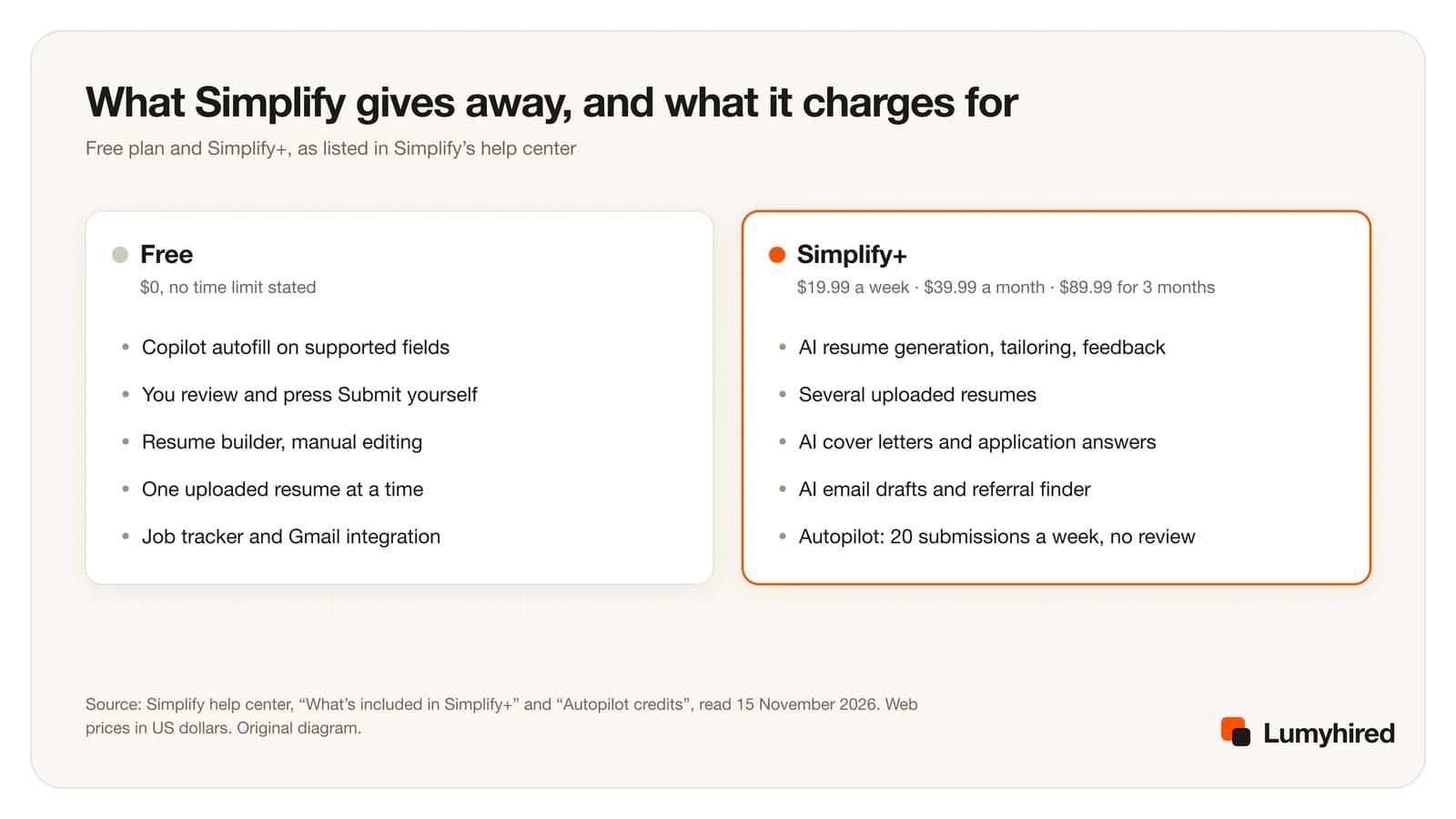
The billing period changes the bill more than anything else. A search that lasts about three months costs $259.87 on the weekly plan (13 payments), $119.97 on the monthly plan and $89.99 on the 3-month plan, for the same features. The weekly plan only makes sense for a burst of a week or two, and then only if you remember to cancel.
Remembering matters because refunds are narrow. Simplify’s refund policy, last updated on 26 August 2026, says all payments are non-refundable except in two cases. An unintentional renewal of a web subscription can get a pro-rated refund, minus processing fees, if you write within 24 hours of the charge. An “extended inability” to use the service because of a technical problem can qualify too, after you schedule a call and show the issue live. The same policy rules out refunds for low usage and for “dissatisfaction with AI-generated content”. Cancelling stops the next renewal and keeps access until the end of the period already paid; it does not refund the current charge.
Public reviews reflect that policy. On 15 November 2026, Simplify’s Trustpilot profile showed a TrustScore of 2.7 from 22 reviews, unclaimed, with a notice that the company does not invite customers to review. Most of the one-star reviews posted between August and November 2026 are about refused or partial refunds. Twenty-two reviews is a small sample next to the 3.9K store ratings, which rate the extension, so read both before deciding.
What does the Simplify extension see? Privacy and permissions
An autofill extension has to read the pages you apply on, and Simplify says so. Its store listing states that it requires “permission to access pages for autofill functionality” and that it does not sell your data to advertisers. In the store’s privacy section, Simplify declares that the extension handles personally identifiable information, location and website content, and that this data is not sold to third parties outside the approved use cases or used for purposes unrelated to the extension.
The privacy policy, last updated on 19 August 2026, gives the detail:
- Forms. The extension processes “the structure and content of application forms” on supported sites. A support report you send may include “a recording of your interaction with the application page”.
- Self-identification. Gender, ethnicity, veteran status, disability and LGBTQ+ status can be saved to pre-fill the equal-employment sections of US forms. Providing them is optional.
- Gmail. If you connect it, Simplify sorts job-related emails and stores message metadata and short previews, without full message bodies or attachments, and says it follows Google’s API Services User Data Policy.
- AI providers. Resumes, job descriptions and other content may be processed by outside AI model providers, which Simplify says it does not authorize to train their own models on that data. Simplify may use interaction signals to train its own systems.
- Advertising. Ad platforms receive limited identifiers and conversion events, and the policy says your resume, application answers and self-identification data are never shared with them. You can opt out of that cross-context advertising.
- Employers. Applications go to employers with the profile information used to complete them, and recruiter matching can present your profile to employers you did not apply to.
In practice: leave the self-identification fields empty if you would rather answer them form by form, keep recruiter discovery off unless you want it, and disconnect Gmail when your search ends. The policy says you can delete your account and its data from your account settings. One limit to this review: we read the store page and the policy, and did not install the extension to inspect its exact Chrome permissions, which the store page does not list. Chrome shows them when you install it.
Where does Simplify fall short, and is Simplify+ worth it?
The free Copilot is worth keeping whatever you decide. It is free, the store rating is high, and it saves typing on every form it supports. The limits show up when you ask Simplify to do more than fill forms.
- Free means untailored. Every AI feature that adapts your resume or writes a cover letter is in Simplify+. On the free plan, the same uploaded resume goes to every employer.
- The weekly price is high. $19.99 a week is the most expensive weekly rate in this comparison, level with Careerflow Premium Plus, and more than twice Careerflow Premium at $8.99.
- Refunds are close to none. 24 hours, for an accidental renewal on the web, with fees deducted.
- Autopilot sends without a review. Fast, and every mistake in your profile goes out with it, up to 20 times a week.
- Coverage is a claim you test yourself. No public list of supported ATS, and Job Matches limited to ten countries.
Simplify+ is worth paying for if you already like the free extension and want AI tailoring and cover letters in the same panel, on the 3-month plan at $89.99, which works out at about $30 a month. It is a weaker buy if you want help choosing which jobs to apply to, if you search mostly in French, or if you need the option of a refund. Those three situations are what the alternatives below are ranked for. If you have been leaning on Autopilot for volume, read the auto-apply tools comparison first; that category has its own trade-offs.
How we ranked these Simplify alternatives
We did not run a scored test of resume output or autofill accuracy, so nothing here claims one tool writes or fills better than another. The order rests on what each vendor publishes, read on 15 November 2026, against five criteria in this order of weight:
- Covers the whole search. Finds jobs, tailors the resume and cover letter to each one, tracks the application and helps with the interview. Simplify’s free tier covers the form and the tracker.
- You stay in control of what is sent. The tool drafts, you review. Tools that submit without a review rank lower on this criterion.
- Published price and a usable refund window. The cost is on a public page before you sign up, and there is a way back if the tool does not suit you.
- Works outside the US. Job sources and language support for people applying in France and the UK as well.
- A free way to start. You can try the paid features before paying, with a free plan or free days.
This page puts its publisher first and states the criteria so you can reweight them against what matters in your own search.
The 7 best Simplify alternatives in 2027
| Tool | Finds jobs | Tailoring | Fills forms | Submits for you | Free start | Cheapest paid |
|---|---|---|---|---|---|---|
| Simplify (what you are leaving) | Job Matches in 10 countries, a job board | AI tailoring on Simplify+ | Yes, free, you submit | Autopilot on Simplify+, 20 a week | Yes | $89.99 per 3 months |
| Lumyhired | One feed from 10+ sources, match score | Resume and cover letter per offer, ATS check | Resume and cover letter ready for each form | You send, after reviewing | 7 days of Pro, no card | €5/week (≈ €21.67/mo) |
| Jobright | AI-matched feed, 8M+ jobs (its claim) | Tailored resumes advertised | Yes, one-click | AI Agent feature linked | Free to start | Not published |
| Huntr | Job matching on Pro | 2 free, unlimited on Pro | Yes, unlimited free | Not on its pricing page | Yes, 100 tracked jobs | $26.66/mo on 6 months |
| Teal | Not on its pricing page | Keyword matching; you edit | Not on its pricing page | No | Yes, unlimited tracking | $79 per 90 days |
| Careerflow | Not on its plans page | AI resumes on Premium | Limited free, full on Premium | Not on its plans page | Yes, limited | $14.41/mo on yearly |
| AIApply | Scans 1M+ postings for matches (its claim) | Resume and cover letter per posting (its claim) | Through auto-apply | Yes, credit packs extra | $0 plan (its figure) | ≈ $12/mo yearly (its figure) |
| LazyApply | Not on its pricing page | Resume profiles, no tailoring listed | Yes | Yes, 15 to 1,500 a day | No | $99 a year |
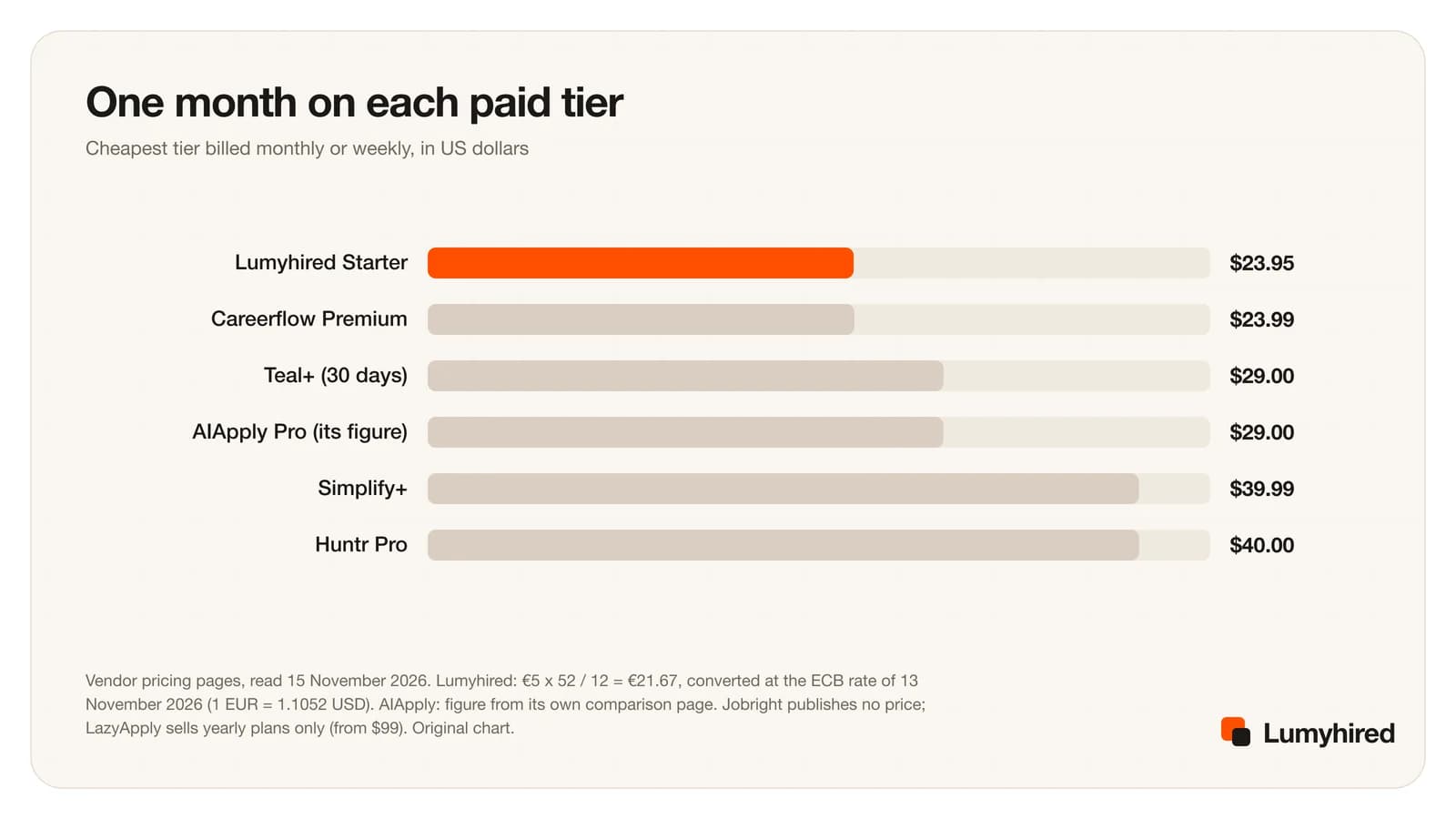
Paid month to month, Simplify+ sits with Huntr Pro at the top of the range, about $16 more than the cheapest tiers. Longer commitments narrow the gap: Simplify+ for 3 months comes to about $30 a month, Teal+ for 90 days to about $26, and LazyApply Basic to $8.25 if you pay for a year up front.
1. Lumyhired
Best for: Finding the right jobs, tailoring a resume and cover letter to each one, and tracking every application
Price: Weekly plans €5 (Starter), €8 (Pro) and €13 (Hunt), cancel anytime. Every new account gets 7 days of Pro free with no card, and the first 3 days of a paid plan are refundable.
What it does well
- It starts with the jobs. One feed gathers offers from more than 10 sources, among them Indeed, Glassdoor, Welcome to the Jungle, France Travail, The Muse, Careerjet and employer career sites on Greenhouse, Lever, Ashby and Workable. Simplify’s free tier starts from a form you already found.
- Every offer gets a match score from 0 to 100% built on role, skills, experience and degree, so you see why a job ranks where it does.
- Your resume is rewritten for each offer from your real experience, then put through a 10-point ATS check, in one of 5 ATS-readable templates with PDF export. On Simplify, AI tailoring is a Simplify+ feature.
- A cover letter for the same offer, a kanban tracker from saved to rejected, and interview preparation with the likely questions and the topics to brush up, for each job.
- The free start costs nothing and asks for no card: 7 days of Pro, and nothing is charged when it ends.
2. Jobright
Best for: The closest like-for-like swap: AI job matches, tailored resumes and one-click autofill in the US market
Price: Free to start. No job-seeker price on a public page: the only pricing link on its site leads to employer pricing (checked 15 November 2026). Third-party reviews quote $39.99 a month for its paid tier, which we could not confirm on Jobright’s site.
What it does well
- It covers the same ground as Simplify with discovery first: personalized job matches, a job-specific tailored resume, one-click application autofill and insider referrals, per its homepage.
- Its homepage says it holds 8,000,000+ jobs with 400,000+ added that day, and 3,000,000 users. Those are Jobright’s own figures.
- An AI career copilot called Orion answers questions about your search, and an AI Agent feature is linked from the homepage for people who want more automation.
Worth knowing
- No published price, so you learn the cost after signing up. That fails one of our five criteria.
- The homepage asks “What regions does Jobright’s service cover?” without answering it on the page, and its job search defaults to the United States. Check coverage before paying if you search in Europe.
Source: https://jobright.ai/
3. Huntr
Best for: Keeping free autofill, with a tracker and tailored resumes in the same account
Price: Free plan: unlimited base resumes, 2 job-tailored resumes, 2 application packets, up to 100 tracked jobs, unlimited application autofills, up to 100 document uploads. Pro $40 a month, $90 every 3 months ($30 a month) or $160 every 6 months ($26.66 a month).
What it does well
- Unlimited application autofills on the free plan, so the habit Simplify built carries over at no cost.
- Two tailored resumes and two application packets free, enough to judge the output before paying anything.
- Pro adds unlimited tailored resumes, unlimited AI cover letters, advanced job matching and unlimited tracking. On the 6-month plan it costs $26.66 a month, below Simplify+ on any billing period.
Worth knowing
- Free tracking stops at 100 jobs.
- Pro at $40 a month is level with Simplify+ at $39.99 when you pay monthly.
- The pricing page states no refund window. It says a cancelled subscription stays active until the end of the period.
Source: https://huntr.co/pricing
4. Teal
Best for: A free, uncapped job tracker and a resume builder with keyword matching
Price: Free Forever plan. Teal+ $13 every 7 days, $29 every 30 days or $79 every 90 days, no credit card required to start.
What it does well
- Unlimited resumes and unlimited job tracking on the free plan, stated in writing on its pricing page.
- Teal+ at $79 every 90 days costs less than Simplify+ at $89.99 for 3 months, and unlocks every job-description keyword with a match score.
- Teal+ includes unlimited AI for resume bullets, summaries and cover letters.
Worth knowing
- Its pricing page lists no form autofill and no auto-apply. Moving from Simplify to Teal means filling forms by hand again.
- The free AI is small: 5 resume-bullet credits, 2 summaries and 2 cover letters on 15 November 2026. A month earlier, on 15 October, the same page showed 10 bullet credits.
- Keywords are highlighted for you to place yourself; the tailoring stays manual.
Source: https://www.tealhq.com/pricing
5. Careerflow
Best for: A cheaper weekly AI plan than Simplify+, with a LinkedIn profile optimizer
Price: Free Basic plan with the Chrome extension and limited tracker, autofill and resume builder. Premium $8.99 a week, $23.99 a month, $54.99 a quarter or $172.99 a year. Premium Plus $19.99 a week, $44.99 a month, $119.99 a quarter or $299.99 a year.
What it does well
- Premium at $8.99 a week costs less than half of Simplify+ at $19.99 a week.
- Premium includes unlimited AI resumes, an ATS score and keyword analyzer, an unlimited AI cover letter writer and an advanced LinkedIn optimizer.
- Premium Plus adds AI mock interviews and interview analysis, which Simplify does not list in Simplify+.
Worth knowing
- The free tracker, autofill and resume builder are marked “limited” with no number attached.
- Mock interviews sit in Premium Plus, at the same $19.99 a week as Simplify+.
- The plans page says nothing about refunds.
6. AIApply
Best for: Auto-apply with credits that do not expire
Price: No dedicated pricing page (aiapply.co/pricing showed the homepage on 15 November 2026). Its own comparison page gives a free plan at $0, Pro at about $29 a month or about $12 a month billed yearly, and auto-apply credits sold separately in packs of 100 or 250, with no pack price on that page.
What it does well
- Auto-apply credits never expire, per AIApply. Simplify’s 20 weekly Autopilot credits do not roll over.
- The yearly plan works out at about $12 a month, by AIApply’s own figure.
- Auto Apply tailors the resume and cover letter to each posting, per AIApply, and the free plan includes unlimited cover letters, a resume scanner and job board access.
- Mock interviews with scored answers sit in the same account, for the step after the application.
Worth knowing
- Auto-apply costs extra on top of Pro, and the pack price is not on the page we read.
- Every price comes from a comparison page AIApply wrote about a competitor, with “approximately” and “around” in front of the figures.
- Like Simplify’s Autopilot, an auto-apply tool sends applications you did not read one by one.
7. LazyApply
Best for: High-volume auto-apply on a yearly budget
Price: Yearly plans only: Basic $99 (15 applications a day, 1 resume profile), Premium $149 (150 a day, 5 profiles), Ultimate $999 (1,500 a day, 20 profiles). 30-day refund window on the first subscription, with conditions.
What it does well
- Basic at $99 a year works out at $8.25 a month, the lowest monthly rate in this list for anyone who will commit to a year.
- It applies on platforms such as Greenhouse, Dice, Indeed and ZipRecruiter, per its pricing page, and tracks applications and referral emails in one dashboard.
Worth knowing
- The refund needs three things at once: a first subscription, fewer than 100 jobs applied through the service, and a product that “demonstrably fails to function as advertised”.
- The plan is added to an email address that must be a Gmail account, per its checkout form.
- One resume profile on Basic, so every application goes out with the same resume.
Source: https://lazyapply.com/pricing
Several of these tools have their own review on this blog, with more detail than fits here: the Jobright review and alternatives, the Huntr review, the Teal review and the AIApply review, which compares the auto-apply price claims made about it.
Which Simplify alternative should you pick?
Pick Lumyhired when the hard part is knowing which jobs are worth an application and sending each one with a resume and cover letter written for it, in English or French, with7 days of Pro free to try it.
Pick Jobright when you search in the US and want the same mix as Simplify (matches, tailoring, autofill) under another brand, and you are fine learning the price after signing up.
Pick Huntr when free autofill is the habit you want to keep, with a tracker and two free tailored resumes to test.
Pick Teal when what you used most in Simplify was the tracker, since Teal’s free tracking has no cap.
Pick Careerflow when you want Simplify+’s AI writing for a short burst at $8.99 a week, or a LinkedIn profile review alongside it.
Pick AIApply when you used Autopilot and want auto-apply credits that do not expire at the end of the week.
Pick LazyApply when volume is the plan, you can commit to a year, and you have read its refund conditions.
For a wider view of the category, beyond tools people compare with Simplify, the ranking of AI tools to find a job covers job boards and search assistants too.
How do you leave Simplify without losing your search?
Keep the free account and move in five steps. Cancelling Simplify+ leaves the free features in place, so nothing forces you to delete your tracker the day you switch.
- Cancel before the renewal date. Plans renew at their billing interval until cancelled, and refunds are limited to 24 hours after an accidental web renewal. Web plans are managed in Simplify’s billing portal, App Store plans by Apple.
- Export every resume you sent. Name each file after the company and the date. If a recruiter calls, you need the exact version they read.
- Copy live applications into a sheet. Company, role, date applied, resume version, status and next step. The free tracker template has these columns ready.
- Check what you shared. Turn off recruiter discovery, clear self-identification answers you no longer want stored, and disconnect Gmail from Simplify or from your Google security settings.
- Delete the account if you are done. The privacy policy says you can delete your account and its data from account settings; backups and legally required records may persist for a while.
Switching is also a good moment to look at how many applications you send a week. The numbers behind a sensible target are in how many jobs to apply to.
Frequently asked questions
Is Simplify Jobs legit and safe to use?
Is Simplify free?
How much does Simplify+ cost in 2027?
Does Simplify auto-apply to jobs?
Which ATS does Simplify Copilot support?
Can I get a refund from Simplify?
Does Simplify work in France and the rest of Europe?
Simplify vs Lumyhired: which should you use?
Is Simplify the same as the Simplify calculator app?
Where Lumyhired fits
Lumyhired is a job-search assistant built around the steps before and after the form. Its feed gathers offers from more than 10 sources, from Indeed and Glassdoor to France Travail and Welcome to the Jungle, and scores each one against your profile. For the offers you keep, it rewrites your resume from your real experience, checks it against 10 ATS points, writes a cover letter for the same offer and files the application on a kanban board with interview preparation. The interface is available in six languages, French and English included.
Every new account gets 7 days of Pro free, with no card asked and nothing charged when they end. After that, plans are €5, €8 and €13 a week on the pricing page, cancel in one click, and the first 3 days are refundable.
The ATS preview shows what a parser extracts from your resume, with no account. Run it on the resume you exported from Simplify before deciding anything. Matching a resume against a specific posting is the ATS resume checker, part of the plans.
Sources
Every page below was opened on 15 November 2026. Teal’s site refuses automated fetchers, so its pricing page was read in a browser. User counts and ratings are the vendors’ own figures or the store’s. Simplify’s help articles show a relative date (“last updated 22 days ago”) with no calendar date. Jobright publishes no job-seeker price we could find, and AIApply publishes its prices only on a comparison page.
- Simplify, help center, “What’s included in Simplify+ (features and pricing)” (free vs paid features, $19.99 / $39.99 / $89.99, 20 Autopilot credits a week), read 15 November 2026
- Simplify, help center, “Get started with Autopilot” (submission with no review step, Letterfern forwarding address for codes), read 15 November 2026
- Simplify, help center, “Supported countries and regions” (Job Matches in 10 countries), read 15 November 2026
- Simplify, Refund Policy, last updated 26 August 2026 (24-hour renewal window), read 15 November 2026
- Simplify, Privacy Policy, last updated 19 August 2026 (extension data, optional self-identification, Gmail, AI providers, advertising), read 15 November 2026
- Chrome Web Store, Simplify Copilot listing (500,000 users, 4.8 from 3.9K ratings, version 3.1.15 updated 13 November 2026, privacy disclosures), read 15 November 2026
- Trustpilot, simplify.jobs reviews (TrustScore 2.7, 22 reviews, unclaimed profile), read 15 November 2026
- Jobright, homepage (user and job counts are Jobright’s own figures), read 15 November 2026
- Huntr, pricing page, read 15 November 2026
- Teal, Teal+ pricing page (Free Forever and Teal+ features, AI credits, billing periods), read in a browser 15 November 2026
- Careerflow, Premium plans page, read 15 November 2026
- AIApply, “AIApply vs LoopCV” comparison page (the only AIApply page with its own prices; AIApply wrote it about a competitor), read 15 November 2026
- LazyApply, pricing page (yearly plans, daily application caps, Gmail account requirement), read 15 November 2026
- LazyApply, refund policy (30 days, first subscription, fewer than 100 applications), read 15 November 2026
- European Central Bank, euro foreign exchange reference rates, 13 November 2026, the latest published on 15 November (1 EUR = 1.1052 USD)
- Lumyhired plans, free days and features: our own product; prices match the pricing page.
Corrections: if you work at any tool named above and something here is out of date, write to us and we will correct it and change the date.
Read next
- Jobright Review and 7 Alternatives (2027)
Is Jobright worth it? Features, a price it does not publish, the r/csMajors scraping question, and seven alternatives with prices read on 15 November 2026.
- Best AI Job Search Tools in 2027: 10 Compared
Ten AI job search tools ranked, from Lumyhired's all-in-one search to Simplify's free autofill and Final Round AI's interview prep, with plans and prices read on 15 November 2026.
- Best Auto Apply Tools in 2026
Seven auto apply tools compared on their own terms, with what Greenhouse measured about what mass applying actually buys now that so many candidates do it.
- Teal Review and 7 Teal Alternatives (2027)
Is Teal worth it? Free plan, Teal+ prices and limits read on 15 November 2026, then seven Teal alternatives ranked with verified prices.