
Resume & ATS
How to pass ATS filters in 2026
Almost every guide on this subject repeats a rejection rate nobody ever measured. This one works from what the vendors publish: what Greenhouse, Workday, Teamtailor, Lever, iCIMS and SmartRecruiters say their software does to your file, which single mechanism actually rejects people automatically, and what you can change before you send.
How do you pass ATS filters in 2026?
Send a file a parser can read, answer the application questions correctly, and use the posting’s own job title and terms. In the vendor documentation, the only automatic rejection is a rule a recruiter attaches to an application question such as work authorisation or location (Greenhouse help center, updated 30 January 2026). The AI layer grades rather than rejects: Greenhouse Talent Matching labels candidates Strong to Limited (3 September 2026), Workday HiredScore grades A to D (20 March 2026), Teamtailor Co-pilot ticks each criterion. Greenhouse accepts .doc, .docx, .pdf, .rtf and .txt (19 August 2026), so the format debate matters far less than whether the text is selectable. The often quoted 75% rejection rate traces back to Preptel, a company that closed in August 2013 without publishing a method.
Vendor documentation read 15 September 2026. Page updated 16 September 2026.
Where a resume can actually be stopped
An application passes through five stages before anyone offers you an interview, and only two of them produce a no. The software parses your file, applies whatever knockout rules the recruiter configured, grades you against the job criteria, waits in a database for recruiter searches, then gets skimmed by a person.
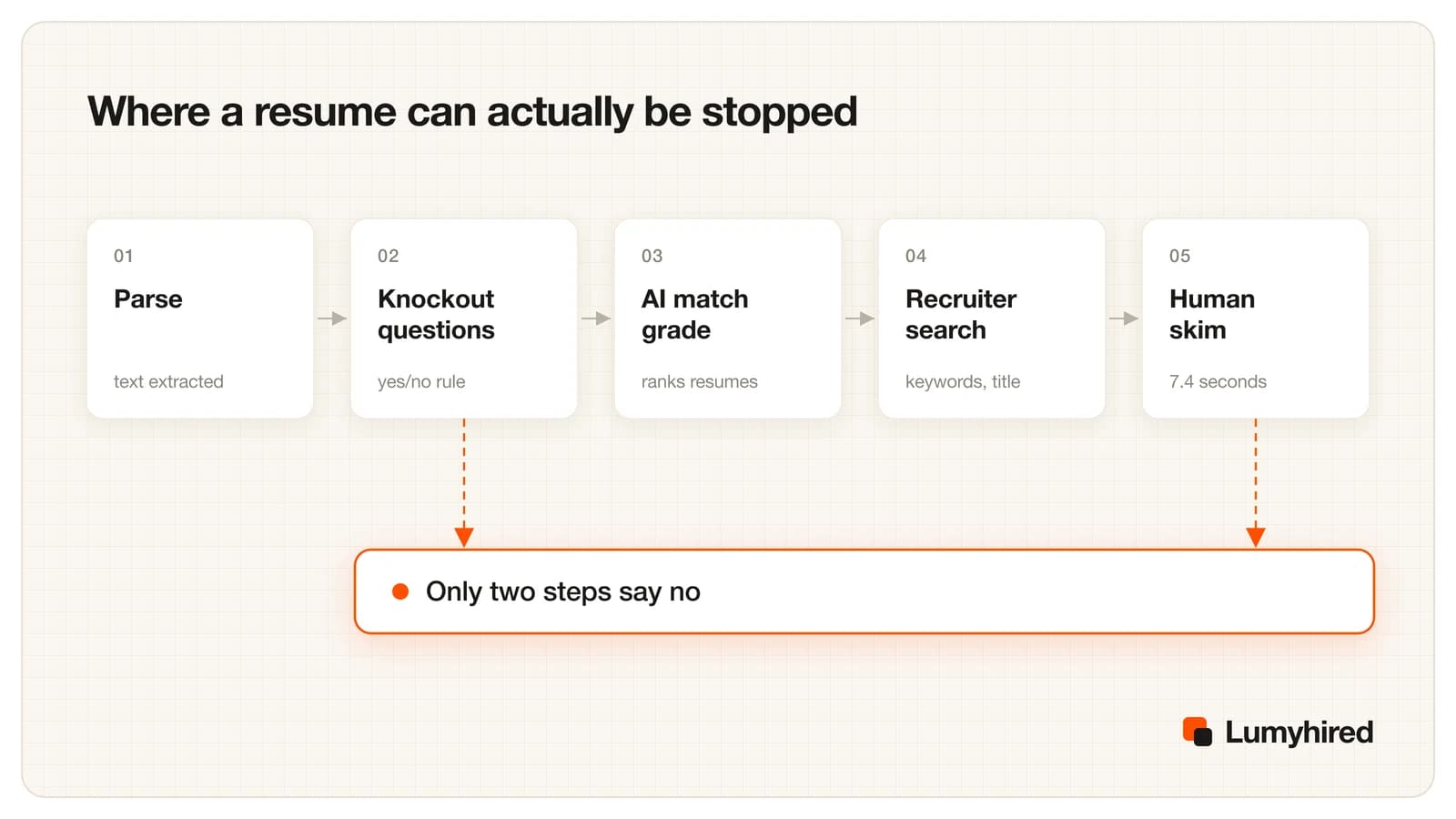
Knockout questions are the automatic no. They are the checkboxes you answer in the form: are you legally authorised to work here, will you need sponsorship, do you hold the licence, are you within commuting distance. Greenhouse lets recruiters attach an auto-reject rule to any yes/no, single-select or multi-select question, and that rule fires within seconds of submission. That is the source of the rejection email that lands before lunch.
The human skim is the other no, and it is where most rejections happen. Everything in between reorders a list. If you have applied to a hundred roles and heard nothing, the diagnostic in why you are not getting interviews separates a parsing problem from a targeting problem, which need different fixes.
How AI resume screening works, vendor by vendor
Six systems cover most of the applications you will send. Each publishes something about what its AI does, and none of them describes a score rejecting a candidate by itself. Read the middle column as what happens to your file, and the right column as the only question that decides whether a human ever sees it.
| ATS | What its AI does to your resume | Can it reject you on its own? | Document |
|---|---|---|---|
| Greenhouse (Talent Matching) | Sorts applicants into Strong, Good, Partial, Limited or Needs manual review against criteria the recruiter weights. Related terms count toward the same skill, so it is not pure exact matching. A file it cannot read lands in Needs manual review. | No. Auto-reject fires only on a rule the recruiter attaches to a yes/no, single-select or multi-select application question. | Talent Matching FAQ, updated 3 Sep 2026; Auto-reject article, updated 30 Jan 2026 |
| Workday (HiredScore Spotlight) | Grades each candidate A, B, C or D against the job requirements, A being the closest match. Fetch resurfaces past applicants into a new req. | Not described. The admin guide says recruiters advance or reject candidates themselves, singly or in bulk. | Responsible AI page, analysis dated 20 Mar 2026; HiredScore admin guide, undated |
| Teamtailor (Co-pilot) | Marks every recruiter-set criterion as met, not met, or unknown with a stated reason, reading the resume, cover letter, application answers, tags and custom fields. | No automatic rejection. Recruiters override each mark and sort by how many criteria are met. | Co-pilot screening support article, read 15 Sep 2026 |
| Lever | Shows a fit percentage with a written justification and labels candidates Strong Fit, Good Fit or Review. Drafts rejection emails for a recruiter to edit. | Nothing found either way. The claim comes from a product page rather than a help center article. | AI-powered screening product page, undated, read 15 Sep 2026 |
| iCIMS | Ranks candidates on skills and experience. The customer decides how much autonomy to switch on. | Not stated. The vendor says recruiters stay in control of decisions. | AI recruiting product page, undated, read 15 Sep 2026 |
| SmartRecruiters | The AI addendum is the strictest language of the six: the applications do not independently evaluate, score or rank candidates. | Ruled out by contract as the sole or primary basis of an employment decision. | AI Addendum, section 5, effective 18 Jun 2025 |
Table built from vendor help centers, admin guides, product pages and legal terms, all read on 15 September 2026. Dates in the last column are the vendors’ own last-updated dates where the page shows one. Lever and iCIMS publish marketing pages rather than help center articles on this, which is why their rejection column says nothing was found.
Two details are worth keeping. Greenhouse states that related terms count toward the same skill, so a system that understands React and React.js are the same thing is already normal. And a file with technical or formatting problems is routed to Needs manual review instead of being dropped, which is a queue with a much longer wait than the graded pile.
Greenhouse also surveyed 4,136 people in the US, UK, Ireland and Germany in November 2025: 70% of hiring managers trust AI to help them decide faster and better, while only 21% of recruiters are very confident their AI is not rejecting qualified candidates. Those are vendor numbers, and they describe an industry that is not certain about its own tools.
Which ATS you are probably facing
Jobscan publishes the only regularly updated census of this market. In its sixth edition, dated 20 August 2026, it found a detectable ATS at 487 of the Fortune 500, or 97.4%, from a manual review of career pages plus more than a million resume scans across 13,130 companies. Workday runs over 40% of the Fortune 500 and SAP SuccessFactors around 12%.
Across the wider sample of 13,130 companies the shape changes completely: Greenhouse 19.0%, Workday 17.5%, Lever 15.6% and iCIMS 14.4%. Jobscan sells resume optimisation, so it has a commercial interest in a high ATS count, and its own older page gives different figures. Use it as an order of magnitude. The practical read is that the six systems in the table above cover most of what you will meet, and they behave similarly enough that one clean file works everywhere.
The 75% rejection myth, traced to its source
You have read that 75% of resumes are rejected by ATS before a human sees them. HR practitioner Christine Assaf traced the number in October 2020: it came from Preptel, a resume services company that went out of business in August 2013 and never published a study or a method. It was repeated by CIO.com from 2012, by Forbes in 2014, by CNBC in 2019, and by most of the 2026 blog posts competing with this one.
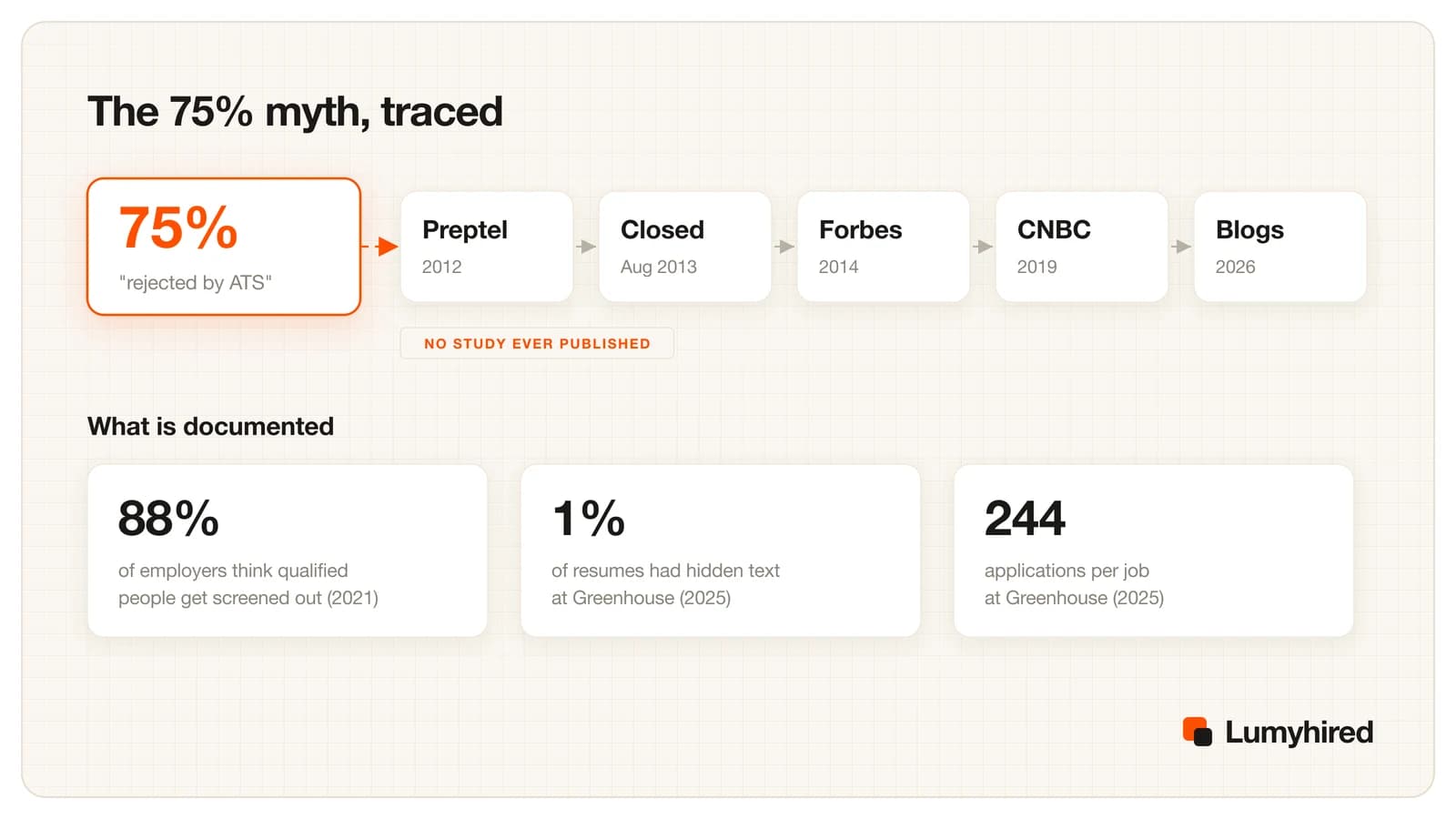
What is documented points somewhere more useful. The Hidden Workers report from Harvard Business School and Accenture (September 2021, surveying more than 2,250 executives) found 88% of employers agree that qualified high-skills candidates get screened out because they do not match the job description exactly, rising to 94% for middle-skills roles. That is employers describing their own configuration choices rather than a measured rejection rate, and those choices are the knockout questions and negative filters they set, including filters on employment gaps.
ATS friendly resume format in 2026: what breaks and what does not
Greenhouse accepts .doc, .docx, .pdf, .rtf and .txt files up to 100 MB and states no penalty for PDF (support page updated 19 August 2026). Workday portals accept PDF as well. The file extension is close to irrelevant. What matters is whether there is text inside.
- Image-only PDFs fail completely. A scan, a screenshot, a design export that flattens type, or a PDF printed from a LinkedIn profile gives the parser nothing. Open the file and drag your cursor across a line: if the text does not highlight, the parser reads an empty page.
- Columns and tables can still break some parsers. Textkernel, whose parsing engine it says is over 95% accurate on critical fields, has said two-column layouts can choke some parsers and that tables can come out as a column of dates, a column of titles and a column of companies with nothing linking them. Those statements date from 2021 and its newer LLM parser handles columns, so this is a risk with no upside rather than a certainty.
- Headers and footers are the classic silent loss. Contact details placed in a Word header survive visually and disappear from plenty of extractions.
- Skill bars and star ratings carry no text. Write the level out: Spanish, professional working proficiency.
- Standard section headings win. Work Experience, Education, Skills. A heading reading My journey maps to no field.
Textkernel also normalises skills and job titles to public taxonomies such as O*NET and ISCO, which is the technical reason a standard job title beats an internal one. Growth Ninja is a title no taxonomy contains. If you want to see the extracted text rather than guess, the ATS extraction preview shows what a parser pulls out of your file, and single-column resume examples show the structure that survives it.
Hidden text and white-font keywords: why they backfire
The trick going around in 2026 is a block of white text or a hidden instruction aimed at the AI reading your file. Greenhouse found hidden text in about 1% of resumes in the first half of 2025. ManpowerGroup told the New York Times it appears in roughly 10% of the resumes it scans with AI, about 100,000 a year, and that those candidates are not moved forward.
The mechanism that makes it useless is the same one this whole article rests on. Parsers strip formatting. White text on white background becomes ordinary text in the extracted output, so the recruiter opening your profile reads your hidden paragraph in plain black, sitting oddly under your education section. In a Greenhouse survey of job seekers published 19 November 2025, 41% of the US respondents said they had tried this kind of prompt injection, which is exactly why screening teams now look for it.
How recruiters actually search the database
Once your resume is parsed and graded, it sits in a database that a recruiter queries. LinkedIn Recruiter supports AND, OR and NOT in capitals, parentheses and quoted phrases across the title, company, keyword, skills, location, school, industry and language fields, with plus and minus signs unsupported and stop words ignored in the keyword field. Greenhouse runs full-text search across resumes and returns snippets. A recruiter typing "product manager" AND (SQL OR Looker) is reading whatever text your file produced, nothing else.
Jobscan's analysis of 2.5 million applications found recruiters filtering on skills in 76.4% of searches, education in 59.7% and job title in 55.3%, and that a resume title matching the job ad went with a 10.6 times higher interview rate. Correlation, from a vendor, on its own users. It still matches what the taxonomies do, and the cheapest change on your resume is putting the posting's standard job title at the top when it describes what you did.
Matching is drifting away from exact strings. Greenhouse maps related terms to one skill, and LinkedIn's Hiring Assistant, an agent recruiters brief in natural language, went globally available in English in September 2025. Writing for meaning and writing for keywords are converging, which is the argument made in our roundup of AI adoption on both sides of the hiring table.
Why the human stage got harder than the software stage
Greenhouse published benchmarks in March 2026 drawn from more than 6,000 companies and more than 640 million applications. Applications per job went from 116 in 2022 to 244 in 2025. Recruiters per organisation fell from 10.43 to 4.62 over the same period, and applications per recruiter per year rose from 146 to 746.
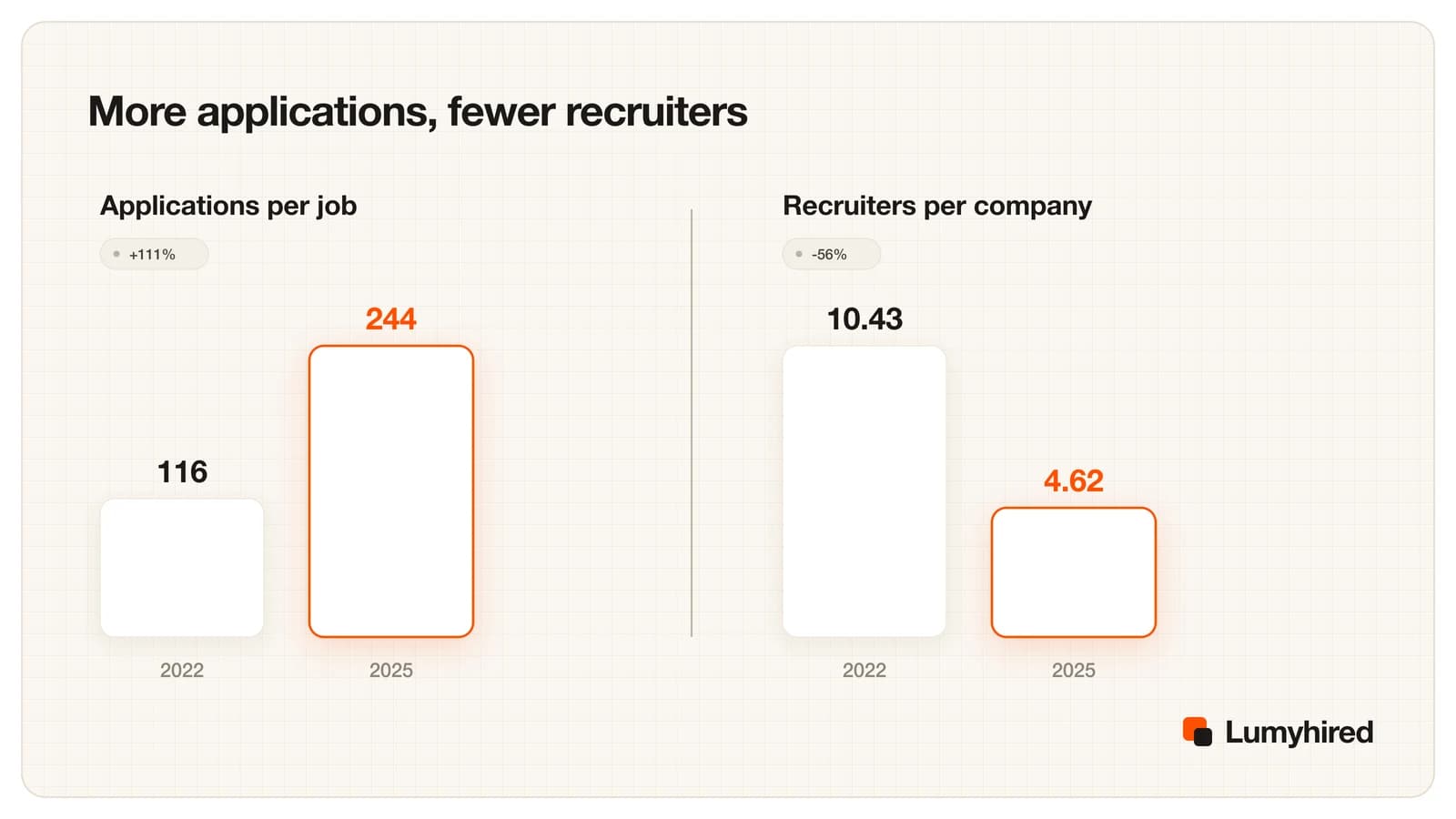
That ratio explains the thing people blame the robot for. A recruiter with twice the applications and half the team gives each file the 7.4 seconds the 2018 Ladders eye-tracking study measured across about 30 recruiters, and that study is small, vendor-funded and eight years old. The finding that survives is about layout: simple pages with clear headings were read properly, multi-column and cluttered ones were not.
A checklist to run before you send
- Select a sentence in your PDF with the cursor. If it highlights, the text is real.
- Run the file through a parser and read the output rather than the layout.
- Check the current job title, dates and employer names all came out attached to each other.
- Put the posting's standard job title at the top of your most recent role when it is accurate.
- Answer every knockout question deliberately, since that is the one automatic rejection.
- Move anything from a header, footer or text box into the body.
- Replace skill bars and star ratings with words.
- Use Work Experience, Education and Skills as headings.
- Spell out each acronym once, for example CRM (customer relationship management).
- Delete any hidden text, white font or invisible instruction.
Two jobs sit next to this one and are covered properly elsewhere. Pulling the right terms out of a posting is a separate skill, set out in finding and placing resume keywords. Rewriting the document for a specific posting without inventing experience is a workflow with before and after examples, in tailoring your resume to a job description. This article stops at how the software reads and ranks what you send.
What the rules say about being screened by software
The EU AI Act lists recruitment in Annex III point 4(a), covering systems used to analyse and filter job applications and to evaluate candidates. Regulation (EU) 2026/1744, published in the Official Journal on 24 July 2026 and in force since 27 July 2026, moved those high-risk obligations to 2 December 2027. Until then, GDPR article 22 is the operative rule in Europe: you have a right not to be subject to a decision based solely on automated processing that affects you significantly, which is why a final rejection needs real human involvement.
Enforcement is arriving before the AI Act deadline. The CNIL named recruitment as one of its three priority investigation themes for 2026 on 3 April 2026, checking automated decision systems, the information given to candidates and retention periods, starting with large companies and recruitment firms. In New York City, Local Law 144 has required a bias audit within the previous year, a public summary and candidate notice since enforcement began on 5 July 2023, with penalties of $500 to $1,500. Illinois has required notice for AI video interviews since 2020, and its amended Human Rights Act, in effect since 1 January 2026, bans discriminatory AI use in hiring and the use of zip code as a proxy.
One case is worth watching rather than quoting: in Mobley v. Workday, a federal court in California certified a preliminary nationwide collective under the age discrimination act on 16 May 2025. Those are allegations that have not been decided.
Frequently asked questions
Do ATS automatically reject resumes?
PDF or Word for ATS in 2026?
Is a two-column resume still a problem?
Does hidden white text still work?
How does AI resume screening work in a real hiring system?
Does matching the exact job title matter?
How long does a recruiter spend on my resume?
Can I ask whether AI screened my application?
Where Lumyhired fits
Everything above comes down to one question you cannot answer by looking at your resume: what text does a parser actually get out of it. The ATS preview shows that extracted text, the ATS resume checker flags the fields that came out empty or misfiled, and the tailoring step then rewrites the wording against a specific posting. Weekly plans start at €5 on the pricing page, cancel anytime, with a 3-day money-back window. If you are comparing scanners, we put ourselves against the best-known one in Lumyhired vs Jobscan, and the wider category is reviewed in the best ATS resume tools for 2026. For how this fits a whole search, see our guide to getting a job in 2026.
Sources
- Greenhouse, Auto-reject, support article updated 30 January 2026. support.greenhouse.io
- Greenhouse, Talent Matching FAQ, updated 3 September 2026. support.greenhouse.io
- Greenhouse, supported upload formats, updated 19 August 2026. support.greenhouse.io
- Greenhouse, Hire Standard hiring benchmarks, March 2026. greenhouse.com
- Greenhouse, AI trust survey of 4,136 respondents, 19 November 2025. greenhouse.com
- Workday, Responsible AI and bias mitigation, analysis dated 20 March 2026. workday.com
- Workday, HiredScore AI for Recruiting admin guide, undated. doc.workday.com
- Teamtailor, Co-pilot candidate screening, support article read 15 September 2026. support.teamtailor.com
- Lever, AI-powered screening product page, read 15 September 2026. lever.co
- iCIMS, AI recruiting software product page, read 15 September 2026. icims.com
- SmartRecruiters, Artificial Intelligence Addendum, effective 18 June 2025. smartrecruiters.com
- Jobscan, ATS usage report, sixth edition, 20 August 2026. jobscan.co
- Jobscan, State of the Job Search, 2025, for the search-filter and title figures. jobscan.co
- Christine Assaf, HRTact, on the origin of the 75% figure, 5 October 2020. hrtact.com
- Harvard Business School and Accenture, Hidden Workers: Untapped Talent, September 2021. hbs.edu
- Built In, hidden AI prompts in resumes, quoting the New York Times, 15 October 2025. builtin.com
- Computerworld, on resume parsing, 27 August 2021, and Textkernel developer FAQ. developer.textkernel.com
- HR Dive, on the Ladders eye-tracking study, 2018. hrdive.com
- LinkedIn, Boolean search in Recruiter, help page. linkedin.com
- Regulation (EU) 2026/1744, Official Journal, 24 July 2026, and AI Act Annex III. eur-lex.europa.eu
- CNIL, 2026 priority investigation themes, 3 April 2026. cnil.fr
- New York City DCWP, automated employment decision tools. nyc.gov
- National Law Review, Illinois HB 3773 in effect 1 January 2026. natlawreview.com
- Holland & Knight, on the Mobley v. Workday collective certification, May 2025. hklaw.com
Read next
- Resume Keywords in 2026
A worked extraction on a sample job posting, how recruiter Boolean search and related-term matching read your resume, and keyword lists by role from O*NET.
- How to Tailor Your Resume to a Job Description
A 15-minute method with three before and after bullets, an AI prompt that forbids invented facts, and Huntr's data: tailored resumes got interviews at 4.23% vs 2.07% in Q1 2026.
- Why You're Not Getting Interviews in 2026
Diagnose it by symptom: no replies, rejections within minutes, screens with no interviews, interviews with no offers, or silence. A 10-minute test for each.
- Jobscan Alternatives in 2026: 7 Tools Compared
Seven tools that replace part of Jobscan, ranked on six stated criteria, with Jobscan's own plan screen and every rival price read on 27 September 2026.