
Career Guides
Huntr review and 7 Huntr alternatives in 2026
Huntr is a job tracker with a Chrome extension, an AI resume builder and a generous free plan. This page reviews it first, from its own pricing page, its store listings and its own research, all read on 15 October 2026. Then it ranks seven tools for the reader who wants to replace Huntr as a whole, and shows how to take your data with you.
What is the best Huntr alternative in 2026?
Lumyhired ranks first because it covers the step Huntr leaves to you: it finds the jobs in one ranked feed, tailors your resume to each posting and tracks the application, from €5 a week with a 3-day money-back guarantee. It has no free plan and no browser extension, and Huntr has both. If the free plan and the clipper are what you need, Teal is the closest swap, with unlimited job tracking where Huntr stops at 100. For autofill on career sites, Simplify. For a free US job feed, Jobright.
Lumyhired publishes this page and ranks itself first, so weigh the criteria against what you need. Prices read on each vendor’s own pages on 15 October 2026. Published 15 October 2026.
What is Huntr, and what does it do?
Huntr is a job search organiser built around a kanban board, with an AI resume builder and a Chrome extension attached. You find a posting somewhere on the web, save it to the board with one click, tailor a resume to it inside Huntr, and move the card from stage to stage as the application progresses. Its homepage lists these parts, all read on 15 October 2026:
- Job tracker. A board that stores the description, salary and location of each job, with a map view, notes, tasks, and separate trackers for contacts and interviews. Job search metrics show how many applications turned into interviews and offers.
- Chrome extension. The job clipper saves a posting from a job board or an employer’s applicant tracking system, and the same extension autofills application forms from your Huntr profile. It does not submit them for you.
- Resume builder. Templates, spell-check, one-click PDF export, and a base resume you can copy as often as you like.
- AI features. Job-tailored resumes that pull the keywords from a posting, score your match and propose edits; an AI resume review that gives a reason for each suggestion and lets you accept or reject them in bulk; a resume checker; cover letters; and generators for summaries, bullets and skills.
- Mobile app. Huntr: Job Search Browser, which opens your favourite job sites inside one app and saves postings to the board. Its App Store listing shows version 2.0.10, released on 4 September 2024.
Huntr also sells to career coaches, bootcamps and university career centres, who give clients a premium account and watch their boards. If your account came from a programme like that, you are not paying for Pro, and most of the price discussion below does not apply to you.
How much does Huntr cost, and what is on the free plan?
The free plan is real and has no end date. Pro costs $40 a month, $90 every 3 months or $160 every 6 months. Those figures come from huntr.co/pricing on 15 October 2026, which also states that there is no free trial of Pro.
| Feature | Free | Pro |
|---|---|---|
| Jobs tracked | Up to 100 | Unlimited |
| Base resumes | Unlimited, free PDF export | Unlimited |
| Job-tailored resumes | 2 | Unlimited |
| Application packets | 2 | Unlimited |
| AI cover letters, reviews, tailoring | A small number of credits | Unlimited |
| Job matching and resume scoring | Basic | Advanced |
| Chrome clipper and autofill | Clipper, unlimited autofills | Same |
| Contacts | Unlimited | Unlimited |
| Document uploads | Up to 100 | Unlimited |
| Price | $0 | $40/mo, $90/3 mo, $160/6 mo |
Per month, Pro works out at $40, $30 or $26.66 depending on how long you commit. Per week that is roughly $9.23, $6.92 and $6.15, which is the number to hold against the weekly-billed tools further down. No annual plan is offered, and the pricing page states no refund policy. If you cancel, Pro stays active to the end of the period you paid for and the account then returns to the free plan, data included, with the 100-job limit back in force.
Two free tailored resumes is the allowance that runs out first. The 100-job cap comes next for anyone applying daily: at five new postings saved a day, a board fills in under three weeks.
What Huntr does well, and where it falls short
Huntr is good at keeping a self-run search in order and at showing you why it suggests each resume edit. It is weakest at the step before the board: finding the jobs.
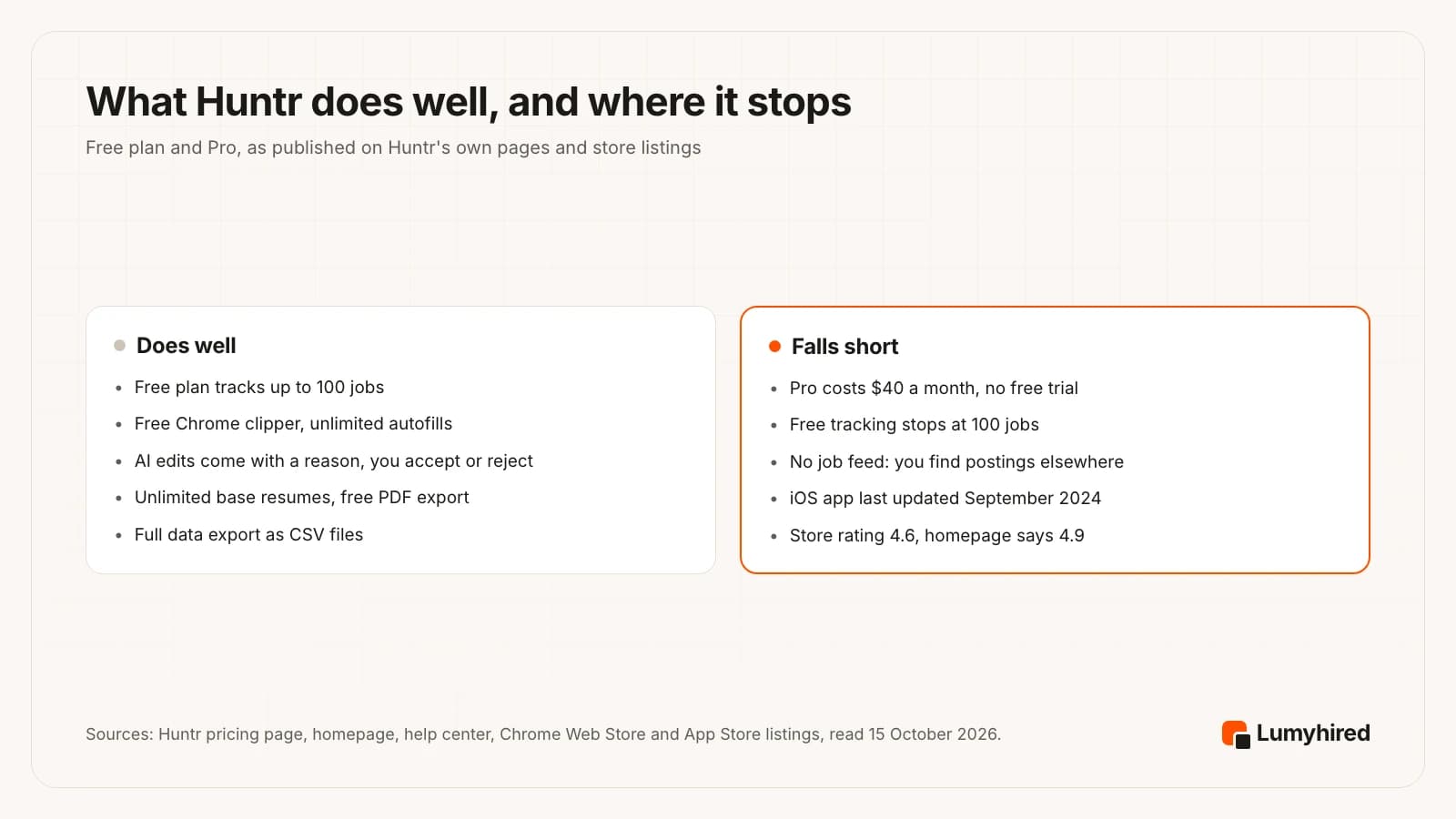
On the strong side, the free plan includes 100 tracked jobs, unlimited base resumes and unlimited autofills at no cost. The AI review explains each suggestion and leaves the decision with you, which matters because a tailored resume that claims a skill you lack will come up in the interview. And leaving is easy, because the full export is a set of plain CSV files.
On the weak side, Huntr has no feed of jobs. The tracker fills with what you clip from other sites, and the mobile app is a browser that opens those sites for you. Pro costs $40 a month for that organising layer plus unlimited AI.
The popularity figures also need a second look. Huntr’s homepage says the Chrome extension has “over 1.1k reviews and a 4.9 star rating” and that 500,000+ job seekers have used Huntr. The Chrome Web Store listing, read the same day, shows 4.6 out of 5 from 1.3K ratings and 90,000 users, and its own description says over 250k people have used Huntr.
Public reviews outside the store are thin. Trustpilot showed 21 reviews and a TrustScore of 4.5 on 15 October 2026, with a note that Huntr has not recently invited customers to review. The praise is for tailoring and organisation. The criticisms are that autofill is inconsistent on some forms (a February 2026 review) and that support is not available in real time (a July 2025 review).
Is Huntr legit, and what does its own research show?
Huntr is legitimate. The extension is published by Huntr LLC, and the Chrome Web Store marks the publisher as having a good record with no history of violations. Prices are on a public page, the free plan has no end date, and cancellation is self-serve from account settings.
Huntr also publishes job search research built from its users’ boards, and its report states its sample sizes: the Q1 2026 edition covers 139,927 applications from 25,635 job seekers, plus 39,184 tailored resumes. Three findings are relevant to anyone choosing a tool:
- Applications sent with a tailored resume had a 4.23% interview rate, against 2.07% for untailored ones, which the report puts at 2.04 times.
- The median time to a first offer was 108 days in Q1 2026, up from 83 days in Q4 2025.
- Applying to the same company again lowers the rate: 6.07% for a single application there, 1.91% for eight or more.
Read these with the vendor in mind. Huntr sells the tailoring tool whose benefit the first finding measures, its users chose to use a tracker, and the interview outcomes are self-reported, which the report itself says are “almost certainly underreported”. The report’s highlights and its body also give different figures for career gaps, so quote it carefully. What the data supports is a direction: a resume adapted to the posting does better than the same file sent everywhere. How to do that by hand is in how to tailor a resume to a job description.
Why do people switch away from Huntr?
Four reasons come out of the pricing page and the product itself, and each one points to a different alternative.
- The 100-job cap. A daily applicant reaches it in weeks, and the next step is $40 a month. Teal and Eztrackr track unlimited jobs for free.
- The price of Pro. At $40, Huntr Pro is the most expensive monthly plan in the chart below, one cent above Simplify+.
- Finding the jobs is still your job. Huntr organises postings you found elsewhere. If most of your hours go into searching five sites, look for a tool that brings the jobs to you.
- English only. Huntr’s Chrome Web Store listing names English as its only language.
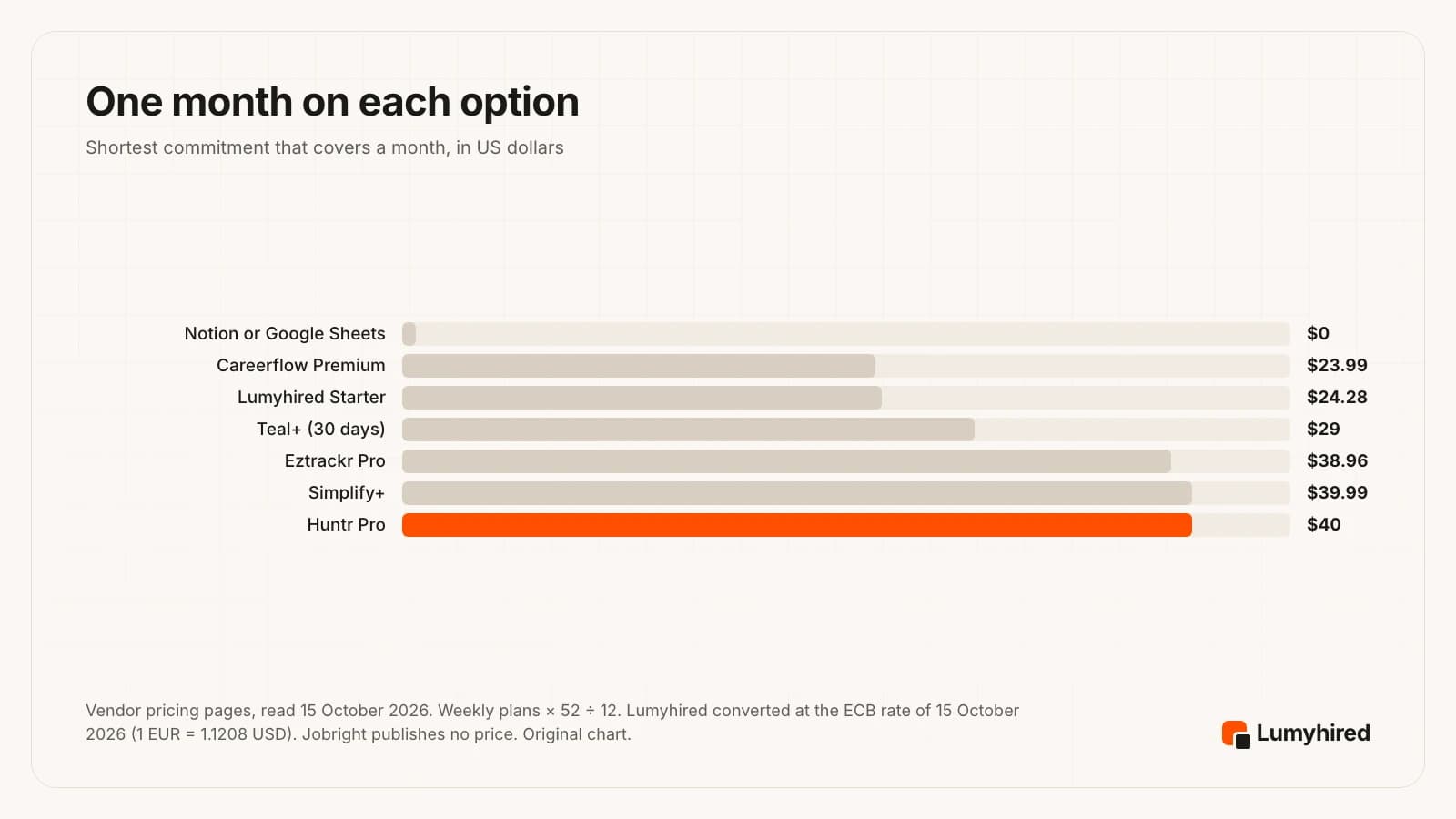
The chart compares one month without a long commitment. Longer plans close the gap: Huntr Pro drops to $26.66 a month on 6 months, Teal+ to $26.33 on 90 days and Careerflow Premium to $14.41 on a year. If you only want a better tracker, the full feature-and-price comparison of trackers, with a free spreadsheet template, is in the best job application tracker for 2026.
How do you leave Huntr without losing your data?
Export your data before you cancel. Huntr’s help center describes a full export in account settings, and cancelling keeps your data on the free plan, so nothing is lost if you do the steps in order.
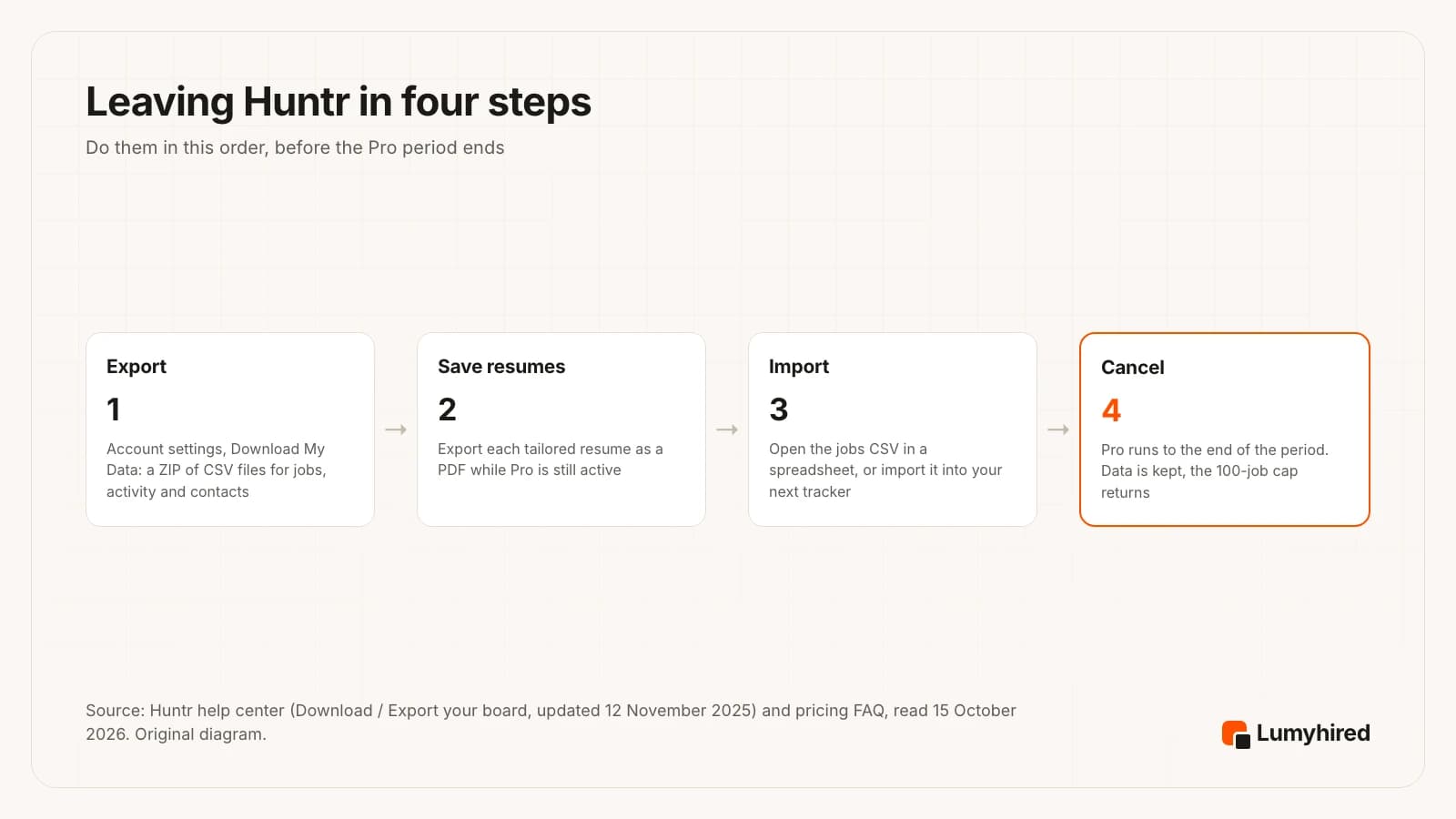
- Download My Data. In account settings, this produces a ZIP file with one CSV per type of data: jobs, activity, profile and contacts. The Metrics section has a smaller export with each job’s title, company, date created, list and source.
- Save the resumes you sent. The help article does not say tailored resumes are in the ZIP, so export each one as a PDF from the builder while Pro is active. Name each file after the company, so it can sit beside the job in your next tool.
- Import the jobs. The jobs CSV opens in Google Sheets or Excel as it is. Eztrackr imports spreadsheets, and a Notion database can be created from a CSV. Keep the source column: it tells you which sites produced interviews.
- Cancel. From Plan & Usage in personal account settings. Pro stays active until the end of the billing period, then the account reverts to Free with your data kept.
Open applications need one more step. Note the date of your last message on each live job before you move it, so that follow-ups land on time in the new tool. How long to wait before each one is in how to follow up on a job application.
How did we rank these Huntr alternatives?
We did not run a scored test of each tool’s output, so nothing here claims one tailoring engine writes better than another. The order rests on what each vendor publishes on its own pages, read on 15 October 2026, weighed on five criteria:
- Replaces Huntr as a whole. Huntr covers tracking and tailoring. A tool that also finds the jobs replaces more of the search than one that only tracks.
- Fixes a reason people leave. The 100-job cap, the $40 month, or the hours spent searching other sites.
- Published price. Readable on a public page with the billing period stated, before an account.
- Free allowance stated in units. Jobs, resumes or credits, counted.
- Says plainly what it does without you. Auto-submit without review, and self-reported results without a method, both cost a tool places.
The three pages that rank for “Huntr review” today are published by competitors, and each recommends its own product. This one does the same, which is why the criteria are listed: if you weigh the free plan or the extension above everything else, Teal moves to the top and you should reorder the list.
The 7 best Huntr alternatives in 2026
| Tool | Finds jobs | Tailors resume | Tracker | Extension | Free plan | Cheapest paid |
|---|---|---|---|---|---|---|
| Huntr (what you are leaving) | No feed. Mobile app browses job sites | Yes, edit by edit with a reason | 100 jobs free, unlimited on Pro | Yes, clipper and autofill | Yes | $26.66/mo on 6 months |
| Lumyhired | Yes, one feed with a match score | Yes, per posting, ATS check | Yes, kanban with reminders | No | No (free ATS preview only) | €5/week |
| Teal | You save postings found elsewhere | Keywords highlighted, you edit | Unlimited, free | Yes | Yes | $79 per 90 days |
| Simplify | Yes, matched roles | On Simplify+ | Yes, logged as you apply | Yes, free Copilot | Extension free | $89.99 per 3 months |
| Jobright | Yes, US-focused feed | Yes, daily limit when free | Yes | Autofill | Yes, with daily limits | Not published |
| Careerflow | No | On Premium | Yes, to be limited on free | Yes | Yes | $14.41/mo on yearly |
| Eztrackr | No | On Pro | Unlimited, free | Yes | Yes | $8.99/week |
| Notion or Google Sheets | No | No | Yes, by hand | No | Yes | None needed |
1. Lumyhired
Best for: Finding the jobs, tailoring a resume to each one and tracking them in one account
Replaces: The tracker and the resume tailoring, plus the job search Huntr leaves to you.
Price: No free plan and no trial. Weekly plans €5 (Starter), €8 (Pro) and €13 (Hunt), cancel anytime, 3-day money-back guarantee.
What it does well
- It covers the step Huntr starts after. One feed gathers jobs from Indeed, LinkedIn and Glassdoor, from employer career sites on Greenhouse, Lever, Ashby, Workable and Workday, and from France Travail and Welcome to the Jungle, among other sources.
- Every job in the feed gets a match score. Postings older than 3 days are hidden by default (a switch shows them) and saved jobs stay visible, so the list opens on recent roles.
- You upload one master resume and it is tailored to each posting, keywords and an ATS-readable layout included, then run through an ATS check. The tailored version stays with the job.
- The kanban tracker, interview reminders and AI interview prep sit in the same account, so nothing is copied from one tool to another.
- A contract-type filter (permanent, fixed-term, freelance, work-study, internship) with internships and work-study off by default, and the free ATS preview runs with no account.
Worth knowing
- No free plan and no browser extension, and Huntr has both. If clipping postings from any site and autofilling forms is what you use Huntr for, this does not replace it.
- A newer and smaller brand than Huntr, with far less third-party review coverage to read before you decide.
- No auto-apply and no mobile app. Starter allows 6 resume adaptations a week; a heavier week needs Pro at €8 or Hunt at €13.
2. Teal
Best for: The closest swap for Huntr's tracker and builder, with no cap on tracked jobs
Replaces: The tracker and the resume builder, with a lighter keyword check.
Price: Free Forever: unlimited resumes, unlimited job tracking, 10 resume templates, the top 5 keywords per posting, 10 AI bullet credits, 2 summary credits and 2 cover letter credits. Teal+ $13 every 7 days, $29 every 30 days or $79 every 90 days, no credit card to start.
What it does well
- Job tracking is unlimited on the free plan. Huntr's free plan stops at 100 jobs.
- Unlimited resume versions on the free plan, so each application can keep its own.
- Over three months, the 90-day Teal+ plan at $79 costs $11 less than Huntr Pro's $90 quarterly plan.
- No credit card to start Teal+, and cancelling returns the account to the free plan at the end of the period.
Worth knowing
- Free keyword matching stops at the top 5 keywords per posting and the resume analysis is marked Basic.
- Free AI is one small batch: 10 bullet credits, 2 summaries and 2 cover letters.
- Paying every 7 days is the dearest way in: $13 a week works out at $56.33 a month (weekly price × 52 ÷ 12), against $29 for 30 days.
Source: https://www.tealhq.com/pricing
3. Simplify
Best for: Autofill on employer career sites, with each application logged as you submit it
Replaces: The Chrome extension, the autofill and the tracker.
Price: Copilot browser extension free. Simplify+ $19.99 a week, $39.99 a month or $89.99 for 3 months, same features on every period.
What it does well
- Simplify describes Copilot as a free browser extension that autofills applications on 100,000+ company career sites.
- Copilot saves every application you submit to your Simplify tracker, which removes the clipping step Huntr asks of you.
- Simplify says it matches you to roles and that 2M+ people have joined. Simplify+ adds tailored resumes with missing keywords surfaced, cover letters, networking help and job analytics that estimate how much attention a posting is getting.
- Simplify+ includes 20 auto-applies a week through Autopilot, and a credit is only used when an application goes through.
Worth knowing
- Simplify's own help page says Autopilot submits without a review step. If you want to read every application before it leaves, keep it switched off.
- Simplify+ costs one cent less than Huntr Pro on both the monthly ($39.99 vs $40) and 3-month ($89.99 vs $90) plans.
- The help page lists what Simplify+ adds and does not list what stays free beyond the extension, and it states no refund terms.
Source: https://simplify.jobs/copilot
4. Jobright
Best for: A free feed of US jobs matched to your profile
Replaces: The job search Huntr does not do, plus tailoring and autofill.
Price: Free, with daily limits on some features such as resume tailoring. A paid option for unlimited use exists, but its price is not published on any public page we could open on 15 October 2026.
What it does well
- It does the part Huntr skips: Jobright says its job hub holds 8,000,000+ jobs, with 400,000+ added on the day we checked, matched to your skills.
- Its FAQ says all features are free to use, with daily limits on the costlier ones.
- Autofill, tailored resumes and suggested insider connections sit in the same account. Jobright says it has 3,000,000 users.
Worth knowing
- Its FAQ says the primary service is in the United States. Outside the US, including a search in France, the feed is the weakest part of the offer.
- The paid plan has no public price (jobright.ai/pricing returned 404), so you only learn the cost after signing up.
- Its headline results, such as 3x more interviews, are self-reported with no method or sample size.
Source: https://jobright.ai/
5. Careerflow
Best for: A cheaper monthly plan with LinkedIn profile optimisation built in
Replaces: The tracker, the extension and the AI writing tools.
Price: Basic free. Premium $8.99 a week, $23.99 a month, $54.99 a quarter or $172.99 a year. Premium Plus $19.99 a week, $44.99 a month, $119.99 a quarter or $299.99 a year.
What it does well
- Premium at $23.99 a month is $16 less than Huntr Pro, and $14.41 a month on the yearly plan.
- A LinkedIn profile optimizer, which is not on Huntr's pricing page, is in both plans (basic on Free, advanced on Premium).
- The free Basic plan includes the Chrome extension, a job tracker, a networking tracker and autofill.
- Premium Plus adds an AI mock interview with analysis, for people who want interview practice in the same place.
Worth knowing
- On the comparison table, the free tracker, autofill, networking tracker and document storage are each marked “Will be limited soon”, with no limit stated.
- The free resume builder covers 1 resume.
- Its 2x more job offers and 60% faster time to interviews are published without a method or sample size.
6. Eztrackr
Best for: A free tracker with no job cap that imports a spreadsheet
Replaces: The tracker and the Chrome clipper.
Price: Basic free: unlimited jobs, contacts and documents, limited notes. Eztrackr Pro $8.99 a week.
What it does well
- Unlimited jobs on the free plan, where Huntr stops at 100.
- It can import an existing spreadsheet, and Huntr's export is a set of CSV files. We did not test the import with a Huntr file, so check the column mapping on a few rows first.
- The Chrome extension saves postings from boards such as LinkedIn, Lever and Indeed, and the dashboard shows search statistics.
Worth knowing
- Pro is billed weekly only: $8.99 a week works out at $38.96 a month (weekly price × 52 ÷ 12).
- The resume builder, skill match and resume analysis are Pro features, so the free plan replaces Huntr's tracker and nothing else.
- A small company. It says it has 100,000+ users and 1,000,000+ jobs tracked, and there is little independent coverage to check that against.
Source: https://www.eztrackr.app/pro
7. Notion or Google Sheets
Best for: Spending nothing and owning every column
Replaces: The tracker only.
Price: Google Sheets is free with a Google account. Notion's Free plan gives one person unlimited pages and blocks, with 5 MB file uploads.
What it does well
- Huntr's CSV export opens in either one directly, so the switch costs an afternoon of tidying columns.
- You define the columns, including source and resume version, which are the two that make a tracker useful.
- No cap, no subscription, nothing to cancel later.
Worth knowing
- Every row is typed by hand. There is no clipper, no autofill and no reminder unless you build one.
- No resume tailoring, so you still need a second tool for that part of Huntr.
Source: https://www.notion.com/pricing
What do you give up by leaving Huntr?
Three things, and for some readers they are reason enough to stay.
- A free plan that does real work. If you apply to fewer than 100 jobs in a search and two tailored resumes are enough to judge the tool, Huntr costs nothing, and the honest advice is to stay on Free.
- Clipping and autofill from one extension. Teal, Careerflow and Eztrackr clip postings; Simplify autofills and logs each application. Of the tools ranked here, Simplify comes closest to doing both from one extension.
- Edits you approve one at a time. Huntr’s review gives a reason for each suggested change and lets you accept or reject it. Tools that rewrite in one pass give you less to check line by line.
Coaching clients have a fourth reason to stay: if a career centre pays for your account and reviews your board, moving loses that oversight.
Which Huntr alternative should you pick?
Pick Lumyhired when you want the jobs found, each resume tailored and every application tracked in one place, in English or French, and you can do without a free plan and an extension. From €5 a week.
Pick Teal when the 100-job cap is your only problem with Huntr and you want to keep paying nothing.
Pick Simplify when most of your applications go through employer career sites and autofill saves you the most time. Leave Autopilot off if you want to read each application.
Pick Jobright when you search in the United States and want a free feed of matched jobs.
Pick Careerflow when your LinkedIn profile needs work too and a cheaper month matters.
Pick Eztrackr when you want a free tracker with no cap and plan to import your Huntr export.
Pick Notion or Google Sheets when you want to spend nothing and define every column yourself.
Whichever you choose, keep the volume sensible. In the same Huntr report, people who sent 11 to 20 applications in total got interviews at 9.25% per application, against 2.58% for those who sent more than 100. That is a correlation in vendor data, and the reasoning behind a weekly target is in how many jobs to apply to. The tailoring tools are compared on their own in the best AI for resume tailoring.
Frequently asked questions
Is Huntr legit?
Is Huntr free?
How much is Huntr Pro?
Huntr vs Lumyhired: what is the difference?
Is there a free alternative to Huntr?
Can I export my data from Huntr?
Does Huntr have a mobile app?
Does Huntr apply to jobs for you?
Where Lumyhired fits
Lumyhired gathers jobs from Indeed, LinkedIn and Glassdoor, employer career sites on Greenhouse, Lever, Ashby, Workable and Workday, France Travail and Welcome to the Jungle, among other sources, scores each one against your profile, tailors your master resume to the posting you choose, checks that the file parses, and tracks the application on a kanban board with interview reminders and interview prep. Plans are €5, €8 and €13 a week on the pricing page, cancel anytime, with a 3-day money-back guarantee and no free plan. To see what a parser reads from your current resume, the ATS preview is free and needs no account; matching a resume to a specific posting is the job of the ATS resume checker, part of the paid plans.
Sources
Vendor claims and vendor research are marked as such. Reddit threads about Huntr could not be opened for verification on the date this was written, so none are cited. Jobright publishes no job-seeker price. All pages read 15 October 2026 unless a date is given.
- Huntr, pricing page and FAQ, read 15 October 2026 (Free and Pro features, $40 a month, $90 every 3 months, $160 every 6 months, no free trial, cancellation terms)
- Huntr, homepage, read 15 October 2026 (feature list; claims of 500,000+ job seekers and a 4.9 rating from 1.1k reviews for the extension)
- Chrome Web Store, Huntr Job Search Tracker & Autofill listing, read 15 October 2026 (4.6 from 1.3K ratings, 90,000 users, version 2.0.45 updated 28 April 2026)
- Apple App Store, Huntr: Job Search Browser, read 15 October 2026 (version 2.0.10 released 4 September 2024, 4.7 from 360 ratings)
- Huntr help center, Download / Export your board, updated 12 November 2025
- Huntr, Job Search Trends Q1 2026 (139,927 applications from 25,635 job seekers; 39,184 tailored resumes; survey fielded 13 April to 3 May 2026; Huntr sells the tracker and resume tools reviewed here, and its users are not a random sample)
- Trustpilot, Huntr reviews, read 15 October 2026 (21 reviews, TrustScore 4.5; Trustpilot notes the company has not recently invited reviews)
- Teal, pricing page, read in a browser 15 October 2026 (the site returns 403 to our fetcher)
- Simplify help center, What's Included in Simplify+ (Features & Pricing), read 15 October 2026
- Simplify, homepage, read in a browser 15 October 2026 (role matching, auto-apply; the 2M+ users claim is Simplify's own)
- Simplify, Copilot extension page, read 15 October 2026
- Jobright, homepage and FAQ, read in a browser 15 October 2026 (user, job count and free-use claims are Jobright's own)
- Careerflow, Premium plans page, read in a browser 15 October 2026
- Eztrackr, homepage and FAQ, read in a browser 15 October 2026
- Eztrackr, Eztrackr Pro page, read in a browser 15 October 2026
- Notion, pricing page, read 15 October 2026
- European Central Bank, euro reference rate for the US dollar, 15 October 2026 (1 EUR = 1.1208 USD)
Corrections: if you work at any tool named above and something here is out of date, write to us and we will correct it and change the date.
Read next
- Job Application Tracker: Template and Best Apps 2026
A 10-column tracker template for Google Sheets or Excel, formulas for response rate per source and per resume version, and seven trackers compared on price.
- Jobscan Alternatives in 2026: 7 Tools Compared
Seven tools that replace part of Jobscan, ranked on six stated criteria, with Jobscan's own plan screen and every rival price read on 27 September 2026.
- Best AI for Resume Tailoring in 2026
Nine tailoring tools ranked on six criteria, from reading the full posting to keeping your facts, with prices read 18 September 2026 and a prompt that audits itself.
- Best Auto Apply Tools in 2026
Seven auto apply tools compared on their own terms, with what Greenhouse measured about what mass applying actually buys now that so many candidates do it.