
Career Guides
Teal review and 7 Teal alternatives in 2026
Teal is a free job tracker, a resume builder and a Chrome extension, with a paid tier called Teal+. This page reviews what each part does and costs, from Teal’s own pages read on 15 October 2026, then ranks seven alternatives for people leaving Teal as a whole. If you only want a tracker, the job application tracker comparison covers that question on its own.
What is the best Teal alternative in 2026?
Lumyhired ranks first because it does the three jobs Teal splits up: it finds jobs across many sources, tailors your resume to each posting and tracks the application, from €5 a week. It has no free plan and no browser extension, and Teal has both. For a free tracker, stay on Teal. For Teal’s routine with the tailoring drafted for you, Huntr. For free form autofill, Simplify. Teal+ itself costs $13 every 7 days, $29 every 30 days or $79 every 90 days.
Published 15 October 2026. Lumyhired publishes this page and ranks itself first, so weigh the criteria against what you need. Every price was read on the vendor’s own page that day.
What is Teal, and what does the free plan include?
Teal is three tools behind one login: a job tracker, a resume builder that compares your resume with a job description, and a Chrome extension that saves postings into the tracker. The free plan, which Teal calls Free Forever, covers all three with caps on the AI and on keyword matching. Teal says it has over 4 million users.
On the pricing page, read in a browser on 15 October 2026 (the site refuses automated fetchers), the free plan listed:
- Unlimited resumes, so you can keep one version per application.
- Unlimited job tracking: bookmark jobs, set goals, take notes and track statuses. We recorded the same line on 17 September 2026, so it has held for at least a month.
- Keyword matching limited to the top 5 keywords of each job description, and a resume analysis mode marked Basic.
- AI credits: 10 for resume bullets, 2 for professional summaries and 2 for cover letters.
- 1 email template per job stage and basic design settings.
- 10 resume templates on the pricing table. The homepage advertises “100+ free templates”, so Teal’s own pages disagree on this one.
Teal also runs a public job board at tealhq.com/jobs. On 15 October 2026 it showed “10,000+ Jobs”, with a search by title and by city or ZIP code, filters for date posted, remote work and salary, and buttons to apply, save the job or match your resume. When we typed Paris into the location box, the suggestions were Paris, Ontario, Paris, Arkansas and other North American towns, and no French city.
How much does Teal+ cost in 2026?
$13 every 7 days, $29 every 30 days or $79 every 90 days, with the same features on all three. Teal shows these as $1.85, $0.96 and $0.87 a day, and no credit card is needed to start. Teal+ removes the caps: unlimited keywords with a match score, unlimited analysis, unlimited AI for bullets, summaries and cover letters, and advanced design settings.
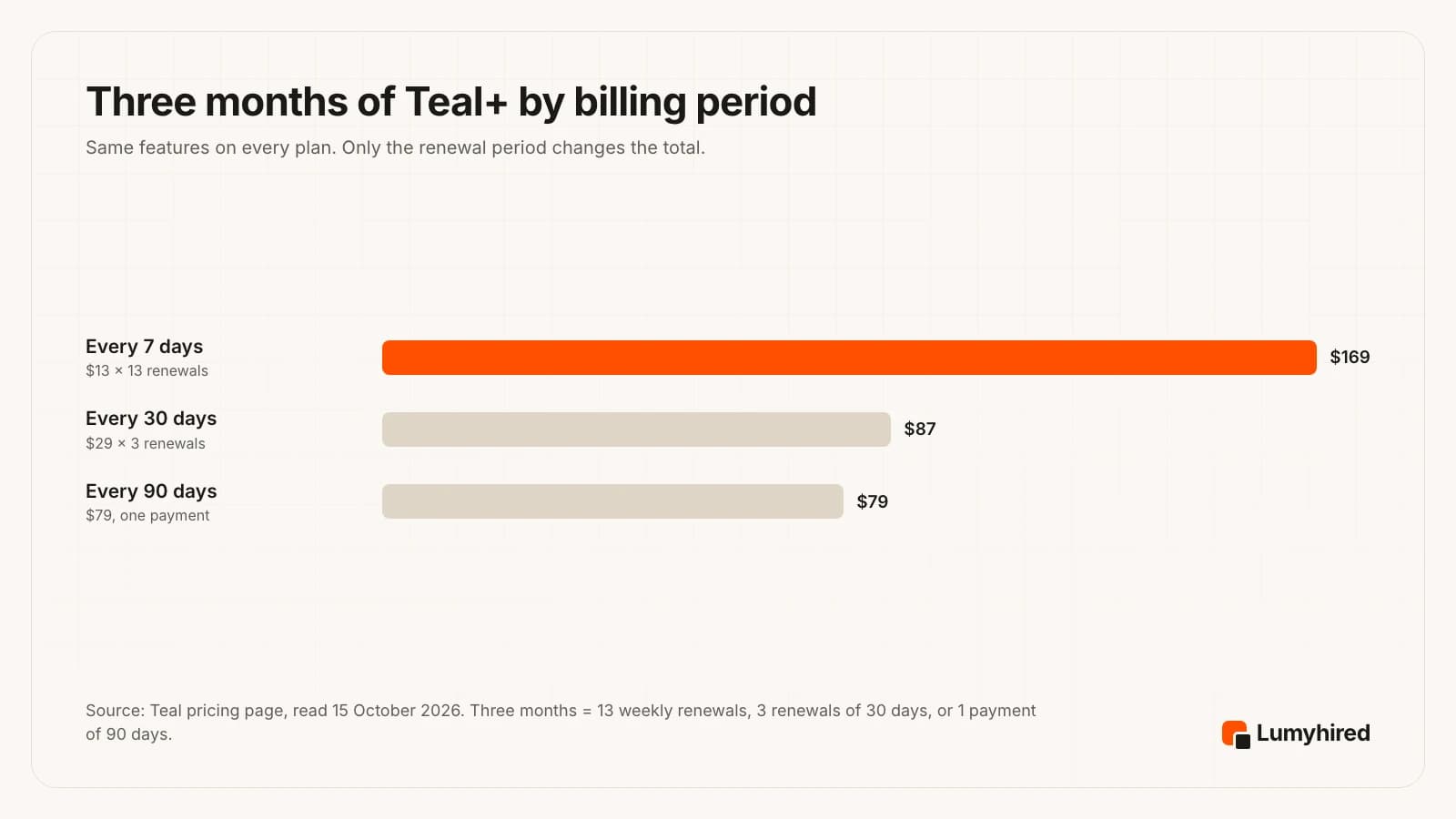
The billing period matters more than the plan name. A search that lasts about three months costs $169 on the weekly plan, $87 on the 30-day plan and $79 on the 90-day plan, so the weekly option costs more than twice the 90-day one for the same features. The weekly plan only makes sense for a burst of one or two weeks, for example to tailor a batch of applications and cancel.
Read the refund rules before paying. Teal’s terms, last updated on 12 August 2026, say subscriptions renew automatically and that refund requests are considered within 2 calendar days of the billing period start on weekly plans, 7 days on monthly plans and 14 days on quarterly plans, case by case. When you cancel, the pricing page says the account reverts to the free plan at the end of the period you paid for, and your tracker data stays.
Be careful with prices quoted elsewhere. A review on the LoopCV blog dated 4 July 2026 quotes Teal+ at “around $9/week” and at $179 a year. On 15 October 2026 Teal’s pricing page showed neither a $9 plan nor a yearly plan. LoopCV sells a competing product, and so does the publisher of this page, which is why every price here comes from the vendor’s own page, dated.
What does Teal do well?
Teal’s best feature is the one it gives away: a job tracker with no cap, fed by a free extension. For someone who applies to a few dozen roles and wants them in order, that covers most of the need at no cost.
- The extension. “Teal - Job Search Companion” has 200,000 users and a 4.7 rating from 3.2K ratings on the Chrome Web Store. It saves jobs, contacts and companies, sets follow-up reminders and pulls salary information from job descriptions. Teal’s homepage says it saves jobs from over 40 job boards.
- One resume per job, free. Unlimited resume versions on the free plan means you can keep the exact version you sent next to each application.
- A low-risk trial of the paid tier. No credit card to start Teal+, and the account falls back to the free plan when you cancel.
- Public reviews lean positive. Trustpilot showed a TrustScore of 4.2 from 117 reviews on 15 October 2026. The 2026 reviews we read praise the tracker and the extension most often.
One headline claim deserves a discount. Teal’s homepage promises “Land 6X more Interviews”, and the page gives no method, sample or date behind that figure, so this review does not use it.
Where does Teal fall short?
In four places, all visible on Teal’s own pages: the free AI runs out fast, the tailoring is manual, the job board is built for North America, and the extension has not been updated in over a year.
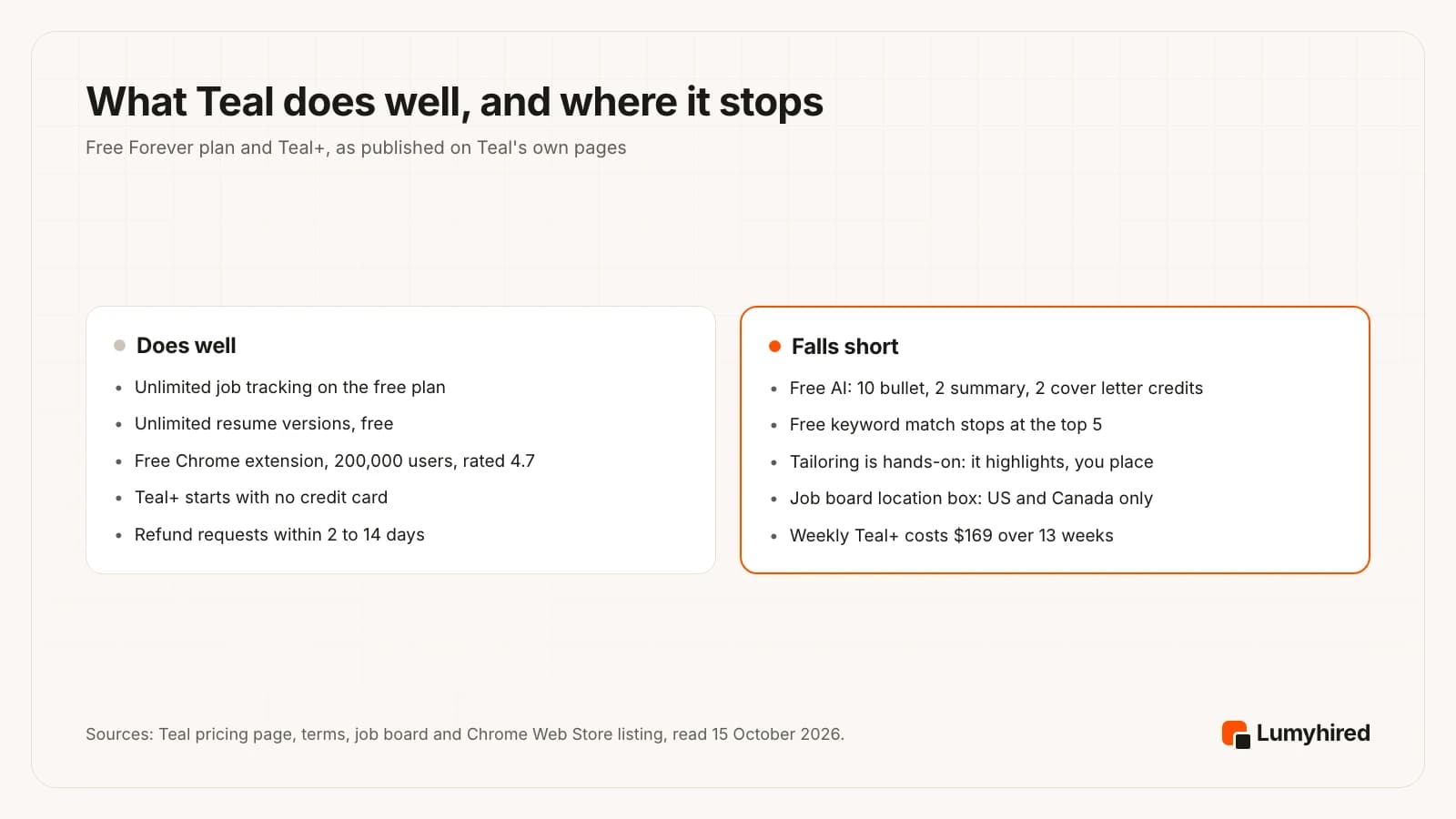
- The free AI is capped. Ten bullet credits, two summaries and two cover letters, and the pricing page does not say whether they renew. Tailoring ten applications with AI help uses up the free allowance quickly.
- You do the tailoring. Teal highlights the keywords of the job description and suggests AI text you choose from. Placing keywords and rewriting bullets stays your job. A 4-star Trustpilot review from July 2026 asked for the keyword tailoring to be more automatic.
- Discovery is narrow outside North America. The job board exists, and its location box only suggested US and Canadian places in our test. The main workflow is still to find a job elsewhere and save it with the extension.
- The extension looks quiet. The Chrome Web Store listing showed version 4.0.8, updated on 26 June 2025, nearly 16 months before we read it. That listing says nothing about the web app.
- Short refund windows. 2 days on the weekly plan and 7 on the monthly plan. Two 1-star Trustpilot reviews from May and June 2026 complain about cancelling and about marketing emails, and Teal replied to both.
Is Teal+ worth the price?
The free plan is worth keeping whatever you decide. Teal+ is worth paying for if you write your own resumes and want unlimited AI suggestions and the full keyword list for each posting, on the 90-day plan at $79.
It is a weaker buy in three situations. If you want the tool to find the jobs for you and rank them, Teal+ adds nothing on that front. If you search in France or elsewhere in Europe, the job board’s location search did not reach you in our test. And if you want a tailored resume drafted for each job, Teal’s approach on every plan is to suggest keywords and AI text that you place yourself. Those three situations are what the alternatives below are ranked for.
Before switching, decide which part of Teal you were using. If it was only the tracker, nothing here beats Teal’s free plan on price. If it was the resume tailoring, the comparison of AI resume tailoring tools goes deeper on output quality.
How we ranked these Teal alternatives
We did not run a scored test of resume output, so nothing here claims one tool writes better than another. The order rests on what each vendor publishes, read on 15 October 2026, against five criteria in this order of weight:
- Covers the whole loop. Finds jobs, tailors the resume to each one, tracks the application. Teal does the third well and leaves the first two mostly to you.
- Published price. The cost is readable on a public page before you sign up.
- Free allowance stated to the unit. A number of resumes, jobs or credits, with no vague “limited” label. Lumyhired scores nothing on this criterion: it has no free plan.
- The tool drafts the tailoring. It proposes the tailored version for each job and you review it.
- Works outside the US. Job sources and language support for people applying in France and the UK as well.
This page puts its publisher first, and states the criteria so you can reweight them. Someone who values a free plan above everything would put Huntr first and Lumyhired near the bottom.
The 7 best Teal alternatives in 2026
| Tool | Finds jobs | Tailoring | Tracker | Extension | Free plan | Cheapest paid |
|---|---|---|---|---|---|---|
| Teal (what you are leaving) | Own job board, “10,000+ Jobs”; extension saves from 40+ boards | Highlights keywords (top 5 free); you edit | Unlimited, free | Yes, free | Yes | $79 per 90 days |
| Lumyhired | One feed: job boards, employer career sites, France Travail, Welcome to the Jungle | Master resume tailored per job, ATS check | Kanban with reminders | No | No (free ATS preview only) | €5/week (≈ €21.67/mo) |
| Huntr | Job matching on Pro | 2 tailored resumes free, unlimited on Pro | 100 jobs free | Yes, Job Clipper | Yes | $26.66/mo on 6 months |
| Simplify | Job recommendations from your dealbreakers | AI rewriting on Simplify+ | Free, no cap stated | Yes, Copilot | Yes, unlimited autofill | $89.99 per 3 months |
| Jobright | AI-matched feed, 8M+ jobs (its claim) | Tailored resumes advertised | Free, “no strict limits” on jobs tracked | Autofill advertised | Free to start | Not published |
| Careerflow | Not on its plans page | AI resumes on Premium | Limited on free | Yes | Yes | $14.41/mo on yearly |
| Rezi | Not on its pricing page | Keyword targeting, Rezi Score | Not on its pricing page | Not on its pricing page | 1 resume, 3 PDF downloads | $149 once |
| Kickresume | None in any plan | AI Writer on Premium | None in any plan | Not listed | 4 templates, unlimited downloads | €8/mo on yearly |
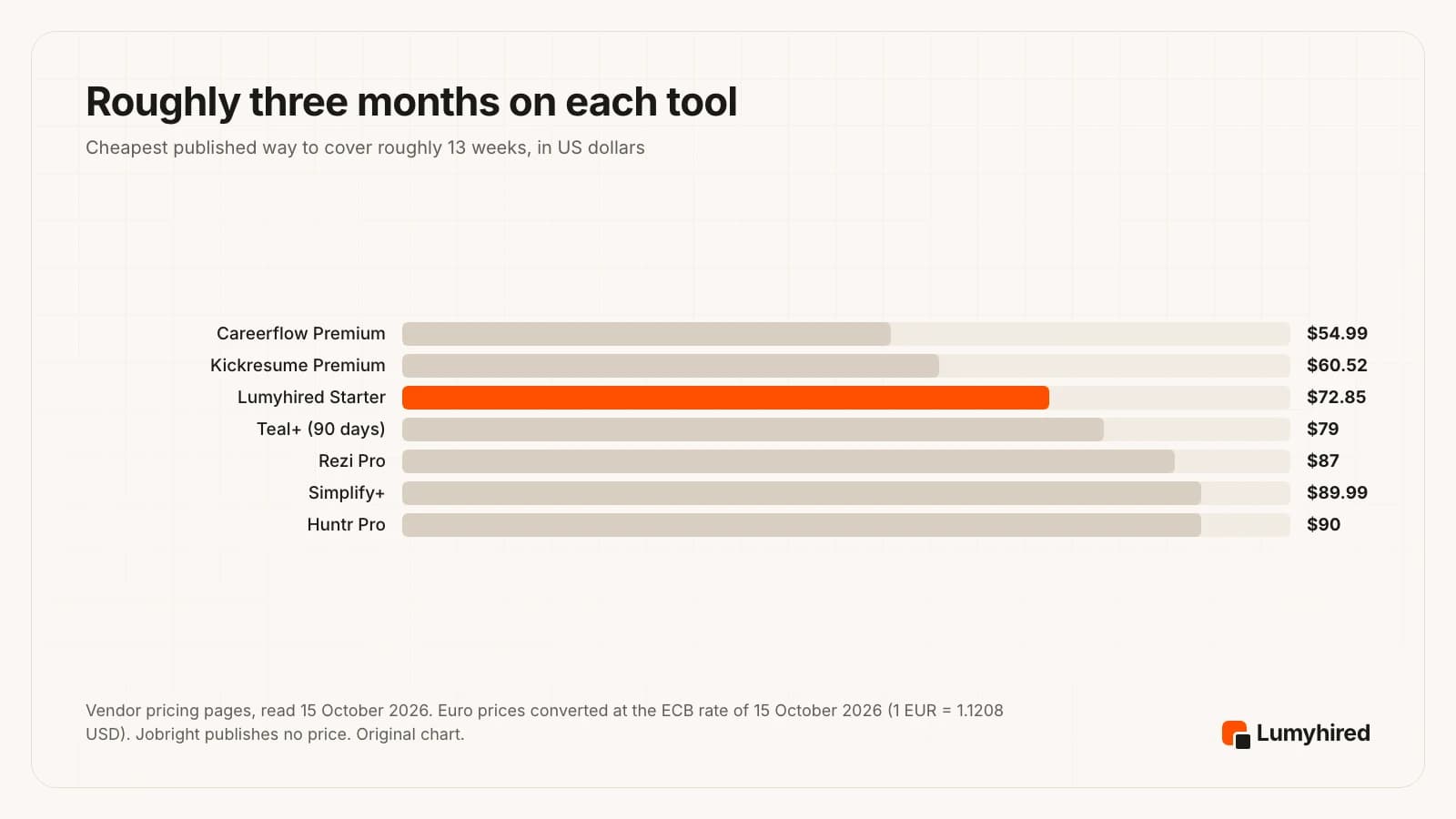
Over a three-month search, the gap between the cheapest and the most expensive tool here is about $35, which is smaller than the $90 gap between Teal’s own weekly and 90-day plans.
1. Lumyhired
Best for: Finding the job, tailoring the resume to it and tracking the application in one place
Price: Weekly plans €5 (Starter), €8 (Pro) and €13 (Hunt), cancel anytime, 3-day money-back guarantee.
What it does well
- It finds the jobs too. One feed gathers listings from Indeed, LinkedIn and Glassdoor, from employer career sites hosted on Greenhouse, Lever, Ashby, Workable and Workday, and from France Travail and Welcome to the Jungle, among other sources. Teal’s main workflow starts from a job you saved somewhere else.
- Each job gets a match score. Listings older than 3 days are hidden by default (a switch shows them, and saved jobs stay visible), so the feed favours roles that are still open to fresh applicants. Contract filters cover permanent, fixed-term, freelance, work-study and internships.
- You upload one master resume and it is tailored to each job: the posting’s keywords and a layout an ATS can read, followed by an ATS check. On Teal’s free plan, keyword matching stops at the top 5 and you place each one yourself.
- Applications sit on a kanban board with interview reminders and AI interview preparation.
- Works for English and French job markets, with France Travail and Welcome to the Jungle in the feed.
Worth knowing
- No free plan and no browser extension, and Teal has both. The free tool is the ATS preview, which shows what a parser extracts from your file, with no account.
- A newer and much smaller brand than Teal, which says it has over 4 million users. There is far less third-party review coverage to read before you decide.
- Built for well-aimed applications, one at a time. No auto-apply and no mobile app, so it does not suit sending hundreds of applications a day.
2. Huntr
Best for: Keeping Teal’s save-and-track routine, with the tailoring drafted for you
Price: Free plan: unlimited base resumes, 2 job-tailored resumes, 2 application packets, up to 100 tracked jobs, unlimited autofills, Chrome Job Clipper. Pro $40 a month, $90 every 3 months ($30 a month) or $160 every 6 months ($26.66 a month).
What it does well
- The closest copy of how Teal works: a Chrome Job Clipper saves postings into a tracker, and each resume is tailored to a saved job.
- Unlimited application autofills on the free plan, according to its pricing page, plus 2 tailored resumes to judge the output before paying.
- Pro includes unlimited AI and advanced job matching. On the 6-month plan it comes to $26.66 a month.
Worth knowing
- Free tracking stops at 100 jobs. Teal’s free tracking has no cap.
- Pro at $40 a month costs more than Teal+ at $29 every 30 days, and only drops below that rate on the 6-month plan.
- The free plan includes “a small number” of AI credits, with no figure given.
Source: https://huntr.co/pricing
3. Simplify
Best for: Filling in ATS application forms quickly, for free
Price: Free: autofill on major ATSs through the Simplify Copilot extension, described on its Chrome Web Store listing as “no limits, free forever”. Simplify+ $19.99 for 1 week, $39.99 for 1 month or $89.99 for 3 months.
What it does well
- The Copilot extension lists 600,000 users and a 4.8 rating from 3.8K ratings on the Chrome Web Store. Teal’s extension lists 200,000 users and 4.7.
- Autofill covers Workday, Lever, Greenhouse and other ATSs, and the listing says it has no limits on the free plan.
- The same extension flags missing keywords and recommends jobs from your dealbreakers, such as minimum salary and location. Its tracker page says the tracker is free and that Simplify plans to keep it that way.
Worth knowing
- Simplify+ costs $19.99 for a single week, level with Careerflow Premium Plus as the highest weekly price in this list. Its help article says the plans differ only in duration.
- AI rewriting inside the resume builder is a Simplify+ feature, per its help center.
Source: https://help.simplify.jobs/articles/5623502-whats-included-in-simplify-features-and-pricing
4. Jobright
Best for: AI-ranked job matches in the US market
Price: Free to start. No job-seeker price on a public page: the only pricing link on its site leads to employer pricing (checked 15 October 2026).
What it does well
- It starts from discovery. The homepage offers matched jobs, tailored resumes, autofill and insider connections, and says it holds 8,000,000+ jobs, with 400,000+ added that day, per its homepage on 15 October 2026.
- Jobs are matched to your skills before you see them, the step Teal leaves to you.
- Its job tracker page calls the tracker free, with “no strict limits” on the number of jobs you can save or track, and accepts jobs uploaded from other sites.
- Jobright says it has 3,000,000 users. That is its own figure.
Worth knowing
- No published price, so you only learn the cost after signing up. That fails one of our five criteria.
- The live feed on its homepage showed US employers. Check coverage before paying if you search elsewhere.
Source: https://jobright.ai/
5. Careerflow
Best for: A cheap weekly AI plan with a LinkedIn profile optimizer
Price: Free Basic plan with the Chrome extension and limited tracker, autofill and resume builder. Premium $8.99 a week, $23.99 a month, $54.99 a quarter or $172.99 a year. Premium Plus $19.99 a week, $44.99 a month, $119.99 a quarter or $299.99 a year.
What it does well
- Premium at $8.99 a week costs less than Teal+ at $13 a week.
- The free plan includes the Chrome extension and a basic LinkedIn optimizer, plus limited versions of the tracker, autofill and resume builder.
- Premium adds unlimited AI resumes, an ATS score and keyword analyzer, and an advanced LinkedIn optimizer.
Worth knowing
- The free tracker is marked “limited” with no number. Teal states unlimited.
- AI writers such as the cover letter writer show as not available on the free plan.
- Mock interviews are in Premium Plus, at $19.99 a week.
6. Rezi
Best for: Paying once for a keyword-targeted resume builder
Price: Free: 1 resume, 1 AI interview, 3 PDF downloads. Pro $29 a month. Lifetime $149 one time. 30-day money-back guarantee on Pro and Lifetime.
What it does well
- Lifetime at $149 is the only one-time payment in this list, less than two 90-day Teal+ payments ($158).
- A 30-day money-back window on Pro and Lifetime. Teal’s refund windows run from 2 to 14 days depending on the plan.
- Pro includes unlimited resumes, interviews and PDF downloads, with the Rezi Score.
Worth knowing
- The free plan is 1 resume and 3 PDF downloads, far tighter than Teal’s unlimited resumes.
- Pro at $29 a month matches Teal+ every 30 days, so the saving only appears on Lifetime.
- Lifetime leaves out the monthly expert review that Pro includes, per its FAQ.
Source: https://www.rezi.ai/pricing
7. Kickresume
Best for: Designed templates and a mobile app, at the lowest yearly price
Price: Free: 4 resume and 4 cover letter templates, 1 website template, 20,000 pre-written phrases, unlimited downloads. Premium €24 a month, €18 a month billed €54 quarterly, or €8 a month billed €96 a year, as shown to a visitor in France on 15 October 2026. 14-day money-back guarantee.
What it does well
- €8 a month on the yearly plan is the lowest monthly rate in this list.
- Free downloads are unlimited.
- Premium includes iOS and Android apps, LinkedIn and PDF import, 40+ resume templates and an ATS Resume Checker.
Worth knowing
- The ATS Resume Checker and the AI Writer are Premium features.
- Its pricing page lists no job tracker or job search in any plan, so it replaces Teal’s builder and nothing else.
- Prices appeared in euros for our visitor in France. Check the currency shown to you before comparing.
What do you give up by leaving Teal?
Three things.
- Unlimited free tracking, stated in writing. Two alternatives come close: Jobright says its free tracker has “no strict limits” on the jobs you save or track, and Simplify says its tracker is free and that it plans to keep it that way, without stating a cap. Huntr stops at 100 jobs and Careerflow says “limited”.
- A free extension that saves jobs from anywhere. Huntr, Simplify and Careerflow have one.
- A large user base. Teal says it has over 4 million users and its extension shows 3.2K ratings. Newer tools, this one included, have far fewer public reviews to check.
Keeping Teal free and adding a second tool is a reasonable answer. The free tracker costs nothing to leave running while you try something else for a week.
Which Teal alternative should you pick?
Pick Lumyhired when you want jobs found, scored, tailored for and tracked in one place, in English or French, from €5 a week.
Pick Huntr when you like Teal’s routine of clipping jobs into a tracker and want the tailored resume drafted for you, starting with 2 free tailored resumes.
Pick Simplify when filling in Workday and Greenhouse forms is what eats your evenings, since its autofill is free.
Pick Jobright when you search in the US and want an AI-ranked feed of matches, and you are fine learning the price after signing up.
Pick Careerflow when you want a short AI burst at $8.99 a week, or a LinkedIn profile optimizer alongside the resume.
Pick Rezi when you would rather pay $149 once and never renew.
Pick Kickresume when design matters most and a yearly plan at €8 a month suits you.
If volume is the reason you are leaving Teal, the auto-apply tools comparison covers that category, and none of the seven tools above is built mainly for it. If you are weighing Teal against a keyword scanner, Teal is ranked second in the Jobscan alternatives list.
How do you move off Teal without losing your search?
Keep the free account and move in four steps. Cancelling Teal+ returns you to the free plan, per its pricing page, so nothing forces you to delete anything.
- Save every resume version you sent. Download each one and name the file after the company and the date. If a recruiter calls, you need the exact text they read.
- Copy your live applications into a sheet. Company, role, date applied, where you found it, resume version, status and next step. The free tracker template has these columns ready.
- Cancel before the renewal date. Teal’s terms say plans renew automatically, and cancellation takes effect at the end of the period already paid. If you want a refund, the window is 2, 7 or 14 days from the start of the period depending on the plan.
- Run the new tool on fresh applications only. Let older applications finish in Teal’s free tracker and start new ones in the new tool, so each application has one home.
Switching is also a good moment to look at how many applications you send. The numbers behind a sensible weekly target are in how many jobs to apply to.
Frequently asked questions
Is Teal legit and worth it?
Is Teal free?
How much does Teal+ cost in 2026?
Teal vs Lumyhired: which should you use?
Is there a free alternative to Teal?
Does Teal find jobs for you?
Is Teal’s Chrome extension free?
Does Teal work outside the US?
Where Lumyhired fits
Lumyhired brings job discovery, per-job tailoring and tracking into one place. Its feed gathers listings from job boards, employer career sites, France Travail and Welcome to the Jungle, among other sources, scores each job against your profile and hides listings older than 3 days by default. You upload a master resume once; it is tailored to each posting with an ATS-readable layout, checked, and filed on a kanban board with interview reminders and interview preparation. Plans are €5, €8 and €13 a week on the pricing page, cancel anytime, with a 3-day money-back guarantee.
The one free tool is the ATS preview, which shows what a parser extracts from your resume, with no account. Run it on a resume exported from Teal before you decide anything. Matching a resume against a specific posting is the ATS resume checker, part of the paid plans.
Sources
Every page below was opened on 15 October 2026. Teal’s site refuses automated fetchers, so its pages were read in a browser. User counts and ratings are the vendors’ own figures or the store’s. Teal’s refund policy article on its help center would not open for us; the refund windows come from its terms. Jobright publishes no job-seeker price we could find.
- Teal, Teal+ pricing page (Free Forever and Teal+ features, AI credits, billing periods), read in a browser 15 October 2026
- Teal, homepage (“Over 4 Million Users”, “Land 6X more Interviews”, 100+ free templates, jobs saved from over 40 job boards), read 15 October 2026
- Teal, job board (“10,000+ Jobs”, filters, location suggestions), read 15 October 2026
- Teal, Terms of Service, last updated 12 August 2026 (automatic renewal, refund windows of 2, 7 and 14 days), read 15 October 2026
- Chrome Web Store, Teal - Job Search Companion listing (200,000 users, 4.7 from 3.2K ratings, version 4.0.8 updated 26 June 2025), read 15 October 2026
- Trustpilot, Teal reviews (TrustScore 4.2, 117 reviews), read 15 October 2026
- LoopCV blog, Teal HQ Review, 4 July 2026 (written by LoopCV’s CEO; LoopCV sells a competing auto-apply product)
- Huntr, pricing page, read 15 October 2026
- Simplify, help center, What’s included in Simplify+ (features and pricing), read 15 October 2026
- Chrome Web Store, Simplify Copilot listing (600,000 users, 4.8 from 3.8K ratings), read 15 October 2026
- Jobright, homepage (user and job counts are Jobright’s own figures), read 15 October 2026
- Jobright, job tracker page (“Free Online Job Tracker”, “no strict limits on the number of jobs you can save or track”, external job upload), read 15 October 2026
- Simplify, job application tracker page (says the tracker is free and that Simplify plans to keep it that way), read 15 October 2026
- Careerflow, Premium plans page, read 15 October 2026
- Rezi, pricing page, read 15 October 2026
- Kickresume, pricing page (prices shown in euros to a visitor in France), read 15 October 2026
- European Central Bank, euro foreign exchange reference rates, 15 October 2026 (1 EUR = 1.1208 USD)
- Lumyhired plans and free tools: our own product; prices match the pricing page.
Corrections: if you work at any tool named above and something here is out of date, write to us and we will correct it and change the date.
Read next
- Job Application Tracker: Template and Best Apps 2026
A 10-column tracker template for Google Sheets or Excel, formulas for response rate per source and per resume version, and seven trackers compared on price.
- Best AI for Resume Tailoring in 2026
Nine tailoring tools ranked on six criteria, from reading the full posting to keeping your facts, with prices read 18 September 2026 and a prompt that audits itself.
- Jobscan Alternatives in 2026: 7 Tools Compared
Seven tools that replace part of Jobscan, ranked on six stated criteria, with Jobscan's own plan screen and every rival price read on 27 September 2026.
- Best Auto Apply Tools in 2026
Seven auto apply tools compared on their own terms, with what Greenhouse measured about what mass applying actually buys now that so many candidates do it.