
Resume & ATS
The best resume format for AI screening in 2026
The pages that rank for this question disagree on the basics. One university blog says to avoid PDF, a training company says to save as PDF, and Indeed's own guides give two different answers a year apart. This guide settles each rule with the vendor document behind it where one exists, labels the rest as habit, and gives you a test you can run on your own file in two minutes.
What is the best resume format for AI screening?
A reverse-chronological resume in one column, with standard headings (Experience, Education, Skills), month and year on every date, contact details in the body of the page, and skills written inside experience lines as well as in a skills list, saved as .docx or as a PDF whose text you can select. The file type question is settled by the vendors: Greenhouse accepts .doc, .docx, .pdf, .rtf and .txt up to 100 MB (support page updated 19 August 2026). Its Talent Matching feature sends a resume with formatting problems to Needs manual review and does not reject anyone automatically (FAQ updated 3 September 2026). The layout rules (columns, tables, text boxes, headers) come from parsing vendors quoted in 2021, so treat them as risks that can still break some parsers rather than certain failures. Fonts, date style and file name come from best practice, and no vendor documents them.
Sources read 18 September 2026. Page published 18 September 2026.
What resume format is best for AI screening?
Reverse-chronological, meaning your most recent job first and each earlier one below it. The reason is mechanical. Before any AI reads your resume, a parser turns the file into records: a job title, an employer, a start date and an end date, tied together, plus a list of skills. Textkernel, one of the large parsing vendors, says it then normalizes job titles and skills to public taxonomies such as O*NET and ISCO. The AI match layer compares those records with the job. Greenhouse Talent Matching labels candidates Strong, Good, Partial, Limited or Needs manual review; Workday HiredScore grades them A to D.
A functional resume, which groups skills at the top and lists employers with no detail at the bottom, breaks that link. The parser finds skills with no role and no dates attached, so the matcher cannot tell whether you used SQL last month or in 2014. A hybrid works fine: a short skills block above a normal reverse-chronological experience section, with each skill also appearing inside a bullet about a specific job.
This page is about the document. Our guide on how ATS filters work covers the screening itself vendor by vendor. In short, the only automatic rejection in the vendor documentation is a rule a recruiter attaches to an application question, and AI grades reorder a list without rejecting anyone on their own.
Which format rules are documented, and which are habit
Most format advice arrives with no source and no date, which is how a 2013 sales statistic ends up on 2026 template pages. The table sorts every rule on this page by what supports it. "Vendor documented" means an ATS vendor's own help page. "Reported 2021" means parsing vendors quoted by Computerworld in August 2021: still useful, but parsers have changed since.
| Rule | Status | What supports it |
|---|---|---|
| Send .docx or a PDF with selectable text | Vendor documented | Greenhouse accepts .doc, .docx, .pdf, .rtf and .txt up to 100 MB, with no PDF penalty stated (support page updated 19 Aug 2026) |
| Never send a scanned or image-only PDF | Reported by parsing vendors, 2021 | Computerworld, 27 Aug 2021: a scanned PDF gives a parser nothing without OCR; Sovren warned against PDFs of a LinkedIn profile |
| A formatting problem sends you to manual review | Vendor documented | Greenhouse Talent Matching FAQ (updated 3 Sep 2026): files with formatting or technical problems go to Needs manual review; no auto-reject |
| One column | Reported 2021, partly outdated | Textkernel in Computerworld (2021): two columns can choke some parsers. Textkernel's current FAQ says its LLM parser handles column layouts |
| No tables for layout | Reported 2021 | Computerworld (2021): tables can come out as a column of dates, a column of titles and a column of employers; Sovren called the old table-based Word template the least readable |
| No text boxes, nothing important in headers or footers | Reported 2021; repeated by career sites in 2026 | Computerworld (2021) on text boxes and headers; Indeed ATS template guide (updated 11 Aug 2026) says to skip headers, tables and graphics |
| Any common font, 10 to 12 pt | Best practice | Computerworld (2021): fonts do not matter to a parser; DaXtra recommended a plain Word file in a system font. Size range from Indeed (Aug 2026) |
| Standard headings: Experience, Education, Skills | Best practice | Recommended by Penn Career Services (Oct 2024), Indeed (Oct 2025) and resume.io (2026); no ATS vendor publishes a heading list |
| Month and year on every date | Best practice | No vendor document found. Recommended by Resume Optimizer Pro (Jun 2026); see the dates section below for the reasoning |
| One or two pages | Best practice | No vendor document cited here sets a page limit. Greenhouse's limit is file size (100 MB) |
| No hidden or white text | Measured by employers | Greenhouse found hidden text in about 1% of resumes in the first half of 2025; ManpowerGroup around 10% of the resumes it scans with AI, and it does not move those candidates forward (Built In, 15 Oct 2025) |
Sources: Greenhouse help center (supported formats, updated 19 August 2026; Talent Matching FAQ, updated 3 September 2026); Computerworld, 27 August 2021, quoting Textkernel, DaXtra and Sovren; Textkernel developer FAQ, undated; Indeed career guides (2 October 2025 and 11 August 2026); Penn Career Services, 8 October 2024; Built In, 15 October 2025. All read 18 September 2026.
The copy-paste test: see what a parser reads
You cannot judge a resume's format by looking at it, because you are looking at the rendering and a parser reads the text layer underneath. This test shows you a rough version of that text layer with tools you already have.
- Export the resume to PDF, the way you would send it.
- Open the PDF, select all (Ctrl+A or Cmd+A) and copy.
- Paste into a plain text editor: Notepad on Windows, TextEdit in plain text mode on a Mac, or any code editor.
- Read the result from top to bottom. Is your name first, followed by your email and phone? Do the section headings appear as words? Does each job title sit next to its employer and its dates? Do the bullets follow the job they belong to, or has a sidebar been spliced into the middle of a sentence? Are any characters replaced by boxes or question marks?
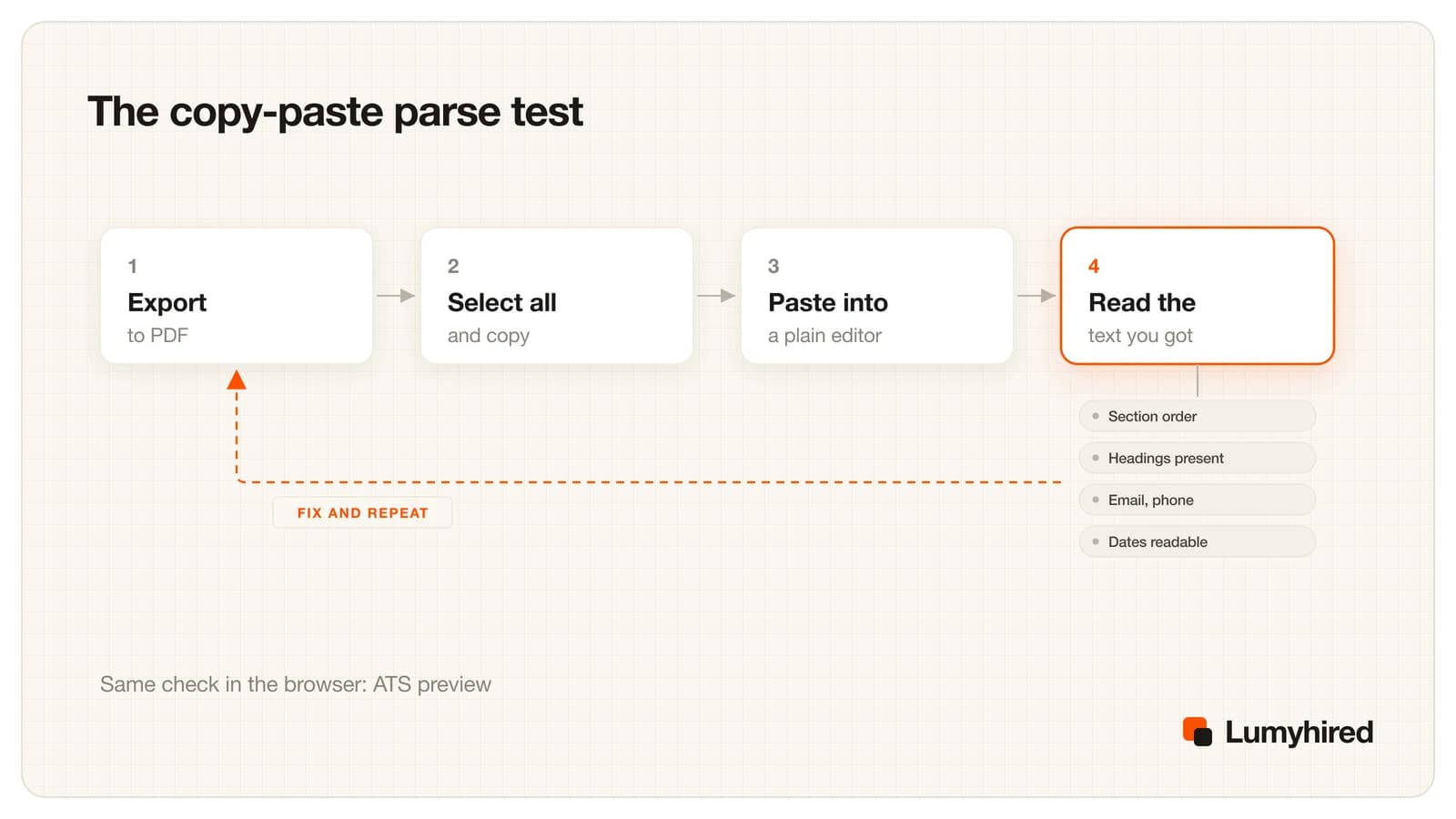
Be clear about what this proves. A PDF viewer extracts text in a simpler way than Textkernel or an ATS does, so a clean paste does not guarantee a clean parse everywhere. A messy paste is a strong warning, though. If the text comes out interleaved or empty here, you are relying on the employer's parser being smarter than your PDF reader.
For a more structured read, the free ATS extraction preview runs in your browser, uploads nothing and needs no account. It accepts PDF, DOCX, TXT and Markdown files, shows the extracted text, and flags whether your email and phone survived, whether standard section headings were found, whether the layout interleaves (the two-column tell) and whether your dates parse. It gives no score, because no ATS computes a universal one.
Resume format rules, section by section
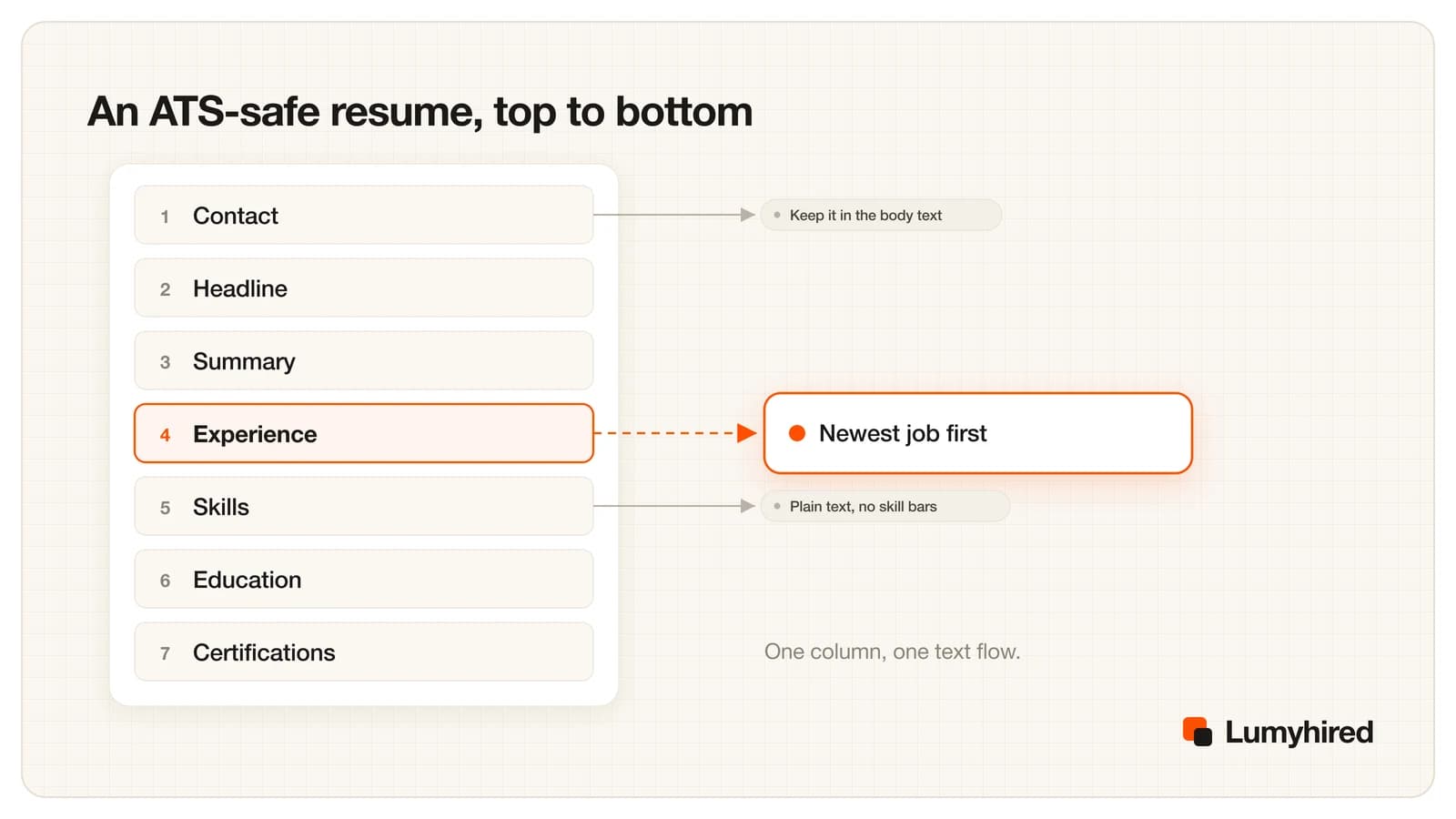
Seven sections, in this order, cover almost every job. Add Projects, Publications or Volunteering below Experience when they are relevant, under those plain names.
Contact
Name on the first line of the body, then one line with city and state, email, phone and a LinkedIn URL. Leave out the street address; a city is enough for location filters. Type the email as text. An envelope icon is fine as decoration, but the address itself has to be characters a parser can read.
Headline
One line with the title of the job you want, in the posting's wording when it describes you: Senior Data Analyst. Recruiters search titles as literal strings, and Textkernel maps titles to a taxonomy, so a standard title is easier to match than an internal one like Insights Ninja. Keep your real past titles on the experience lines.
Summary
Two or three lines under a heading called Summary. Say what you do, for whom, with which tools, and one result with a number. This is also the block a recruiter reads during the few seconds of the first skim.
Experience
One block per job, newest first, each built the same way: a line with job title, employer and city; a line with the dates; then three to six bullets. Consistency matters more than the exact pattern, because parsers learn where a field sits from the first entries they read. Here is a line before and after:
Before
Responsible for reporting and dashboards for the sales team.
After
Built 12 Tableau dashboards on Salesforce data for a 40-person sales team, cutting the weekly forecast meeting from 90 to 45 minutes.
Invented example written for this article.
The second line carries two tools, a scale and a result, all as plain text inside the job they belong to. That is what the table above means by skills written in context. Picking which terms go in, for a given posting, is covered in finding and placing resume keywords.
Skills
A short list under the heading Skills, grouped on two or three lines (Tools, Methods, Languages), comma separated. Write levels as words: Spanish, professional working proficiency. Star ratings and progress bars are shapes, so a parser extracts the word Spanish and nothing about the level, while a reviewer sees a self-rating nobody can check. Every tool in this list should also appear in at least one experience bullet.
Education
Degree, field, school, city and graduation year on one line. Put Education above Experience only if you graduated in the last year or two and your experience is thin.
Certifications
Full name, then the acronym in parentheses, then the issuer and year: Project Management Professional (PMP), Project Management Institute, 2023. Recruiters search both forms, and writing both once covers either search.
Dates, fonts, file type, file name and length
Dates
Use month and year on both ends of every range, in one style for the whole page: March 2022 - Present, or 03/2022 - 05/2024. No vendor document specifies a date format, so this is best practice, and the reasoning is arithmetic. A range written 2019 - 2021 could mean January 2019 to December 2021, which is 35 months, or December 2019 to January 2021, which is 13. A parser building your timeline has to guess, and so does the recruiter. Avoid seasons (Summer 2023), apostrophe years ('21) and dates placed in a separate column made with a table.
Precise dates also make gaps visible. Hiding them by switching to years only tends to raise the question instead of answering it. A one-line explanation on the page usually works better, and how to explain a career gap on a resume has wording for the common cases.
Fonts
Parsing vendors told Computerworld in 2021 that fonts mean nothing to a parser, which reads characters, and DaXtra recommended a plain Word document in a system font. So the font is for the human. Pick one that exists on every machine, such as Calibri, Arial, Georgia or Times New Roman, at 10 to 12 points for body text, and use bold and size for headings rather than a second decorative typeface. If a font exports badly, the copy-paste test shows it as boxes or odd symbols.
File type
Follow the posting when it names a format. When it does not, .docx and text-based PDF both work: Greenhouse lists .doc, .docx, .pdf, .rtf and .txt as supported and states no penalty for PDF. The advice you will find elsewhere contradicts itself. ORISE's blog tells you to avoid PDF, ACI Learning tells you to save as PDF, and Indeed said .docx or text-based PDF in October 2025 and that .docx may be best in August 2026. The vendor page is the tiebreaker. The only PDF that fails is one with no text in it.
File name
A recruiter sees the file name in the ATS and in downloads. Firstname-Lastname-Resume.pdf, or with the target title added (Firstname-Lastname-Data-Analyst.pdf), is easy to find later. Resume_final_v7.pdf is not. This is courtesy: no vendor document says the file name is scored.
Length: one page or two
No vendor document cited here sets a page limit. Greenhouse's limit is 100 MB of file size, which no text resume will reach. Length is a question for the human reader. One page is the usual choice early in a career. With ten or more years of relevant work, two pages are normal and cutting to one usually means deleting evidence. Whatever the length, page one should carry the headline, the summary and the most recent role. The often quoted figure for the first skim is 7.4 seconds, from a 2018 Ladders eye-tracking study of about 30 recruiters: small, vendor-run and eight years old, but its finding that simple layouts with clear headings were read better than cluttered, multi-column ones still matches what parsers need.
What breaks resume parsers: text boxes, headers, tables, columns and images
Everything in this section comes with a date, because parsing has improved. The detailed quotes are from 2021, when Computerworld interviewed Textkernel, DaXtra and Sovren. Textkernel's current FAQ says its standard parser is over 95% accurate on the most critical fields and that its LLM parser handles column layouts. Older parsers are still running inside employers' systems, though, and you cannot see which one reads your file.
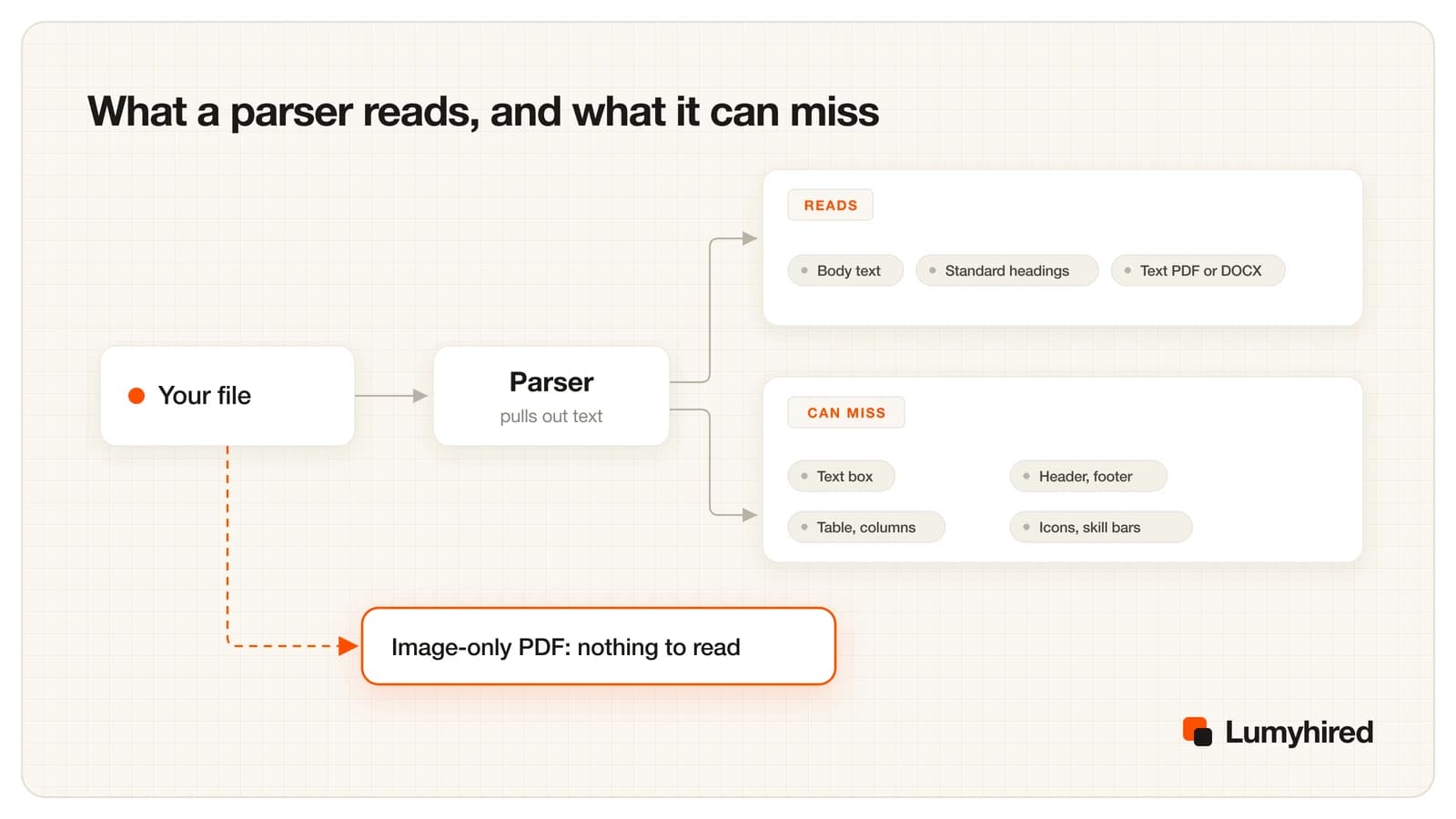
- Text boxes. Text in a floating box sits outside the main text flow. Depending on the parser it is read in the wrong place or skipped. Computerworld's 2021 piece put text boxes on its do-not-use list.
- Headers and footers. Contact details placed with Insert, Header look right on screen and can be missing from the extraction. Keep the header for a page number at most.
- Tables. A table used for layout can come out column by column: all the dates, then all the titles, then all the employers, with nothing linking them. Sovren's co-founder called the old Word resume template, built on tables, the least readable one it saw.
- Columns. Textkernel said two columns "can choke some parsers", usually by reading straight across both columns and splicing a sidebar line into a job bullet. Its newer parser handles columns, so this can still break some parsers without being a guaranteed failure.
- Images, icons, logos and charts. Parsers ignore them. That is harmless for decoration and harmful when the image carries information: a skill chart, a logo standing in for an employer's name, or a photo of your certificate.
- Image-only PDFs. A scan, a screenshot or a design export that turns type into pictures gives a parser nothing to read without OCR. Sovren also warned in 2021 against sending a PDF of your LinkedIn profile as a resume.
None of these gets you rejected by a rule. In Greenhouse, a file with formatting or technical problems is moved to Needs manual review, according to its Talent Matching FAQ updated 3 September 2026. That queue is less visible than the graded list, and a misread file can also have its job titles and skills in the wrong fields.
Best resume template for AI screening: build it in Word or Google Docs
The best resume template for ATS and AI screening is one you can check line by line, and the easiest one to check is the one you built from a blank page. It takes about twenty minutes. Below is a plain-text skeleton you can copy into either editor, then the steps for each.
FIRSTNAME LASTNAME
City, ST | name@email.com | (312) 555-0142 | linkedin.com/in/yourname

TARGET JOB TITLE
Two or three lines: what you do, for whom, with which tools, and one
result with a number in it.

EXPERIENCE

Job Title, Company Name, City, ST
Month YYYY - Present
- Verb + what you did + scale + result.
- Verb + what you did + tool you used + result.

Previous Job Title, Company Name, City, ST
Month YYYY - Month YYYY
- Verb + what you did + scale + result.

SKILLS
Tools: tool one, tool two, tool three
Methods: method one, method two
Languages: English (native), Spanish (professional working proficiency)

EDUCATION
Degree, Field of Study, School Name, City, ST, YYYY

CERTIFICATIONS
Full Certification Name (ACRONYM), Issuing Body, YYYY
Plain-text skeleton. Replace each placeholder, delete sections that do not apply, and keep the order. The phone number uses the 555-01xx range reserved for fiction.
Best Word resume template for ATS: the steps
- Open a blank document. Set margins between 0.5 and 1 inch in Layout, Margins.
- Set the body text to Calibri or Arial at 10.5 or 11 points in the Normal style, so every paragraph inherits it.
- Type your name and contact line as the first paragraphs of the body. Do not use Insert, Header.
- Format each section name (Summary, Experience, Skills, Education, Certifications) with the Heading 1 or Heading 2 style. Heading styles give the .docx a real outline, which screen readers use and which keeps every section name formatted the same way.
- Put dates on their own line under each job title. If you want them right-aligned, use a right tab stop rather than a table.
- Make bullets with the Bullets button and the plain round bullet. Skip custom symbols and emoji.
- Do not insert text boxes, shapes, SmartArt, icons or charts.
- Save as .docx, then File, Save As (or Export), PDF, and run the copy-paste test on the PDF.
Best resume template for Google Docs: the steps
- Open a blank document. Set margins in File, Page setup.
- Pick one font for the whole document from the font menu. Arial and Georgia are both built in.
- Type your name and contact line in the body. Leave Insert, Headers and footers alone.
- Apply Heading 2 to each section name from Format, Paragraph styles, so the document keeps a real outline.
- Use the bulleted list button for bullets. Avoid Format, Columns and Insert, Table for layout, and avoid Insert, Drawing.
- Export with File, Download, PDF Document (.pdf), or Microsoft Word (.docx) if the posting asks for Word. Then run the copy-paste test on the downloaded file.
To see the finished shape filled in for real roles, the single-column resume examples follow this skeleton. Once the template is set, adapting it to each posting is a separate fifteen-minute job, set out in tailoring your resume to a job description.
How to judge a third-party ATS template (Microsoft, Resume Worded, resume.io)
The three template sources that rank on page one for "best resume template for ATS" all call their templates ATS friendly. None of them publishes a test method. Here is what each page says, read on 18 September 2026.
- Microsoft Word ATS templates. The page lists templates such as ATS simple classic resume, ATS stylish accounting resume and ATS healthcare resume, describes them as having clear sections for contact, work history, skills and education, and tells you to save the result as a PDF. It does not say how the templates are built. That matters because the Sovren complaint from 2021 was about an older Word resume template laid out with tables. The newer ones may be fine, and the checks below tell you.
- Resume Worded. Describes its Word and Google Docs templates as vetted by recruiters and optimized for ATS, with a few free and the rest sold individually. Its headline promises you will never be rejected by a computer again, which a template cannot deliver: the automatic rejection that exists in Greenhouse's documentation comes from knockout questions, and no layout changes your answer to a work authorization question. The gallery includes two-column templates, which the page calls ATS compatible when saved as PDF.
- resume.io. Its ATS guide gives sound rules: a single column, no tables, text boxes, icons or decorative lines, contact details in the body, standard fonts at 10 to 12 points, and .docx unless a PDF is requested. It also says an ATS ranks resumes rather than rejecting them outright. The same page shows a graphic claiming only 25% of resumes get past the ATS scanner, which is the untraceable 75% figure turned around, and its ATS template gallery includes a two-column design.
Before you fill in any downloaded template, run five checks:
- Is the page one column from top to bottom?
- Is there a table behind the layout? In Word, turn on View Gridlines in the Table Layout tab. In Google Docs, click into the layout and look for table options in the Format menu.
- Does the header or footer hold your name or contact details? Double-click the top margin to see.
- Are skills shown as bars, dots or stars?
- Does the copy-paste test return your sections in the order you see them?
A template that fails the first four can still pass the fifth with a modern parser. If you like its look, keep it and test the output. If you would rather not guess, rebuild it in one column with the steps above. Tools that score resumes against ATS rules differ in what they measure, compared in the best ATS resume tools for 2026.
Resume format myths about AI screening, checked
Each of these appears on at least one page ranking for this topic in September 2026. The right-hand column is the evidence trail.
| Myth | What the evidence says | Source |
|---|---|---|
| A PDF fails the ATS | A PDF with real text is accepted and parsed. The failures are scans, screenshots, design exports that flatten type into an image, and PDFs printed from a LinkedIn profile. | Greenhouse supported formats, 19 Aug 2026; Computerworld, 27 Aug 2021 |
| A fancy template gets you auto-rejected | In Greenhouse, automatic rejection fires only on a rule a recruiter attaches to an application question, such as work authorization. A file the AI cannot read goes to Needs manual review. The real cost of a hard-to-parse layout is misfiled fields and a slower queue. | Greenhouse Auto-reject, 30 Jan 2026; Talent Matching FAQ, 3 Sep 2026 |
| 75% of resumes are rejected by ATS | The figure traces back to Preptel, a resume services company that closed in August 2013 without publishing a study or a method. resume.io's ATS template page still shows it, inverted, as a graphic saying only 25% of resumes get past the scanner. | Christine Assaf, HRTact, 5 Oct 2020; resume.io ATS page, read 18 Sep 2026 |
| Two columns always break parsing | Textkernel said in 2021 that two columns can choke some parsers, and its current FAQ says its LLM parser handles column layouts. Columns are a risk you gain nothing from taking, and some parsers still trip on them. | Computerworld, 2021; Textkernel developer FAQ, undated, read 18 Sep 2026 |
| You need an ATS font | Parsers read characters and ignore typefaces. Pick a common font so the page looks the same on the recruiter's screen and run the copy-paste test to catch a font that exports badly. | Computerworld, 2021 |
| AI screening needs the exact keyword repeated | Greenhouse Talent Matching counts related terms toward the same skill. Recruiter searches still match literal words, so use the posting's term once where it is true, inside a line of evidence. | Greenhouse Talent Matching FAQ, 3 Sep 2026; LinkedIn Recruiter Boolean help |
| White text full of keywords helps with AI screeners | Parsers strip color, so the hidden block shows up in plain text for the reviewer. ManpowerGroup says it does not move those candidates forward. | Built In, citing the New York Times, 15 Oct 2025 |
Sources as listed in each row, all read 18 September 2026. The 75% origin was traced by HR practitioner Christine Assaf in October 2020. The hidden-text figures come from New York Times reporting quoted by Built In.
Frequently asked questions
What is the best resume format for AI screening?
Is PDF or Word better for AI resume screening?
Can AI screening read a two-column resume?
What is the best resume template for Google Docs?
What is the best Word resume template for ATS?
Should my contact details go in the header?
How long should a resume be for AI screening?
Where Lumyhired fits
The one thing you cannot see from your own screen is the extracted text. The ATS preview shows it for free, in the browser, with no account. That is the only free Lumyhired tool. The ATS resume checker compares your resume with one posting and reports which of its terms are present, and the paid plans also tailor the resume and cover letter to each job. Weekly plans start at €5 on the pricing page, with a 3-day money-back guarantee, cancel anytime, and no free plan. For where the document fits in a whole search, see our guide to getting a job in 2026.
Sources
- Greenhouse, supported formats for resumes and other candidate uploads, updated 19 August 2026. support.greenhouse.io
- Greenhouse, Talent Matching FAQ, updated 3 September 2026. support.greenhouse.io
- Greenhouse, Auto-reject, updated 30 January 2026. support.greenhouse.io
- Workday, Responsible AI and bias mitigation (HiredScore grades), analysis dated 20 March 2026. workday.com
- Computerworld, on resume parsing, with Textkernel, DaXtra and Sovren, 27 August 2021. computerworld.com
- Textkernel, developer FAQ on parsing accuracy, column layouts and taxonomies, undated, read 18 September 2026. developer.textkernel.com
- Christine Assaf, HRTact, on the origin of the 75% rejection figure, 5 October 2020. hrtact.com
- Built In, hidden AI prompts in resumes, citing the New York Times, 15 October 2025. builtin.com
- HR Dive, on the Ladders eye-tracking study, 2018. hrdive.com
- Indeed Career Guide, How to optimize your application for AI resume scanners, Jamie Birt, 2 October 2025, and How to write an ATS resume, Suzanne Taylor, updated 11 August 2026. indeed.com
- ORISE, How to format your resume for AI screening, undated; ACI Learning, Beat the bots, undated. Read 18 September 2026. orise.orau.gov
- Microsoft, ATS resume templates in Word; Resume Worded, resume templates; resume.io, ATS resume templates. All read 18 September 2026. word.cloud.microsoft
Read next
- How to Pass ATS Filters in 2026
What Greenhouse, Workday, Teamtailor, Lever and iCIMS say their software does to your resume, the one mechanism that rejects automatically, and where the 75% myth came from.
- Resume Keywords in 2026
A worked extraction on a sample job posting, how recruiter Boolean search and related-term matching read your resume, and keyword lists by role from O*NET.
- How to Tailor Your Resume to a Job Description
A 15-minute method with three before and after bullets, an AI prompt that forbids invented facts, and Huntr's data: tailored resumes got interviews at 4.23% vs 2.07% in Q1 2026.
- Best AI for Resume Writing in 2026: 11 Tools Compared
ChatGPT, Claude, Gemini and 8 resume tools compared on stated criteria, with prices checked 18 September 2026, a test you can repeat, and 3 prompts with a fact check.