

AI Tools
Best AI job search tools in 2027: 10 compared
AI tools for job search now reach every step, from finding openings to rehearsing the interview, and most of them do one step well. This guide ranks ten, gives each a “best for” line, and lists the plans, limits and prices we read on each vendor’s own page on 15 November 2026. Where a vendor publishes no price, the page says so.
Lumyhired publishes this page and ranks itself first. The criteria are stated below so you can weigh them yourself.
What is the best AI job search tool in 2027?
Lumyhired ranks first because it covers the most of the search in one tool: a job feed drawn from many sources with a match score on every offer, a resume tailored to each posting without invented experience, an ATS check, a cover letter, interview notes and a tracker. New accounts get 7 days of Pro free, then plans start at €5 a week. For one step only, pick the specialist: Simplify for free autofill, Jobright for US job matching, Teal for a free tracker and resume manager, Jobscan for ATS checks, LinkedIn for recruiter visibility, Rezi for the resume itself, Huntr for tracking, Careerflow for your LinkedIn profile, Final Round AI for interviews.
Updated 15 November 2026. Every plan and price was read on the vendor’s own page that day.
What AI job search tools actually do
The label covers seven different jobs: finding openings, tailoring the resume, checking how software reads it, writing the cover letter, tracking applications, preparing interviews, and filling in or sending the application itself. A tool that does one of them very well can still leave you doing the other six by hand, which is why the chart below matters more than any single feature list.
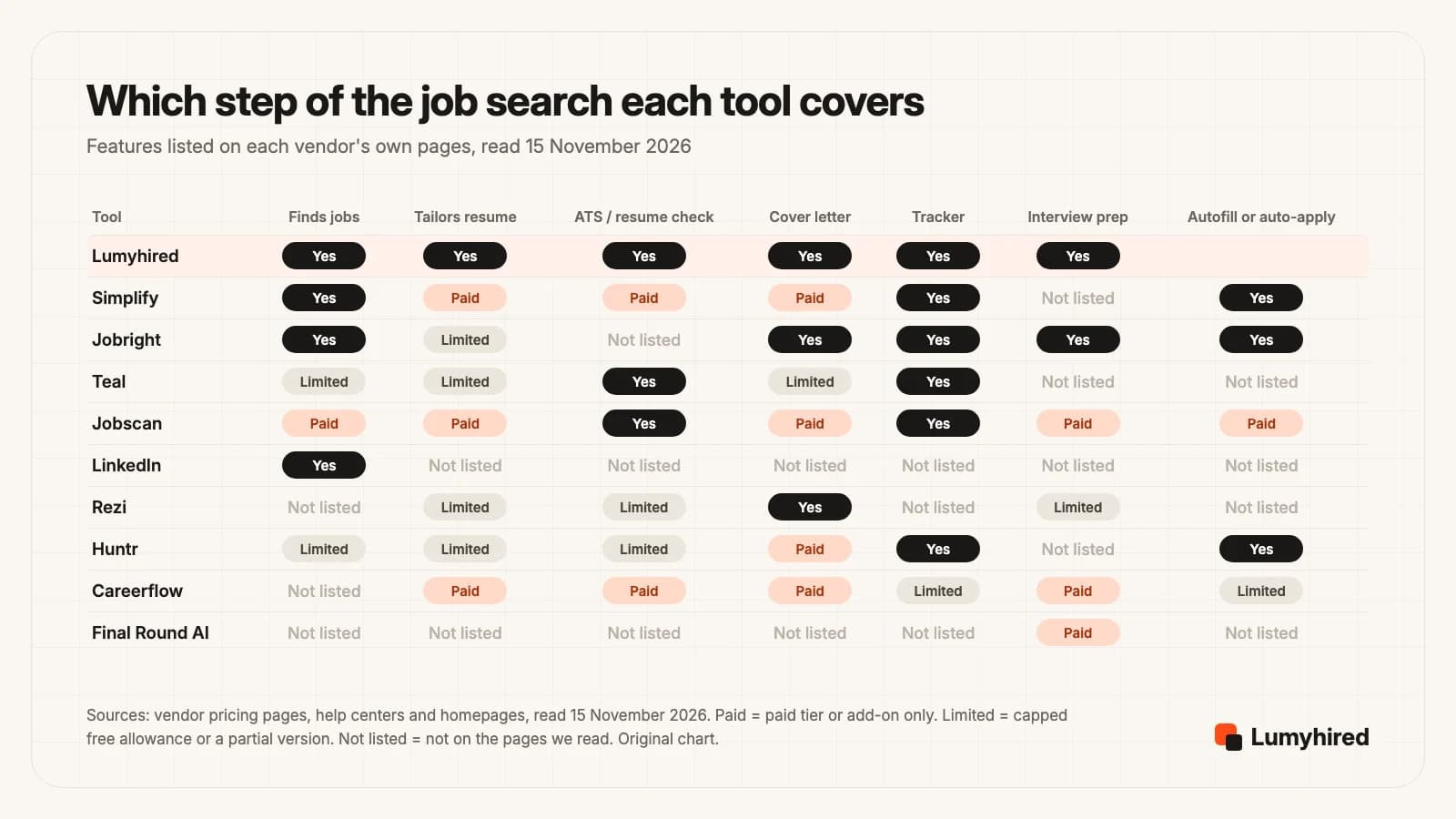
Two patterns stand out. The free plans cluster on tracking and autofill, which cost the vendor little to run, while anything that calls a language model for every application (tailoring, cover letters, live interview help) sits behind a paywall or a daily cap. And only a few tools start with the jobs themselves: Lumyhired, Jobright, Simplify and LinkedIn. With the rest you find the posting elsewhere and bring it in.
The volume on the other side of the table explains why this matters. Greenhouse’s fall benchmark, drawn from 9,473 companies and 161.8 million applications, counts 194 applications per hire so far in 2026. A recruiter reading that pile searches it by keyword and reads the top of the list. The tools that help most are the ones that put a relevant, readable resume in front of the right posting, which is the step the ranking below weighs most.
How we ranked the best AI job search tools
We did not run a scored test of resume output, so nothing here claims that one tool writes better than another. The order rests on what each vendor publishes, read on 15 November 2026, against five criteria in this order of weight:
- Steps covered in one subscription. Finding jobs, tailoring, checking, writing, tracking and interview preparation, without paying for a second tool.
- Quality of each application. The tool tailors the resume to the posting and keeps your real employers, dates and skills, instead of mainly adding volume.
- Published price. The cost can be read on a public page before you sign up, with the refund rules.
- Entry cost. A free plan or free days, and what one month of active search costs with no commitment.
- Works outside the US. Job sources and languages for people applying in the UK, France or elsewhere.
Lumyhired leads because it is the one tool here that covers every step from the first listing to the interview, with a published weekly price and 7 days of Pro free to try it. If one step is your only problem, the specialist for that step is worth a look, and the “best for” line on each tool is there for that reason: it names the one job each tool does best, whatever its overall rank.
The 10 best AI job search tools compared
Ranked on the five criteria above. Prices are in the currency each vendor showed us.
| Tool | Best for | Free option | Cheapest paid | One month |
|---|---|---|---|---|
| 1. Lumyhired | Find, tailor, check and track in one place | 7 days of Pro on sign-up, no card | €5 a week | ≈ €21.67 |
| 2. Simplify | Autofill on career sites | Autofill, resume builder, tracker | $89.99 per 3 months | $39.99 |
| 3. Jobright | US job matching | All features, daily limits | Not published | Not published |
| 4. Teal | Managing the search for free | Unlimited resumes and tracking | $79 per 90 days | $29 per 30 days |
| 5. Jobscan | ATS and keyword check | 5 scans a month | $89.95 per 3 months | $49.95 |
| 6. LinkedIn | Networking, recruiter visibility | Free account with AI job search | $239.88 a year | $39.99 |
| 7. Rezi | ATS-friendly resume builder | 1 resume, 3 PDF downloads | $149 once | $29 |
| 8. Huntr | Application tracking | 100 jobs, 2 tailored resumes | $160 per 6 months | $40 |
| 9. Careerflow | LinkedIn optimization | Basic plan, limits unstated | $172.99 a year | $23.99 |
| 10. Final Round AI | Interview preparation | App and goals, no live sessions | $300 a year | $150 |
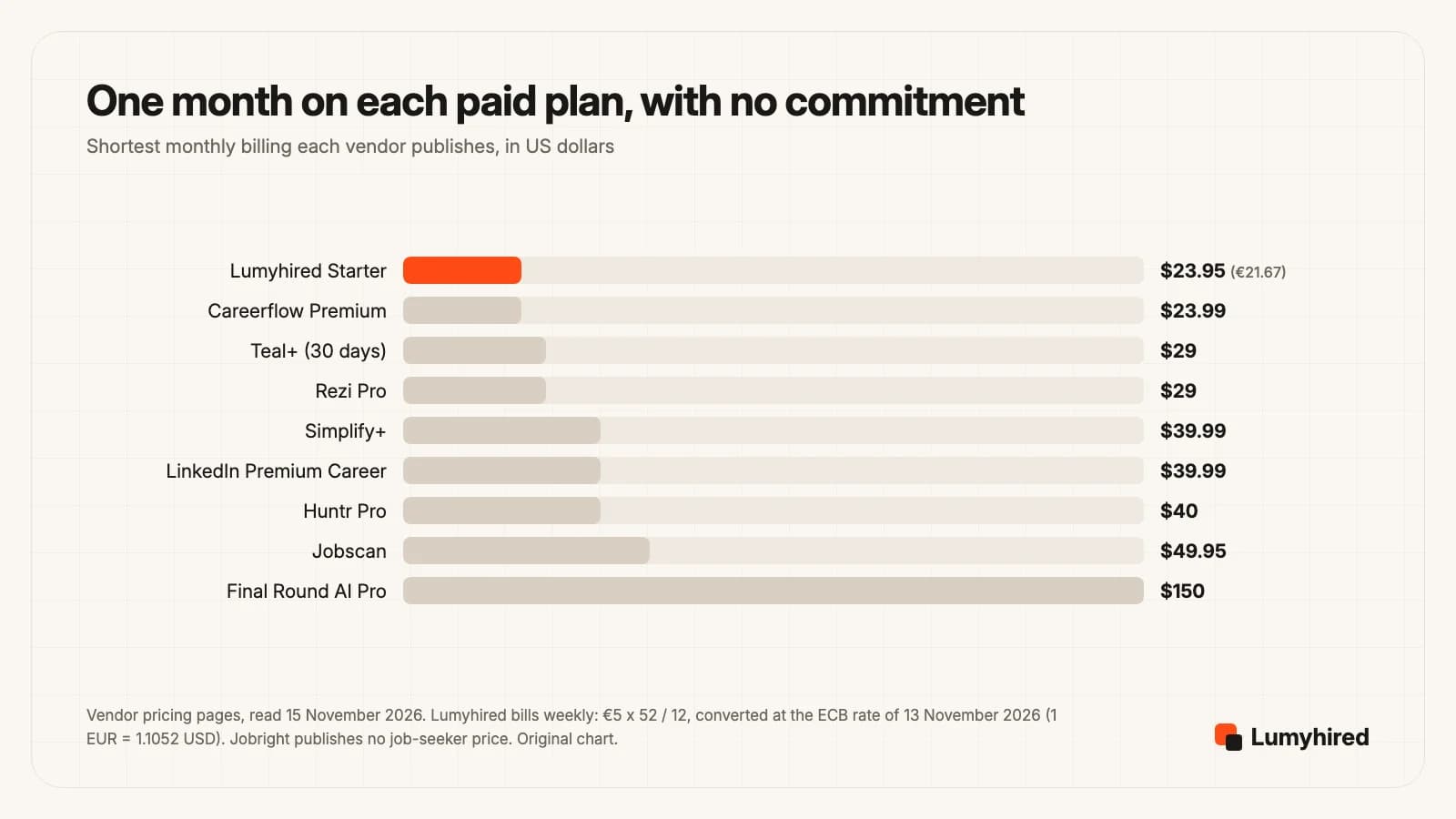
Eight of the nine published prices sit between about $24 and $50 for a month. Final Round AI is the exception at $150 on monthly billing, which falls to $25 a month only if you pay $300 for a year. Before committing to a long plan, read the refund terms. Lumyhiredrefunds the first 3 days of a paid plan and Rezi gives 30 days on Pro and Lifetime. Final Round AI’s plan FAQ and its Refund Policy disagree on whether monthly plans can be refunded, so check the policy, which also excludes accounts with 2 or more sessions over 30 minutes.
Weekly billing is the other trap. Simplify+ at $19.99 a week and Teal+ at $13 a week suit a burst of one or two weeks. Kept for a whole quarter, the weekly plans cost two to three times their own 3-month or 90-day plans ($169 against $79 at Teal, $259.87 against $89.99 at Simplify).
The 10 tools, one by one
1. Lumyhired
Best for: Running the whole search in one place: finding the jobs that fit, tailoring each application and tracking it
Price: Every new account gets 7 days of Pro free, with no card. Then €5 (Starter), €8 (Pro) or €13 (Hunt) a week, cancel anytime, and the first 3 days of a paid plan are refundable.
What it does well
- It finds the jobs. One feed gathers listings from Indeed, LinkedIn and Glassdoor, from employer career sites hosted on Greenhouse, Lever, Ashby, Workable and Workday, and from France Travail and Welcome to the Jungle, among other sources.
- Each offer gets a match score from 0 to 100%, built from the role, your skills, your experience and your degree, so the best fits come first.
- Your real resume is reworded with the posting’s vocabulary, without inventing experience, and you read and edit everything before you send it. Tailoring works in six languages, English and French included.
- A 10-point resume check shows what applicant tracking software reads well or badly, with fixes. Five templates and PDF export.
- For each offer it also writes a cover letter and prepares interview notes: likely questions, what to brush up, what to ask them. Applications then sit on a board (saved, applied, interview, offer, rejected) with a daily goal.
2. Simplify
Best for: Filling in job applications fast with free autofill
Price: Free: basic Copilot autofill, resume builder, job tracker and Gmail integration. Simplify+ $19.99 for 1 week, $39.99 for 1 month or $89.99 for 3 months.
What it does well
- The Copilot browser extension autofills applications on 100,000+ company career sites in one click, according to Simplify’s homepage, and saves each one to its tracker.
- Autofill, the resume builder and the job tracker are free. Many tools in this list charge for at least one of those.
- Simplify+ adds AI resume tailoring and feedback, AI cover letters and answers to application questions, follow-up email drafts, referral tools and a feature called Autopilot with 20 credits a week (unused credits do not roll over).
Worth knowing
- $19.99 for a single week ties with Careerflow Premium Plus as the highest weekly price in this list, and the help article lists the same features on all three durations.
- Every AI writing feature, tailoring included, is on Simplify+. On the free plan, cover letters and answers come from content you saved yourself.
- The pages we read state no country coverage. Check that the career sites you target are covered before relying on it.
Comparing options for this tool? Read our Simplify alternatives.
Source: https://help.simplify.jobs/articles/5623502-whats-included-in-simplify-features-and-pricing
3. Jobright
Best for: Finding relevant jobs in the US with an AI-matched feed
Price: Free, with daily limits on features such as resume tailoring. A paid option for unlimited use exists, with no job-seeker price on a public page.
What it does well
- Discovery comes first. The homepage says it holds 8,000,000+ jobs, with 400,000+ added that day, and matches them to your skills with early alerts. Both counts are Jobright’s own figures.
- One account covers a lot: 1-click autofill across major applicant tracking systems, a resume tailored to each job, insider referrals, and Orion, an AI copilot that also helps with interview preparation.
- Its FAQ says all features are free to use, with daily limits where the service costs more to run.
Worth knowing
- Its FAQ says its primary service is in the United States, and the search form defaults to it.
- No published price for the paid tier: jobright.ai/pricing returned a 404 and the only pricing link on the homepage is for employers (15 November 2026).
- Jobright says it has 3,000,000 users and that it brings 3x more interviews. Neither figure comes with a method we could check.
Comparing options for this tool? Read our Jobright review and alternatives.
Source: https://jobright.ai/
4. Teal
Best for: Managing the whole search, resumes and tracker, on a free plan
Price: Free Forever plan. Teal+ $13 every 7 days, $29 every 30 days or $79 every 90 days, no credit card required to start.
What it does well
- Unlimited resumes and unlimited job tracking on the free plan, with goals, notes and statuses for every job you bookmark.
- The free Chrome extension saves jobs from over 40 job boards, according to Teal’s homepage, and Teal also runs its own job board.
- Teal+ unlocks the full keyword list with a match score, unlimited AI bullets, summaries and cover letters, and advanced design settings. Teal says it has over 4 million users.
Worth knowing
- The free AI is small: 5 credits for resume bullets, 2 for summaries and 2 for cover letters on 15 November 2026. The same table showed 10 bullet credits in October.
- Free keyword matching stops at the top 5 keywords of a posting, and you place each change yourself.
- The weekly plan costs $169 over 13 weeks against $79 on the 90-day plan, for the same features.
Comparing options for this tool? Read our Teal review and alternatives.
Source: https://www.tealhq.com/pricing
5. Jobscan
Best for: Checking a resume against an ATS and one specific posting
Price: Free: 5 resume scans a month. Paid: $49.95 a month, or $89.95 every 3 months ($29.98 a month) after a 7-day free trial.
What it does well
- The most detailed resume-versus-posting report here: keyword comparisons plus ATS and recruiter findings, with 5 free scans a month to try it.
- Paid plans add unlimited scans and AI optimizations, an AI cover letter generator, a LinkedIn optimizer and AI job matching.
- Paid plans include 2 free auto-apply credits a month and 20% off further auto-apply credits and interview practice. Jobscan says 1,000,000+ job seekers rely on it.
Worth knowing
- $49.95 a month is the highest month-to-month price after Final Round AI, and the monthly plan has no trial.
- Its FAQ says that when a subscription expires you lose access to paid features and to all data associated with them. Export what you need before you cancel.
- Auto-apply and interview practice are paid add-ons, discounted for subscribers, and not included.
Comparing options for this tool? Read our Jobscan alternatives.
Source: https://app.jobscan.co/plan
6. LinkedIn
Best for: Networking and being visible to recruiters
Price: Free account, with AI-powered job search for all members. Premium Career from US$39.99 a month or US$239.88 a year.
What it does well
- LinkedIn’s help center says its AI-powered job search is available to all members worldwide, and that classic job search is being retired.
- Premium Career adds 5 InMail credits a month to reach hiring managers outside your network, who viewed your profile over 365 days, Top Applicant and Top Choice jobs, and AI insights on each job post.
- LinkedIn says Premium subscribers who mark a job as Top Choice are 2x more likely to hear back from a recruiter (its own June 2026 data).
Worth knowing
- No resume tailoring and no ATS check in the plan pages we read. LinkedIn is where recruiters find you, and your resume work happens elsewhere.
- The page’s 2.7x hiring claim dates from January 2022 data, and LinkedIn notes that some features are not available globally.
- At US$39.99 a month, Premium Career costs about what Simplify+ or Huntr Pro cost.
Comparing options for this tool? Read our Is LinkedIn Premium worth it?.
7. Rezi
Best for: Building an ATS-friendly resume, with a pay-once option
Price: Free: 1 resume, 1 AI interview, 3 PDF downloads. Pro $29 a month. Lifetime $149 one time. 30-day money-back guarantee on Pro and Lifetime.
What it does well
- The Rezi Score checks a resume against 23 metrics, and Keyword Targeting matches it to a posting. Both are full on Pro and limited on the free plan.
- Lifetime at $149 is the only one-time payment in this list, and the 30-day money-back window is the longest refund period we found stated.
- Cover letters and resignation letters are unlimited even on the free plan, and Pro includes unlimited AI interviews and one expert resume review a month.
Worth knowing
- Its pricing page lists no job search and no application tracker. Rezi builds the document and stops there.
- The free plan allows 3 PDF downloads in total, which runs out after a few applications.
- Lifetime leaves out the monthly expert review that Pro includes, per its FAQ.
Source: https://www.rezi.ai/pricing
8. Huntr
Best for: Tracking every application, contact and stage
Price: Free: up to 100 tracked jobs, 2 job-tailored resumes, unlimited autofills, Chrome Job Clipper. Pro $40 a month, $90 every 3 months or $160 every 6 months ($26.66 a month).
What it does well
- A tracker built around the search: a Chrome Job Clipper to save postings, unlimited contacts, map view and up to 100 documents on the free plan.
- Unlimited application autofills and unlimited base resumes on the free plan, plus 2 tailored resumes to judge the output before paying.
- Huntr publishes research from its own users. Its Q1 2026 report links tailored resumes to a 4.23% interview rate against 2.07% for untailored ones.
Worth knowing
- Free tracking stops at 100 jobs. After a cancellation, data stays but saving more than 100 jobs needs Pro again.
- Pro at $40 a month only drops to $26.66 a month on the 6-month plan.
- The free plan includes “a small number” of AI credits, with no figure given.
Comparing options for this tool? Read our Huntr alternatives.
Source: https://huntr.co/pricing
9. Careerflow
Best for: Optimizing your LinkedIn profile alongside the resume
Price: Free Basic plan. Premium $8.99 a week, $23.99 a month, $54.99 a quarter or $172.99 a year. Premium Plus $19.99 a week, $44.99 a month, $119.99 a quarter or $299.99 a year.
What it does well
- A LinkedIn optimizer on every plan: basic on the free plan, advanced on Premium, next to a LinkedIn post writer and an elevator pitch writer.
- Premium at $23.99 a month is one of the two cheapest monthly rates in this list, with unlimited AI resumes, an ATS score and keyword analyzer, and cover letters.
- The free plan includes a Chrome extension and a search for recruiters and hiring managers.
Worth knowing
- The free tracker, autofill and networking tracker are marked “limited”, with a note that limits are coming, and no number.
- AI mock interviews and interview analysis are only in Premium Plus.
- No job search of its own on the plans page: you bring the jobs.
10. Final Round AI
Best for: Interview preparation, from practice rounds to a live copilot
Price: Free desktop app for setting up goals. Pro $150 a month, $83.33 a month billed quarterly, or $25 a month billed yearly.
What it does well
- Built only for interviews: practice interviews with an AI interviewer, an Interview CoPilot that suggests answers during a live call, automatic debriefs and screen help for coding questions, per its homepage.
- The plan table lists every interview type (coding, HireVue, phone and more) and a bank of 10,000+ questions, and the homepage says the copilot understands 76 spoken languages.
- A 72-hour money-back guarantee. Its Refund Policy, updated 8 October 2026, covers monthly, quarterly and yearly charges, once per customer.
Worth knowing
- $150 for one month is by far the highest price here, and there is no free trial of live sessions. Its own pages disagree on refunds: the FAQ under the plan table says monthly plans are non-refundable, while the Refund Policy includes them but excludes accounts with 2 or more sessions over 30 minutes and allows Stripe fees to be deducted. Read the Refund Policy before paying.
- Its FAQ calls the native app’s stealth mode “fully undetectable”. Using hidden live help in an interview that forbids it is a risk you carry, and the offer is what you would lose.
- Nothing for finding jobs, tailoring a resume or tracking applications on the plans page.
Comparing options for this tool? Read our Final Round AI alternatives.
Which AI tool for which step of your job search
Start from the step that fails. A search with plenty of interviews and no offers needs a different tool from one where nothing comes back at all, and paying for the wrong step is the most common way to waste a subscription.
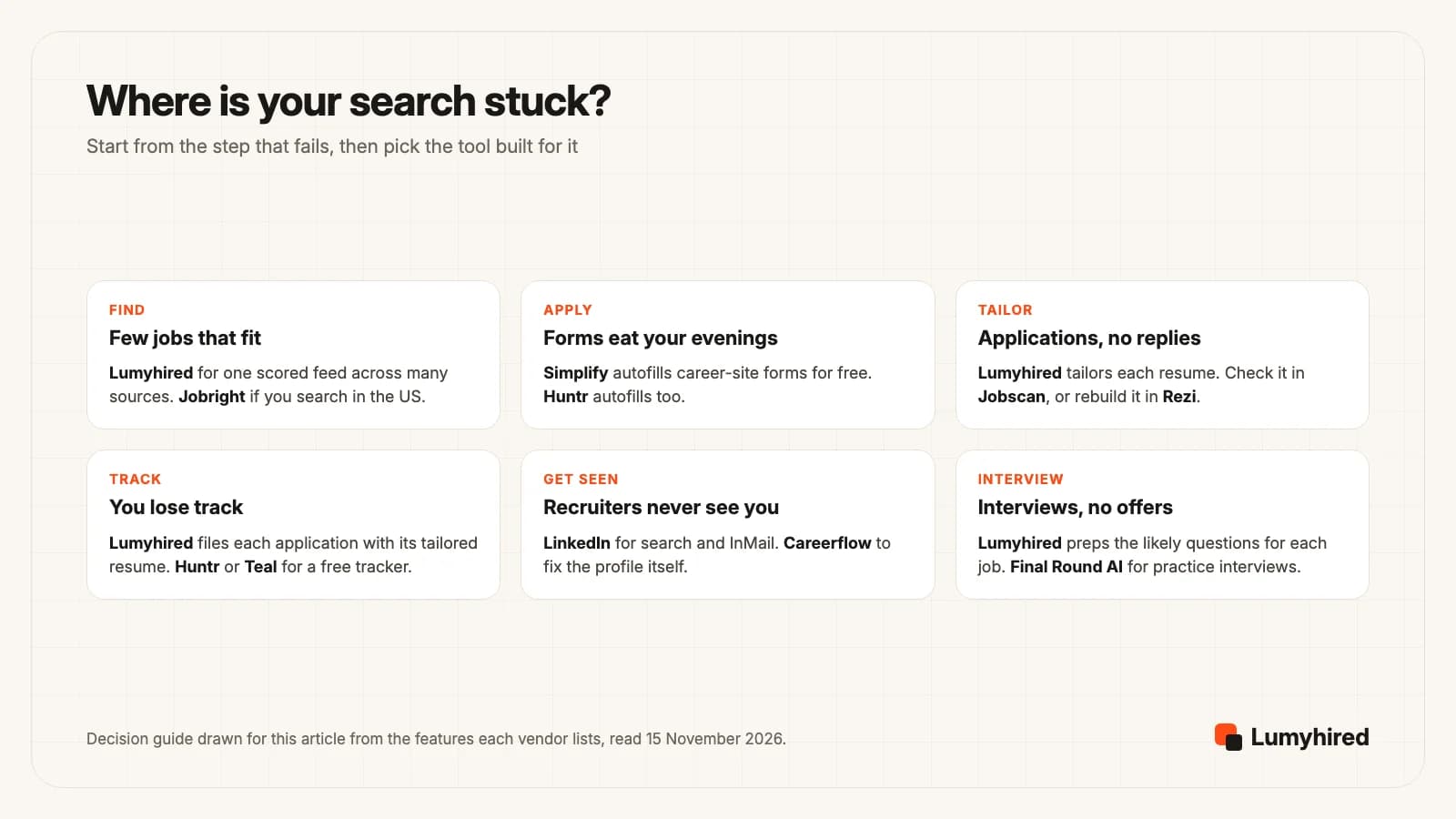
Pick Lumyhired when you want one tool to find the jobs, score them, tailor the resume and cover letter to each, and keep every application on a board, in English or French, from €5 a week after the free days.
Pick Simplify when long Workday and Greenhouse forms are what slows you down. Its autofill is free, and it pairs well with a tool that prepares the documents.
Pick Jobright when you search in the US and want an AI-ranked feed, and you are fine learning the paid price after signing up.
Pick Teal when you want resumes and a tracker in one free account, and you are happy to place keywords yourself.
Pick Jobscan when applications go out and nothing comes back, and you want a line-by-line check of one resume against one posting.
Pick LinkedIn when your network and recruiter searches are where jobs come from in your field. Premium is worth a month if you will use the InMail credits.
Pick Rezi when the resume itself needs rebuilding and you would rather pay $149 once than subscribe.
Pick Huntr when you run dozens of applications with contacts and follow-ups and need them in order.
Pick Careerflow when your LinkedIn profile is weak and you want the resume and profile reworked in one subscription.
Pick Final Round AI when you reach interviews and lose them, and plan to pay yearly for its practice rounds.
Free AI tools for job search: what the free plans include
Most of these tools have a free entry, and the free plans differ far more than the paid ones. Here is what each one gave on 15 November 2026, with the cap that matters.
- Lumyhired: every new account gets 7 days of Pro free, with no card, and nothing is charged when they end. That covers the whole product: the scored job feed, tailored resumes and cover letters, the ATS check, interview prep and the tracker. The free ATS preview shows what a parser extracts from your resume, with no account.
- Teal: unlimited resumes and job tracking, 10 templates, top 5 keywords per posting, and AI credits of 5 bullets, 2 summaries and 2 cover letters. The pricing page does not say whether the credits renew.
- Simplify: basic Copilot autofill, the resume builder, the job tracker and Gmail integration. No AI writing.
- Jobright: all features, with daily limits on the costly ones such as resume tailoring. The limits are not stated as numbers on its public pages.
- Huntr: up to 100 tracked jobs, 2 tailored resumes, 2 application packets, unlimited autofills and a small, unstated number of AI credits.
- Jobscan: 5 resume scans a month with 5 ATS and recruiter findings, a job tracker and a resume builder.
- Rezi: 1 resume, 1 AI interview and 3 PDF downloads, with unlimited cover letters.
- Careerflow: 1 resume, a basic LinkedIn optimizer and limited tracking and autofill, with no numbers given.
- LinkedIn: AI-powered job search for every member. Premium Career may be offered as a free trial, per LinkedIn’s page.
- Final Round AI: the desktop app and goal setup. Live sessions need Pro, with no free trial.
A workable $0 setup exists: Teal or Huntr for tracking, Simplify for autofill, LinkedIn for search and networking, Jobscan’s 5 monthly scans for the applications that matter most. What it lacks is AI tailoring at volume, which every vendor here charges for or caps. That is the step worth paying for when replies are rare.
Auto-apply and interview copilots: the risks to weigh
Two features in this category promise the most and carry the most risk: sending applications for you, and feeding you answers during a live interview.
On volume, the best public data favours fewer, better applications. Huntr’s Q1 2026 report covers 139,927 applications from 25,635 job seekers. Tailored resumes converted to interviews at 4.23%, against 2.07% for untailored ones. People who sent 11 to 20 applications in total converted at 9.25% each, and those who sent 100 or more at 2.58%. Huntr sells a tracker and its users chose themselves, so read it as a pattern. We found no public dataset showing that auto-apply raises the interview rate.
Software is also stricter than candidates expect on one point. Greenhouse documents an auto-reject rule that rejects an applicant automatically from the answer to a yes/no or select question on the form, such as work authorization. An auto-apply bot that answers those questions wrongly loses the application before any person reads it. Our guide to passing ATS filters covers what the main applicant tracking systems do with a resume.
Live interview help raises a different problem. Final Round AI says its copilot suggests answers within seconds during a live call, and its FAQ calls the native app’s stealth mode “fully undetectable”. That claim is the vendor’s, and the rules are the employer’s. Practice rounds and debriefs carry no such risk, and that part of the product is where we would spend the money.
If you have decided that volume is the plan anyway, the auto-apply tools comparison covers that category in detail, and how many jobs to apply for turns the numbers above into a weekly target.
Searching outside the US: what still works
Most tools in this list are built in the US and say little about other markets. Three things decide whether one works for you in the UK, France or elsewhere.
- Where the jobs come from. Lumyhired’s feed includes France Travail and Welcome to the Jungle next to Indeed, LinkedIn, Glassdoor and employer career sites. LinkedIn’s AI job search is available to members worldwide. Jobright’s FAQ says its primary service is in the United States.
- Which language the documents are written in. Lumyhired tailors resumes in six languages: English, French, Spanish, German, Arabic and Portuguese. Final Round AI says its copilot understands 76 spoken languages. The other plan pages we read were in English and did not state the languages their AI writes in.
- Which currency you pay in. Every competitor in this list showed prices in US dollars on the day we read them. Lumyhired bills in euros.
The resume and tracking tools (Teal, Huntr, Rezi, Jobscan, Careerflow) work wherever you apply, since you bring the jobs to them. The method for tailoring by hand, which works in any language, is in how to tailor a resume to a job description.
Frequently asked questions
What are the best AI job search tools in 2027?
Are there free AI tools for job search?
Which AI tool is best for finding jobs?
Is it worth paying for an AI job search tool?
Do AI auto-apply tools get more interviews?
Can recruiters tell that I used AI?
Lumyhired vs Simplify: which should I use?
Which AI job search tools work outside the US?
Where Lumyhired fits
Lumyhired is a job-hunt assistant that runs the search from the first listing to the interview. Its feed gathers offers from job boards, employer career sites, France Travail and Welcome to the Jungle, among other sources, and scores each one from 0 to 100% against your profile. For the offers you pick, it rewords your real resume with the posting’s vocabulary, checks it on 10 points, writes the cover letter, prepares the likely interview questions, and files the application on a board with a daily goal.
Every new account gets 7 days of Pro free, with no card. After that, plans are €5, €8 and €13 a week on the pricing page, cancel in one click, and the first 3 days of a paid plan are refundable. To see what a parser reads in your current resume before anything else, run the free ATS preview, or match it against a posting with the ATS resume checker.
Sources
Every page below was opened on 15 November 2026. Teal, Jobscan, LinkedIn and Final Round AI refuse automated fetchers, so their pages were read in a browser. User counts and outcome claims (Jobright, Teal, Jobscan, LinkedIn) are the vendors’ own figures and are labelled as such. Jobright publishes no job-seeker price we could find. Euro prices are converted at the European Central Bank reference rate of 13 November 2026, 1 EUR = 1.1052 USD.
- Simplify, help center, What’s included in Simplify+ (free features, Simplify+ features, Autopilot credits, prices for 1 week, 1 month and 3 months), read 15 November 2026
- Simplify, homepage (Copilot autofill on 100,000+ company career sites, matching, tracker), read 15 November 2026
- Jobright, homepage and FAQ (8,000,000+ jobs, 400,000+ new that day, 3,000,000 users, free with daily limits, primary service in the US), read 15 November 2026
- Teal, Teal+ pricing page (Free Forever limits, AI credits, $13 / $29 / $79), read in a browser 15 November 2026
- Jobscan, plans page (free plan, $49.95 monthly, $89.95 quarterly with 7-day trial, add-ons, cancellation FAQ), read in a browser 15 November 2026
- LinkedIn, Premium Career page (features, US$39.99 a month or US$239.88 a year, dated LinkedIn claims), read in a browser 15 November 2026
- LinkedIn Help, AI-powered job search (available to all members worldwide, classic search being retired), read 15 November 2026
- Rezi, pricing page (Free, Pro, Lifetime, 30-day money-back guarantee, Rezi Score), read 15 November 2026
- Huntr, pricing page (Free and Pro limits), read 15 November 2026
- Careerflow, Premium plans page (Basic, Premium, Premium Plus), read 15 November 2026
- Final Round AI, plans page and FAQ ($150 monthly, $83.33 quarterly, $25 yearly per month, FAQ on refunds, stealth mode), read in a browser 15 November 2026; its Refund Policy (updated 8 October 2026) is linked in the text
- Huntr, Job Search Trends Q1 2026 (139,927 applications, 25,635 job seekers), read 15 November 2026
- Greenhouse, The Hire Standard, fall edition (194 applications per hire, year to date through August 2026, 9,473 companies), read 15 November 2026
- Greenhouse support, Auto-reject, updated 30 January 2026
- Final Round AI, homepage (Interview CoPilot, practice interviews, debriefs, screen help, 76 spoken languages, no free trial of live sessions), read in a browser 15 November 2026
- Lumyhired plans, free days and features: our own product; prices match the pricing page.
Corrections: if you work at any tool named above and something here is out of date, write to us and we will correct it and change the date.
Read next
- Jobright Review and 7 Alternatives (2027)
Is Jobright worth it? Features, a price it does not publish, the r/csMajors scraping question, and seven alternatives with prices read on 15 November 2026.
- Teal Review and 7 Teal Alternatives (2027)
Is Teal worth it? Free plan, Teal+ prices and limits read on 15 November 2026, then seven Teal alternatives ranked with verified prices.
- Jobscan Review and 7 Alternatives (2027)
Is Jobscan worth it? Plans, trial, refund rule and new auto-apply credits read on 15 November 2026, then seven Jobscan alternatives ranked.
- Huntr Review and 7 Huntr Alternatives (2026)
Huntr reviewed: free plan, Pro prices, its own numbers against the app stores, how to export your data, and seven alternatives ranked.