
Career Guides
Is LinkedIn Premium worth it in 2026? Price, free trial and 6 alternatives
LinkedIn Premium Career costs from US$39.99 a month in the US and from €29.98 a month in euros, according to LinkedIn’s own page on 15 October 2026. This guide covers what that buys a job seeker, the free trial and refund rules, and 6 alternatives, most free or cheaper month to month. It also covers LinkedIn’s help page (updated mid-September 2026), which says AI job search is available to all members worldwide and that classic search is being retired starting in September.
Is LinkedIn Premium worth it in 2026, and what is the best alternative?
Premium Career is worth one intensive month if your target jobs are posted on LinkedIn and you must message hiring managers you do not know: you pay for 5 InMail credits a month and applicant insights. LinkedIn’s help page (updated mid-September 2026) says AI job search is available to all members worldwide. For applications, Lumyhired ranks first: one job feed from many sources, a resume tailored to each offer and a tracker, from €5 a week. It is not a social network. Teal is the best free tracker.
Published 15 October 2026 by Lumyhired, which ranks itself first.
How much does LinkedIn Premium cost in 2026?
Premium Career, the plan built for job seekers, starts at US$39.99 a month or US$239.88 a year in the US, and at €29.98 a month or €179.88 a year in euros. Those are the figures on LinkedIn’s Premium Career page, which carries the line “Last updated: April 20, 2026 (pricing and plan details)”, read on 15 October 2026.
| Plan | US (USD) | Euro (EUR) |
|---|---|---|
| Premium Career, monthly | US$39.99 a month | €29.98 a month |
| Premium Career, yearly | US$239.88 a year (US$19.99 a month) | €179.88 a year (€14.99 a month) |
| Duo option (two people) | US$59.98 a month or US$359.88 a year | €44.99 a month or €269.81 a year |
Three caveats come from LinkedIn itself. The page calls these prices estimates that “may exclude Value-Added Tax (VAT)” and promotional discounts, says pricing is subject to change, and notes slight variations across device types. It describes the Duo option as two people each holding their own Premium Career licence under one shared subscription.
For a member in France, there is no separate French price page. The euro row above is the closest published figure, and LinkedIn does not say whether French VAT is already in it. The page that shows your exact price, linkedin.com/premium/products, redirected to the sign-in screen when we opened it logged out on 15 October 2026. For France, that means €29.98 a month before any tax LinkedIn adds, with the final figure shown only once you are signed in.
What one Premium action costs
A monthly price is easier to judge once it is divided by what you will actually use. Premium Career includes 5 InMail credits a month, and LinkedIn’s help page lets a subscriber mark up to 3 jobs a month as Top Choice. Those are the two features that put your name in front of a specific person. The table divides the price by them.
| Billing | Per InMail (5 a month) | Per action (5 InMails + 3 Top Choice) |
|---|---|---|
| US$39.99 monthly | US$8.00 | US$5.00 |
| US$19.99 a month, yearly | US$4.00 | US$2.50 |
| €29.98 monthly | €6.00 | €3.75 |
| €14.99 a month, yearly | €3.00 | €1.87 |
Eight dollars for a message to a hiring manager you could not otherwise reach pays off if one of those messages leads to an interview. The yearly plan only halves the unit cost if you are still searching in month twelve.
How does the LinkedIn Premium free trial work?
LinkedIn says Premium “may be available to try free for one month”, but the trial is conditional, needs a card, and turns into a paid plan by default. The rules below come from four of LinkedIn’s help pages, read on 15 October 2026.
- Not everyone qualifies. Eligibility depends on several factors, including whether you have used a Premium trial before. The Premium Career page sends you to the “Try Career for free” button to find out.
- The length varies. The free trial page says trial length may vary by region or promotional terms, so treat one month as the usual case.
- A card is required. You must enter a valid credit card to start, and the trial converts to a paid plan unless you cancel before it ends.
- Cancelling has a cost. If you cancel a free trial, you are not eligible for another one for at least 12 months, and your Premium access stops immediately on the day you cancel. A paid plan, by contrast, stays active until the end of the billing cycle.
- Pick the plan first. You cannot switch between Premium plans for free during the trial.
- Cancel early enough. The cancellation page says to cancel at least one day before the next billing date to avoid the next charge.
The refund rules matter if you miss that date. LinkedIn’s refund policy says a Premium subscription may be refundable within 7 days of being charged if you have not used Premium, and that a previous refund may affect eligibility. For people in the European Union, the same page grants a full refund during the 14 days after a subscription begins. If you started with a free trial, those 14 days count from the first day of the trial, so they are usually over by the time the first charge lands. A subscription bought through the iPhone app is refunded by Apple.
The practical version: decide before the trial what you will use it for (which five people you will message, which jobs you will mark), note the end date shown in your account, and set a reminder two days earlier.
What does LinkedIn Premium Career give a job seeker?
Four things that a free account does not have: messages to people outside your network, a view of where you stand among applicants, more data on who looked at you, and LinkedIn Learning. The detail, from LinkedIn’s own pages:
- 5 InMail credits a month. InMail is how you message someone you are not connected to. Premium Business gets 15 and Recruiter Lite 30, according to LinkedIn’s plan comparison. A free account receives InMail without limit and has no credits to send it.
- Applicant insights. Once a job has at least three applicants, you see how many applied, your ranking as a percentage if you are in the top 50%, the top skills among applicants including the ones you share, and their experience and education levels. LinkedIn adds two warnings: the ranking is not endorsed by the hiring company, and when applications are taken on an external site, the data reflects people who clicked to apply.
- Top applicant jobs. On the Jobs homepage, subscribers see jobs where their profile places them in a strong position, based on role, experience and skills.
- Top Choice. While applying through Easy Apply, you can mark a job as a top choice and add a short message; the job poster sees the mark. The limit is 3 a month, refreshed on the first of the month and not carried over. The help page, last updated two years before we read it, says the feature is for a select group of subscribers and a limited number of jobs.
- AI features. The Premium Career page lists AI-powered insights on job posts (your fit and tips for a given role), profile writing assistance and a message proofreader. Cover letter assistance exists too, but its help page says it is in beta, available to a limited number of Premium subscribers, in English only, and may make mistakes.
- Company insights. Headcount and hiring trends over 24 months, growth rate, average tenure, and AI-generated summaries of a company’s priorities that LinkedIn says are powered by Bing.
- Who viewed your profile for the past 365 days, with private browsing.
- LinkedIn Learning, over 25,000 courses. LinkedIn sells no standalone Learning plan to individuals; its help page points to Premium Career as the closest option.
What the Premium Career page does not list is as useful to know. No tracker for applications you send outside LinkedIn, no resume tailored to a posting, and no insight on jobs that live on a company career site beyond the click count.
What changes as LinkedIn retires classic job search?
AI job search does not require Premium. LinkedIn’s help page on AI-powered job search (updated mid-September 2026: it was marked “Last updated: 4 weeks ago” when we read it on 15 October 2026) says AI job search is available to all LinkedIn members worldwide, and that LinkedIn is “gradually retiring classic job search starting in September.”
In practice you type the job you want in plain language, such as “finance manager roles in my network with less than 10 applicants”, one of LinkedIn’s own examples, and the search matches it against job descriptions without needing the exact keywords. The same help page says it runs on large language models fine-tuned on two decades of LinkedIn data and may use your profile and search activity to personalise results. Suggested filters work in English, German, French, Spanish and Portuguese.
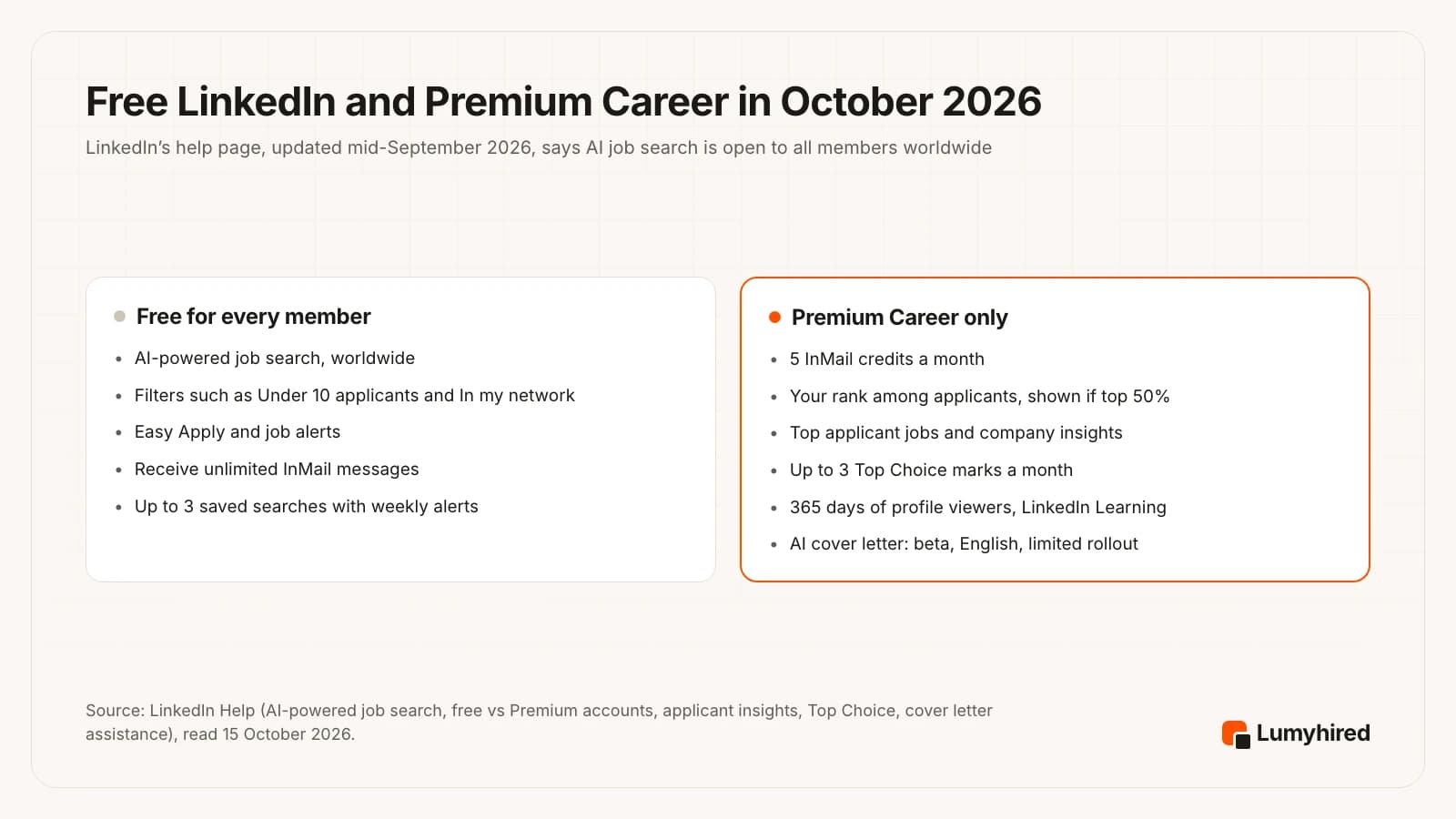
Today the filters still available to everyone include date posted, company, experience level, employment type, remote, Easy Apply, In my network and Under 10 applicants. LinkedIn lists three it plans to bring back: Verified job, the sort by most recent or most relevant, and hybrid or on-site.
Do LinkedIn’s own Premium statistics hold up?
None of them shows that paying for Premium causes the result. The Premium Career page prints four figures, read on 15 October 2026:
- 2.7x: LinkedIn says “Premium subscribers are 2.7x more likely to get hired on average.” Source given: LinkedIn data, January 2022. That is more than four and a half years old, before the AI job search existed.
- 2x: LinkedIn says subscribers who apply using Top Choice are twice as likely to receive a message back from a recruiter. LinkedIn data, June 2026.
- 5.7x: LinkedIn says InMail is 5.7 times more likely to get a reply than cold email. No date or source line on the page.
- 11x: LinkedIn says Premium Career subscribers have 11 times more connections on average. LinkedIn data, July 2026.
None comes with a method, a sample size or a comparison group on the page. The fourth figure explains why that matters. People who pay for Premium Career have, on LinkedIn’s own count, eleven times the network of the average member, which makes them more likely to be hired whether or not they pay. The Top Choice figure has the same problem in a smaller form: you mark the three jobs you care about most, which are likely the ones you fit best.
If your real question is how to get more interviews from the applications you already send, our analysis of how many jobs to apply to each week goes through the published data on that.
What LinkedIn Premium does well, and where it falls short
Everything Premium measures happens inside LinkedIn.
What it does well
- InMail is the paid way to message someone outside your network on LinkedIn, and no other tool on this page can send a message on LinkedIn for you.
- Applicant counts and your ranking on LinkedIn-hosted jobs help you skip roles with a crowd of stronger applicants.
- LinkedIn Learning is included. LinkedIn sells no standalone Learning plan to individuals; its help page points to Premium Career as the closest option.
- Monthly billing lets you stop the day you sign an offer. In the EU, the 14-day refund window counts from the start of the subscription, which is day one of the trial if you took one.
Where it falls short
- Applicant data stops at LinkedIn. For a job taken on an external site, LinkedIn counts clicks to apply, which says little about your competition.
- Your ranking only shows when you are in the top half, and Top Choice is limited to 3 jobs a month, a select group of subscribers and a limited number of Easy Apply jobs.
- The AI job search is available to all members, Premium or not, and the paid AI cover letter is a beta in English for a limited number of subscribers.
- No application tracker and no resume tailoring, two tasks a job seeker repeats for every application.
Is LinkedIn Premium worth it for you?
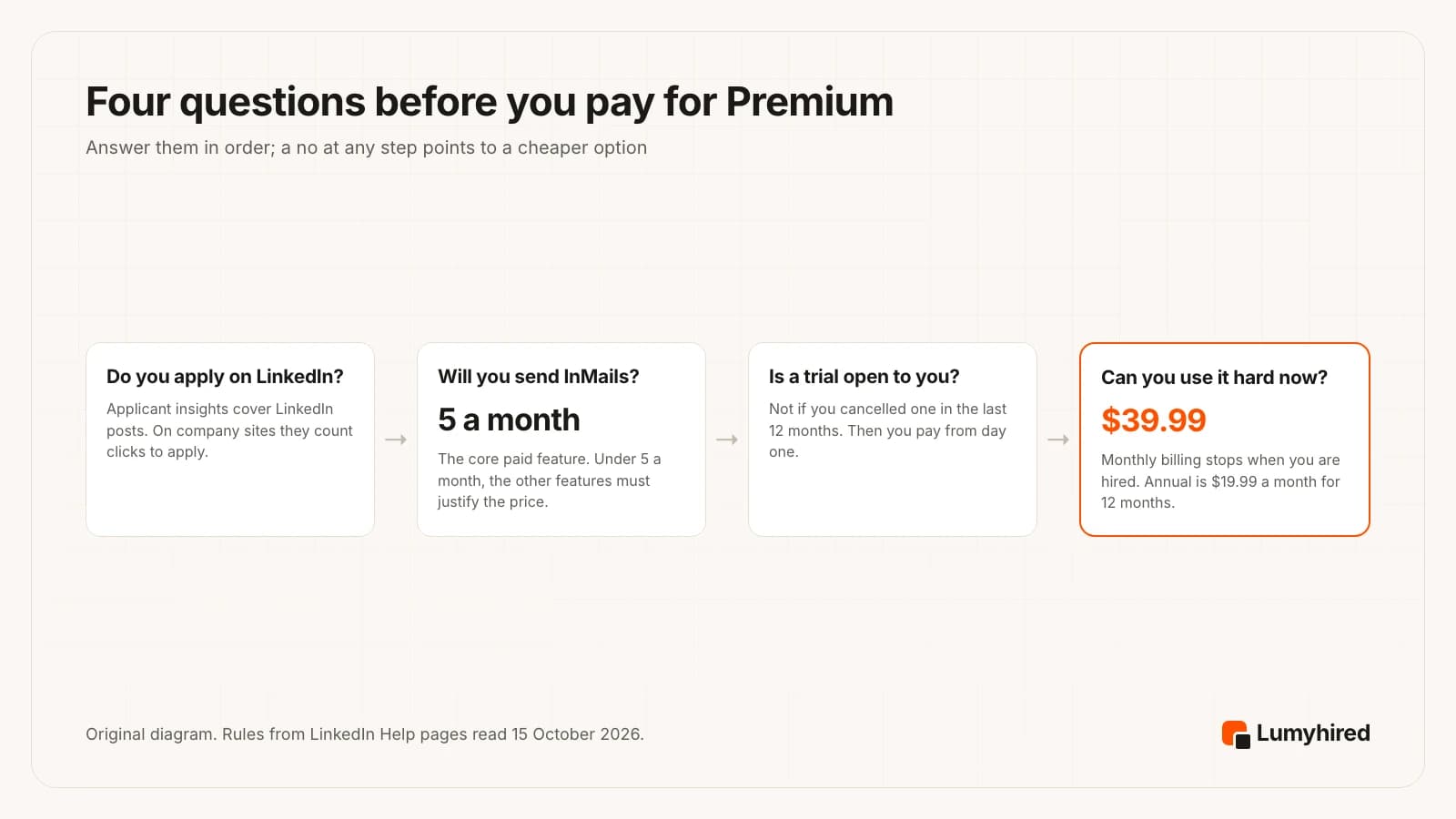
It depends on where your interviews come from. If they come from people (a message, an introduction, a recruiter who found you), Premium pays for its InMail. If they come from applying to posted jobs, most of what you need is free or cheaper elsewhere.
| Your situation | Verdict | Why |
|---|---|---|
| Senior or niche role, hiring managers you need to reach directly | Worth one or two months | InMail is the feature nothing else replaces, and a few replies justify the price. |
| Actively applying, most targets posted on LinkedIn with Easy Apply | Try the trial, use it hard | Applicant insights and Top Choice only work on LinkedIn-hosted jobs, which is where you are. |
| Career changer who wants structured courses | Possibly | LinkedIn sells no standalone Learning plan to individuals; its help page points to Premium Career as the closest option. |
| New graduate applying to many entry-level roles | Usually not | The AI search and the Under 10 applicants filter are free. Spend on targeting first. |
| Applying in France through France Travail, Welcome to the Jungle or company sites | Usually not | Insights on external applications count clicks, and the AI cover letter is English only. |
| Employed, open to offers, applying to nothing yet | No | Without active applications, the profile viewer list is the main paid extra. |
| Used a Premium trial in the last 12 months | Only for InMail | You pay from day one, so the case rests on the messages you will send. |
Whatever you decide, start with what the free account includes. Fill in your profile, turn on job alerts, use the AI search with the Under 10 applicants filter, and send personalised connection requests to the people who would sit in your interview. Then pay for the specific gap you still have. If that gap is the resume itself, our guide to tailoring a resume to a job posting walks through it.
How did we rank the LinkedIn Premium alternatives?
We did not run a controlled outcome test, so no claim here compares interview rates between tools. The order rests on what each vendor publishes, read on 15 October 2026, against five criteria in this order of weight:
- Covers a job-seeker task Premium covers poorly. Finding jobs beyond LinkedIn, tracking applications, researching a company, improving a profile.
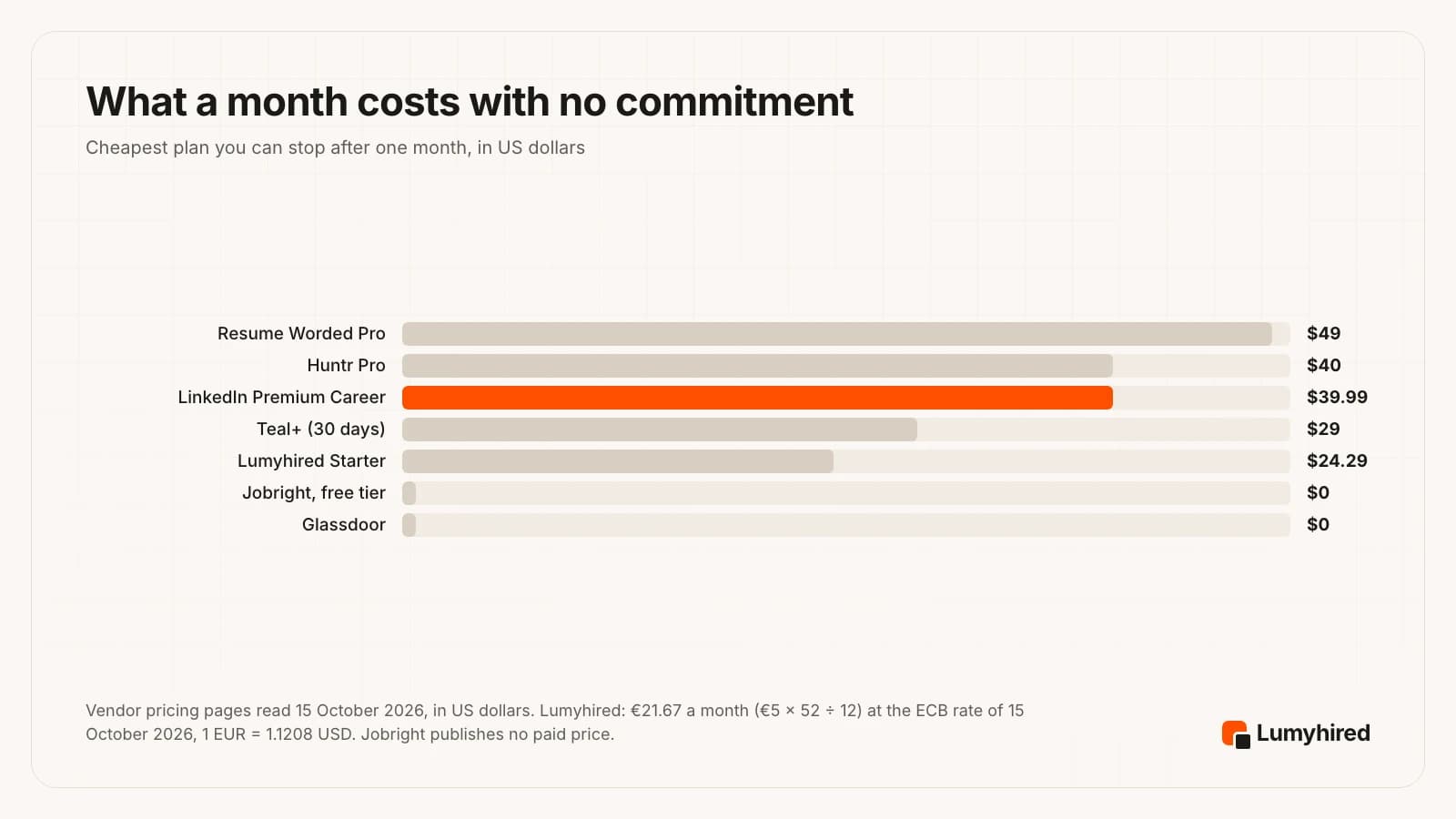
- Cheaper than Premium month to month. A job search should end, so we compare the price you can stop after one month, against Premium Career’s US$39.99 or €29.98.
- Published price. The cost is readable on a public page before you create an account.
- Free allowance stated to the unit. Jobs tracked, reviews, credits.
- Works in the US and in France. For readers applying in English or French.
None of these tools sends a message on LinkedIn, so none replaces InMail. They sit beside a free LinkedIn account. That is also why Lumyhired ranks first despite having no free plan: it covers the most job-seeker tasks that Premium leaves out, at a published price below Premium’s. It is our product, so weigh the criteria and reorder the list if your priorities differ.
What are the best LinkedIn Premium alternatives for job search?
Six alternatives, ranked, most free or cheaper month to month. Each covers part of what a job seeker buys Premium for, or a task Premium leaves out.
| Tool | Covers | Free | Month to month | Does not |
|---|---|---|---|---|
| LinkedIn Premium Career (reference) | n/a | Trial for eligible members, length varies | US$39.99, or €29.98 in euros | Insights stop at LinkedIn-hosted jobs; no tracker |
| Lumyhired | Job discovery, fit score, tracking | Free ATS preview only | ≈ €22 (€5/week) | No messaging, no networking, no free plan |
| Teal | Profile help, tracking, contact list | Unlimited tracking and resumes | $29 per 30 days | No job feed listed, no messaging |
| Jobright | Top applicant jobs, insider contacts | All features, with daily limits | Not published | Mainly US; paid price hidden |
| Glassdoor | Company insights | Yes; full reviews after you contribute | $0 | No outreach, no tracking |
| Huntr | Contact and application tracking | 100 jobs, unlimited contacts | $40 | No messaging; Pro costs more than Premium monthly |
| Resume Worded | Profile writing assistance | LinkedIn profile review | $49 | No job search, no messaging |
1. Lumyhired
Best for: Finding and applying to jobs beyond LinkedIn, in English or French
Covers: The job search side of Premium: finding roles, a fit signal per job, and keeping track of applications.
Price: No free plan. Weekly plans €5 (Starter), €8 (Pro) and €13 (Hunt), about €22 a month on Starter, cancel anytime, 3-day money-back guarantee.
What it does well
- One job feed built from Indeed, LinkedIn and Glassdoor, employer career sites on Greenhouse, Lever, Ashby, Workable and Workday, France Travail and Welcome to the Jungle, among other sources. Premium’s applicant insights cover jobs posted on LinkedIn; for jobs taken on an external site, LinkedIn counts clicks to apply.
- Offers older than 3 days are hidden by default, with a switch to show them, and saved offers stay visible. LinkedIn’s help page says the “Most recent” sort is one of the filters still missing from its AI job search.
- A match score on every offer, and a contract-type filter (permanent, fixed-term, freelance, work-study, internship; internships and work-study are off by default).
- Your master resume is tailored to each offer, with keywords and an ATS-readable layout, then checked. A kanban tracker keeps each application with interview reminders and AI interview preparation.
- At €5 a week, Starter comes to about €22 a month, below Premium Career’s €29.98 a month in euros, and the free ATS preview needs no account.
Worth knowing
- It is not a social network. There is no InMail, no messaging and no profile that recruiters search, so it does not replace networking. Keep your free LinkedIn profile up to date alongside it.
- A young, smaller brand with little third-party review coverage so far.
- No free plan, no browser extension, no mobile app and no auto-apply. It is built for one well-aimed application at a time, so it will not suit a plan to send hundreds a day.
2. Teal
Best for: A free job tracker with a networking contact list and a LinkedIn profile review
Covers: Profile writing assistance, plus the tracking LinkedIn does not offer.
Price: Free forever: unlimited resumes, unlimited job tracking, 10 templates, top 5 keywords per posting, 10 AI bullet credits, 2 summary and 2 cover letter credits. Teal+ $13 every 7 days, $29 every 30 days or $79 every 90 days, no card required to start.
What it does well
- Unlimited job tracking on the free plan, with notes, goals and application statuses for every role you save.
- Its tool list includes a LinkedIn Profile Review, a LinkedIn Summary Generator and a Networking CRM for the people you contact, which covers the profile and follow-up side of a search.
- Teal+ at $29 every 30 days costs less than Premium Career’s monthly rate, and no card is needed to start.
Worth knowing
- Its pricing page lists no job feed of its own. You find jobs elsewhere and save them into Teal.
- It cannot message anyone for you. Outreach to a hiring manager still happens on LinkedIn or by email.
- The 7-day plan is the costliest way to buy Teal+: Teal itself prints $1.85 a day, against $0.87 a day on the 90-day plan.
Source: https://www.tealhq.com/pricing
3. Jobright
Best for: AI job matching and insider connections, for job seekers in the United States
Covers: Top applicant jobs and the “who should I contact” part of Premium.
Price: Free, with daily limits on some features such as resume tailoring. A paid option for unlimited use exists, but no price for it was published on a public page on 15 October 2026.
What it does well
- Matched jobs, application autofill, a tailored resume and recommended insider connections (alumni and hiring managers) in one place, which is the closest feature set to Premium Career’s job tools.
- Its FAQ says all features are free to use, with daily limits on the costlier ones.
- Jobright says it has 3,000,000 users and over 8,000,000 jobs listed, figures it publishes on its own home page.
Worth knowing
- Its FAQ says its primary service is in the United States, so job seekers in France or elsewhere get less out of it.
- The paid price is not published on a public page, so you cannot compare it before signing up.
- Its headline claims (3x interviews, 4x the chance of an interview with insider referrals) are self-published with no method, sample or date.
Source: https://jobright.ai/
4. Glassdoor
Best for: Free company research: employee reviews, salaries and interview reports
Covers: Premium’s company insights (headcount, growth, tenure).
Price: Free for job seekers. Glassdoor states that job seekers never pay.
What it does well
- Glassdoor states that job matching, company reviews, salary information and its anonymous community are free for job seekers.
- Interview reviews tell you what the process at a given company looked like for other candidates, which no Premium insight covers.
- Its job listings draw on Indeed’s, according to its About page, so it doubles as a job board.
Worth knowing
- Its give-to-get policy (updated 7 August 2026) asks you to post a review, salary, benefit or interview report before you get full access to reviews, then grants 12 months of access.
- It has no contact feature.
- Reviews are self-reported by employees and candidates, so read several before you trust a pattern.
Source: https://www.glassdoor.com/about/
5. Huntr
Best for: Tracking applications and the contacts behind them, free for up to 100 jobs
Covers: Nothing in Premium directly; it organises the outreach you do with a free account.
Price: Free plan: 2 job-tailored resumes, 2 application packets, tracking for up to 100 jobs, unlimited contact management, unlimited autofills. Pro $40 a month, $90 every 3 months or $160 every 6 months.
What it does well
- Unlimited contact management on the free plan, so every recruiter or referral you speak to sits next to the job it concerns.
- Tracking for up to 100 jobs and unlimited application autofills cost nothing.
- Pro on the 6-month plan ($160) works out at about $26.67 a month.
Worth knowing
- Pro at $40 billed monthly costs slightly more than Premium Career’s US$39.99.
- Jobs come in through its Chrome job clipper from the sites you already browse, and it cannot message anyone for you.
Source: https://huntr.co/pricing
6. Resume Worded
Best for: Detailed feedback on your LinkedIn profile
Covers: Profile writing assistance.
Price: Free: a review of your LinkedIn profile. Pro $49 a month, $33 a month billed $99 every 3 months, or $19 a month billed $229 a year.
What it does well
- The free tier includes a review of your LinkedIn profile.
- Pro adds keyword analysis of the profile and LinkedIn networking templates, which help the free connection notes you send.
- On the yearly plan, Pro at $19 a month costs slightly less than Premium Career billed yearly ($19.99 a month).
Worth knowing
- Billed monthly, $49 is more than Premium Career’s monthly price.
- No job search and no messaging: it improves the profile, then the outreach is up to you.
- Its pricing page does not state the limits of the free tier.
Source: https://resumeworded.com/get-pro
Which LinkedIn Premium alternative should you pick?
Pick Lumyhired when your interviews will come from applying to posted jobs, on LinkedIn and well beyond it, and you want each application tailored and tracked, in English or French, from €5 a week.
Pick Teal when you mainly need a free place to track every job and every contact, and help writing your LinkedIn profile.
Pick Jobright when you search in the United States and want AI matching and suggested insider contacts at no cost.
Pick Glassdoor when you want to know what a company is like, what it pays and how it interviews, and you are willing to post a review of your own.
Pick Huntr when your search runs on referrals and recruiter conversations and you need them organised, free for up to 100 jobs.
Pick Resume Worded when your LinkedIn profile is the weak point and you want detailed feedback on it, starting with the free review.
Pick LinkedIn Premium Career when you have a short list of people to message this month and no other way to reach them. Take the monthly plan and cancel the day you sign.
Several of these combine well with a free LinkedIn account: free LinkedIn for networking, one tool for applications, and a tracker. Seven trackers are compared, with a free template, in our guide to the best job application tracker.
Frequently asked questions
Is LinkedIn Premium worth it for job seekers?
How much does LinkedIn Premium cost per month in 2026?
Is there a free trial of LinkedIn Premium, and how long is it?
Can I get a refund on LinkedIn Premium?
Is LinkedIn’s AI job search only for Premium members?
Does LinkedIn Premium help you get hired faster?
LinkedIn Premium vs Lumyhired: which should I pay for?
Is there a free alternative to LinkedIn Premium?
Keep LinkedIn for people, use Lumyhired for applications
Lumyhired gathers jobs from Indeed, LinkedIn and Glassdoor, employer career sites on Greenhouse, Lever, Ashby, Workable and Workday, France Travail and Welcome to the Jungle, among other sources, scores each one against your profile, tailors your master resume to it and tracks the application through to the interview. It does not message anyone, so it works alongside your LinkedIn profile. Plans are €5, €8 and €13 a week on the pricing page, with a 3-day money-back guarantee and no free plan. To see first what an applicant tracking system reads from your resume, run the free ATS preview, no account needed, then compare your resume to a specific posting with the ATS resume checker.
Sources
All pages read on 15 October 2026. LinkedIn’s help pages show relative update dates (“4 weeks ago”), which we report as shown. The checkout page that displays a member’s exact Premium price requires signing in, so no checkout price is quoted. LinkedIn’s hiring figures are its own and carry no published method. Jobright publishes no paid price on a public page. The dollar conversion in the price chart uses the ECB euro reference rate of 15 October 2026, 1 EUR = 1.1208 USD.
- LinkedIn, Premium Career page: prices, Duo option, VAT note (“Last updated: April 20, 2026”), and LinkedIn’s own figures (2.7x, January 2022 data; 2x, June 2026; 11x, July 2026; 5.7x, undated), read 15 October 2026
- LinkedIn Help, Difference between free LinkedIn and LinkedIn Premium accounts (free account features, InMail credits per plan, LinkedIn Learning), read 15 October 2026
- LinkedIn Help, LinkedIn Premium free trial, read 15 October 2026
- LinkedIn Help, LinkedIn refund policy, read 15 October 2026
- LinkedIn Help, Cancel LinkedIn Premium subscription, read 15 October 2026
- LinkedIn Help, Premium insights about job applicants, hiring companies, and company strategic priorities, read 15 October 2026
- LinkedIn Help, Top Choice Job on LinkedIn, read 15 October 2026
- LinkedIn Help, Discover new opportunities with AI-powered job search (page marked “Last updated: 4 weeks ago” when read on 15 October 2026)
- LinkedIn Help, Cover letter assistance, read 15 October 2026
- Teal, pricing page, read in a browser 15 October 2026
- Jobright, home page and FAQ (user and job counts are Jobright’s own), read 15 October 2026
- Glassdoor, About page, read 15 October 2026
- Glassdoor Help Center, “Give-to-Get” policy, updated 7 August 2026
- Huntr, pricing page, read 15 October 2026
- Resume Worded, Pro page, read 15 October 2026
- European Central Bank, euro foreign exchange reference rate, US dollar, 15 October 2026: 1 EUR = 1.1208 USD (used for the price chart)
Read next
- Job Search Strategies 2026: Which Channels Get Interviews
Interview rates by job board and career page, referral vs cold application, five message templates and a 10-hour weekly plan built from 2026 data.
- How to Get a Job in 2026: A Data-Backed Guide
The 2026 job market in numbers (11.4 weeks median unemployment, 244 applications per job, 108 days to an offer), an 8-step method and a realistic 30-day plan.
- Best Remote Job Search Tools in 2026: 7 Ranked
We counted 240 postings tagged worldwide: 54 name a country, state or timezone. Seven tools ranked against that and against a pool with no geographic limit.
- Best Job Search Tools for Experienced Professionals in 2026
Seven tools ranked on what experience creates: too much history, a search that has to stay quiet, and a hidden job market smaller than the advice claims.