
AI Tools
Jobright review 2026: what it does, what it costs, and 7 alternatives
Jobright is an AI job search copilot for the US market: a match feed, a tailored resume, autofill, an AI agent that can apply for you, and a chat assistant called Orion. This review reads every claim against Jobright’s own pages as they stood on 15 October 2026, including its privacy policy and the price it does not publish, then ranks seven alternatives on criteria stated before the list.
What is the best Jobright alternative in 2026?
Lumyhired ranks first for people who want one resume tailored to each posting, chosen from a feed that hides postings older than 3 days by default, and who prefer to send each application themselves: it has no auto-apply. It costs from €5 a week with no free plan. Pick Simplify for free autofill on US applications, Teal for unlimited free tracking, and Hiring Cafe for a free search outside the US. Jobright itself is a legitimate tool with a free tier. It publishes no job seeker price.
Lumyhired publishes this page and ranks itself first, so weigh the criteria against your own search. Prices read on each vendor’s pages on 15 October 2026. Published 15 October 2026.
What is Jobright, and does it apply to jobs for you?
Jobright is a US job search platform that matches postings to your resume and automates parts of applying, and yes, its AI Agent can submit applications for you once switched on. Its homepage and menus describe the pieces below, and they are worth separating because only some of them are free without limits.
- Job matching. Jobright promises “jobs you’re truly qualified for” with “no fake listings and early alerts”. It says it holds more than 8 million jobs and adds more than 400,000 a day, drawn mainly from the career sites of hundreds of thousands of companies plus the major job platforms. Searching logged out on 15 October 2026, each posting showed a match score slot, an “Early applicant” label, an applicant count such as “Less than 25 applicants”, and an H1B Sponsored tag where it applied.
- Resume AI. A resume tailored to each posting, which Jobright says is ready “in just 6 seconds” and passes ATS checks.
- Orion. A 24/7 AI career copilot that Jobright says helps you “master every interview”.
- Autofill and the extension. You install an autofill extension that fills application forms on what Jobright calls “thousands of ATS platforms”. The last step on its own page is “Submit your application, done!”, which you do yourself. Jobright says the tool has autofilled 10 million applications.
- Insider connections. Suggested alumni and hiring managers to contact, which Jobright says raises your chance of an interview by 4X. No method is given.
- AI Agent. The auto-apply product. Its page describes an agent that matches roles, customises your resume and applies for you, sending the resume, filling the form and tracking each submission. The button reads “Unlock Auto-Apply”.
- A tracker, plus tools for cover letters and interview questions.
Coverage is the first thing to check. Jobright’s FAQ says its primary service is currently within the United States, with search options for H1B visas and remote work, and the location field in its search form offers United States.
On auto-apply, the arithmetic of applying in bulk is set out in the comparison of auto-apply tools, which covers who these products suit and what they cost.
What does Jobright do well, and where does it fall short?
Jobright’s strengths are a free tier that covers the core of the product and listing details that help you pick where to apply. Its weaknesses are a price it does not show, a service that is mainly US, and figures about itself given without a definition.
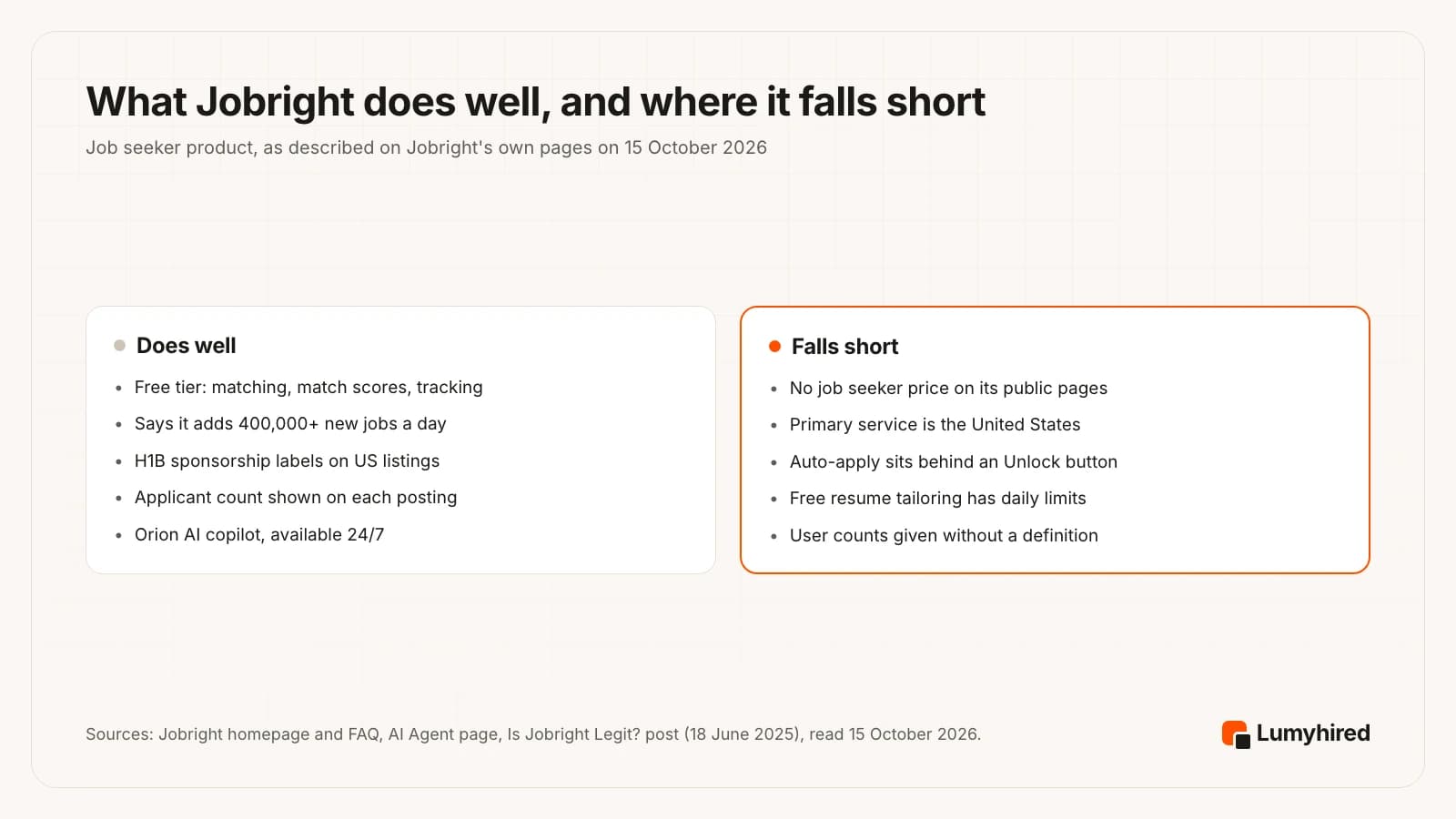
The free tier is real. Jobright’s FAQ says “all features on Jobright.ai are free to use”, then qualifies it: features with higher service costs, resume tailoring among them, have daily usage limits, and a paid option removes them. For a US search, that means you can judge the match feed and the autofill before paying anything.
An applicant count and an early-applicant label tell you whether a posting is new and how crowded it is, and the H1B tag answers the first question a visa holder asks.
Neither user count comes with a definition. Jobright’s homepage says “3,000,000 trusted users”. Its own post of 18 June 2025 said “500,000+ registered users”. Growth over 16 months could explain the gap. The homepage’s “3x interviews landed” and “80% time saved” come with no method, sample or date.
How much does Jobright cost in 2026?
Jobright has a free tier, and its paid plan’s price is not on any public Jobright page we could find on 15 October 2026. jobright.ai/pricing returned a 404, and the “Pricing” link in the site menu goes to the employer product. The price appears only once you sign up.
Two prices circulate, and they come from different places:
- $30 a month, from Jobright itself, in its Is Jobright Legit? post of 18 June 2025. It is the only price Jobright has published that we found.
- $39.99 a month, or $17.99 a week, from RemoteHunt, which says this was the Turbo price when it checked in September 2026 and attributes the numbers to independent reviews it does not name. RemoteHunt sells a competing tool. Its page gives no date for any change, so it does not show the price rose in September 2026; reviews were quoting $39.99 before then.
Refunds are a separate point. RemoteHunt lists Jobright’s refund terms as “Not published, per independent reviews”, and we found none on Jobright’s public pages either.
The safe reading: somewhere between $30 and $39.99 a month, and the number in the app on the day you subscribe is the only one that binds. A weekly plan at $17.99 would cost about $78 over 4.33 weeks, nearly double the monthly rate, so if you do pay, pick the monthly option and note the date you cancel.
Is Jobright legit?
Yes. Jobright is a funded company with a working product, a public privacy policy and a large review footprint. The open questions concern transparency on price and on data.
- Funding. By its own account, $7.7 million: a $4.5 million seed round in mid-2023 led by Lanchi Ventures, and $3.2 million in 2025 led by Translink Capital, with HR Tech Investments, an Indeed affiliate, taking part.
- Trustpilot. A TrustScore of 4.8 from 3,612 reviews on 15 October 2026, with 84% five-star and 1% one-star. Trustpilot notes that Jobright invites its customers to review, the reviews shown carry an “Invited” label, and the company has replied to 98% of negative reviews.
- Privacy. The policy, last updated 15 June 2026, says Jobright has not sold or shared personal information with third parties in the prior 12 months, and that nothing in the notice requires keeping your data more than six months after your account closes.
Two points in the same policy deserve a slower read. AI features run through providers it names as OpenAI, Anthropic, Google Cloud AI and AWS, and “your input, output, and personal information will be shared with and processed by these AI Service Providers”. And the policy now covers an employer product: candidates “may be shown in anonymized or limited form” to employers, while names and direct contact details are shared only when a candidate applies, accepts an invite or enables visibility. Employers must not scrape, resell or redistribute candidate data. The policy does not say whether resumes are used to train models; the only explicit no-training statement covers Gmail data.
What did the r/csMajors post ask about fake postings?
It was one user’s question, with no evidence either way. On 27 September 2026 a user posted “Jobright using fake postings to scrape resumes?” in r/csMajors. The poster noted a company size of 11 to 50 next to more than 50 fresh openings in Canada and more than 80 in the US, and asked whether the listings existed to collect resume data for AI training.
When we read the thread on 15 October 2026 it had 53 points and 6 comments. The most upvoted reply said the Apply button redirects to the real posting at the hiring company. The poster answered that it did appear as an actual listing. Another reply called it suspicious. We found no reply from Jobright in the thread, and no statement on it in a web search on 15 October 2026. Jobright’s published position on listings is on its own homepage: it promises “no fake listings”, and its FAQ says it “continuously screens all new job postings, removing fake listings”. It publishes no method or removal rate.
What you can do with that is the same on any aggregator, Jobright or not: confirm a listing on the employer’s own site before you hand over anything.
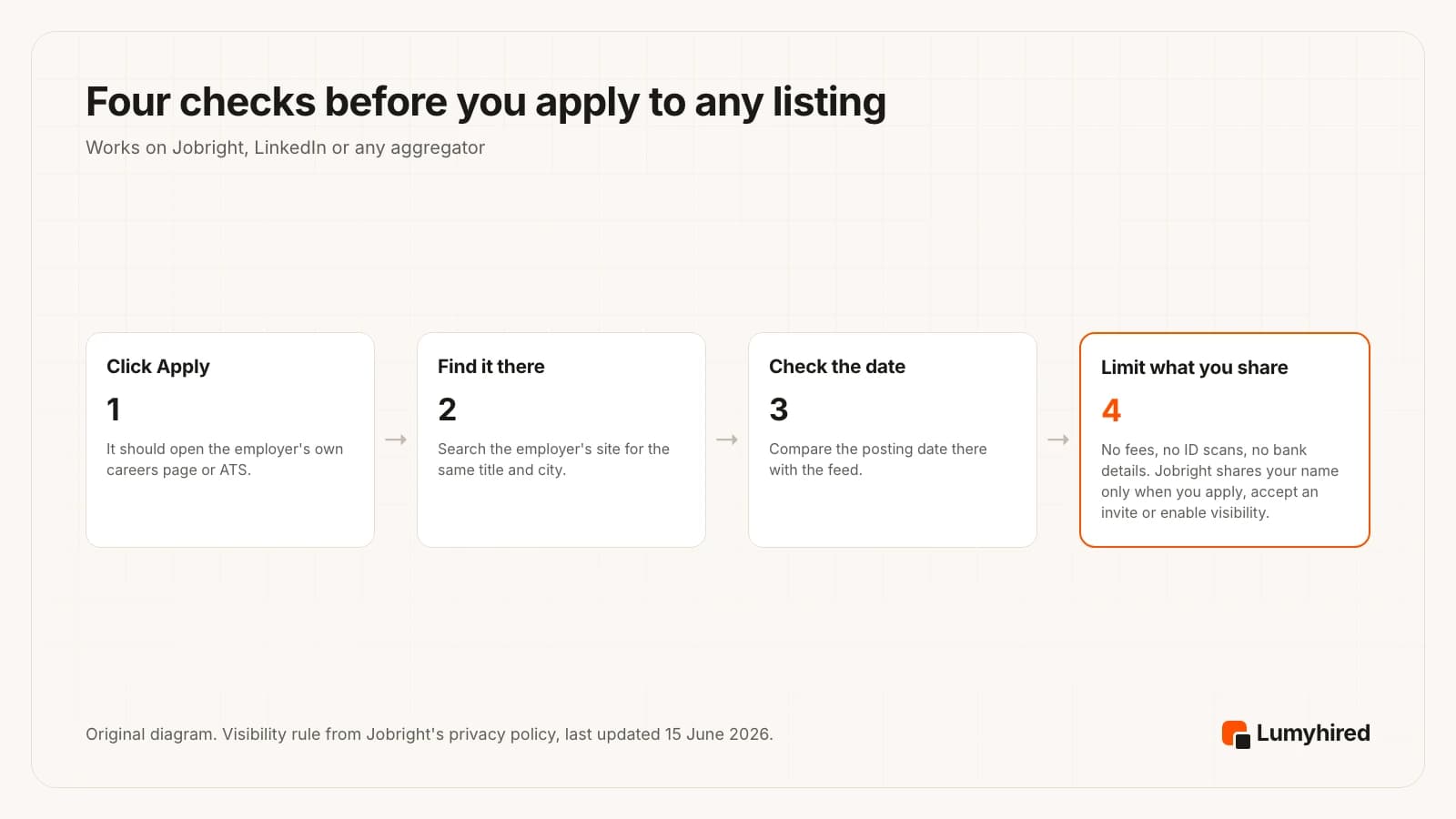
Step two is the quickest test. A real opening exists on the employer’s careers page or ATS under the same title; a listing that exists only on an aggregator is worth skipping whatever the reason.
What Jobright claims, and what we could check
Each claim below is quoted from a Jobright page and set against what a reader could verify on 15 October 2026. None of the three reviews we read on the first page of Google for this search lays them side by side.
| Jobright says | What we found |
|---|---|
| “3,000,000 trusted users” | Its June 2025 post said 500,000+ registered users. No definition of a user in either. |
| “No fake listings” | The FAQ says new postings are screened and fakes removed. No method or removal rate is published. |
| “All features on Jobright.ai are free to use” | Same answer adds daily limits on tailoring and a paid option. Auto-apply sits behind an Unlock button. |
| “3x interviews landed”, “80% time saved” | No method, sample or date given. |
| Premium at “$30/month” (June 2025) | No job seeker price on any public page; jobright.ai/pricing returned 404. |
| “We do not share your personal information with third parties without your consent” | The privacy policy says data is processed by AI providers it names, and limited profiles may be shown to employers. |
| Trustpilot badge on the homepage | 4.8 from 3,612 reviews; reviews are invited by the company. |
How did we rank the Jobright alternatives?
On five criteria, from what each vendor publishes on its own pages, read on 15 October 2026. We did not run a scored test of match quality, so no claim here compares one tool’s matches with another’s.
- Tailoring per posting. Does the resume change for each job, and who controls the change?
- Freshness of the feed. Does the tool help you apply while a posting is new?
- You stay in control of sending. Auto-apply is optional or absent.
- Published price and a stated free allowance. The cost is on a public page before you sign up, and the free plan, if any, is stated in units.
- Coverage outside the US. For readers applying in France, the UK or elsewhere, since Jobright’s service is mainly in the US.
The weighting favours careful applications over volume. If volume is your plan, Simplify’s Autopilot or Jobright’s own agent will suit you better than the top of this list, and you should reorder it. The trade-offs of applying in bulk are covered in how many jobs to apply to.
The 7 best Jobright alternatives in 2026
| Tool | What it does | What it does not | Auto-apply | Free plan | Paid price |
|---|---|---|---|---|---|
| Jobright (reviewed) | US match feed, tailored resume, autofill, Orion copilot, referrals | Publish a job seeker price; its service is mainly US | Yes, AI Agent, behind an Unlock button | Yes, with daily limits on tailoring | Not published; $39.99/mo reported |
| Lumyhired | Fresh multi-source feed, per-job tailoring, ATS check, kanban tracker | Autofill, extension, mobile app, free plan | No | No (free ATS preview only) | €5/week (≈ €21.67/month) |
| Simplify | Autofill extension, tracker, job matches | Tailoring or cover letters on the free plan | Yes, 20 a week on Simplify+ | Yes, autofill and tracker unlimited | $39.99/mo |
| Teal | Resume builder, keyword highlights, tracker | Tailor the resume for you on the free plan | No | Yes, unlimited resumes and tracking | $29 per 30 days |
| Huntr | Tailored resumes, tracker, autofill | Unlimited tailoring on the free plan | No | Yes, 2 tailored resumes, 100 jobs | $40/mo |
| Hiring Cafe | Search across career pages, detailed filters, tracker | Resume tailoring | No | Yes | No paid plan found |
| LinkedIn job search | Job search, Easy Apply, recruiter network | Show Premium's price before sign-in | No | Yes | Premium: after sign-in |
| Careerflow | LinkedIn optimizer, tracker, autofill, resume tools | Keep free tracker and autofill unlimited (marked to be limited) | No | Yes, Basic | $23.99/mo |
1. Lumyhired
Best for: A resume tailored to each posting, picked from a feed that hides postings older than 3 days by default
Price: No free plan. Weekly plans €5 (Starter), €8 (Pro) and €13 (Hunt), cancel anytime, 3-day money-back guarantee.
What it does well
- You upload one master resume and it is tailored to each posting you pick: the keywords that posting uses, in a layout an ATS parser can read.
- One feed aggregated from Indeed, LinkedIn and Glassdoor, from employer career sites hosted on Greenhouse, Lever, Ashby, Workable and Workday, and from France Travail and Welcome to the Jungle, among other sources.
- Postings older than 3 days are hidden by default. A toggle shows them again, and anything you saved stays visible.
- Every posting carries a match score, and a contract-type filter covers permanent, fixed-term, freelance, apprenticeship and internship roles, with internships and apprenticeships off by default.
- No auto-apply. Each application is one you send yourself, then track on a kanban board with interview reminders and AI interview preparation.
Worth knowing
- A newer and smaller brand than Jobright, with far less third-party review coverage to read before you decide.
- No free plan, no browser extension and no mobile app, so there is no form autofill. The free tool is the ATS preview, which shows what a parser extracts from your resume.
- Built for a smaller number of applications aimed with care. If you want hundreds a day, it will feel slow.
2. Simplify
Best for: Free autofill and tracking on US applications
Price: Free: autofill, application tracker, job matches and a basic resume builder. Simplify+ $19.99 for 1 week, $39.99 for 1 month or $89.99 for 3 months, same features on every plan.
What it does well
- Simplify says autofill, the tracker, job matches and the basic resume builder are features it commits to keeping free, with no limit on the number of applications you submit with Copilot.
- It says its users have submitted more than 200 million applications with Copilot, the largest usage figure any tool in this list publishes.
- Every application you submit through the extension is saved to your dashboard without a spreadsheet.
- At $39.99 a month, Simplify+ costs the same as the Jobright Turbo price third parties report, and Simplify prints its price on a public help page.
Worth knowing
- Resume tailoring, AI cover letters and answers to application questions are listed under Simplify+.
- Simplify+ includes Autopilot, 20 auto-applies a week. If you came to this page to get away from auto-apply, leave it off.
- Simplify+ prices sit on a help centre page; the main site has no pricing link, so they are easy to miss.
3. Teal
Best for: Unlimited free tracking and resume versions
Price: Free Forever: unlimited resumes, unlimited job tracking, 10 templates, the top 5 keywords per posting, 10 AI bullet credits, 2 summary and 2 cover letter credits. Teal+ $13 every 7 days, $29 every 30 days or $79 every 90 days, no credit card required to start.
What it does well
- Unlimited resumes and unlimited job tracking on the free plan.
- Attach a posting and Teal highlights its keywords beside your resume. You make each edit, so nothing lands on the page you did not choose.
- Teal+ starts with no credit card, and $79 every 90 days works out to the lowest per-week price for Teal+.
Worth knowing
- Free keyword matching stops at the top 5 keywords and the free AI credits run out after a few applications.
- Paying $13 every 7 days is the dearest way to buy the same Teal+ features.
4. Huntr
Best for: Tailored resumes and a tracker in one free account
Price: Free: unlimited base resumes, 2 job-tailored resumes, 2 application packets, tracking for up to 100 jobs, unlimited autofills. Pro $40 a month, $90 every 3 months or $160 every 6 months.
What it does well
- The free plan includes unlimited application autofills and tracking for up to 100 jobs.
- Two job-tailored resumes free, enough to judge the output before you pay.
- On the 6-month plan Huntr lists $26.66 a month, a third less than the monthly rate.
Worth knowing
- Two tailored resumes is the free ceiling; unlimited tailoring is Pro.
- At $40 a month, Pro costs slightly more than the Jobright Turbo price third parties report.
5. Hiring Cafe
Best for: A free search across employer career pages, inside and outside the US
Price: Free to search. We found no paid job seeker plan on its site on 15 October 2026.
What it does well
- Hiring Cafe says it has over 5 million open jobs and describes its AI tools as free.
- Filters go well past title and location: date posted, apply process, salary, benefits, company stage and funding, company size, security clearance and more.
- It is not limited to the US. Opened from France on 15 October 2026, it listed 138,110 jobs at 6,649 companies for that country, with French-language postings.
- A tracker and saved jobs are built in.
Worth knowing
- We did not see resume tailoring or a cover letter tool among its features, so the writing stays with you.
- Free for job seekers; per its own pages read on 15 October 2026, employers pay for its Talent Network and some listings are sponsored.
6. LinkedIn job search
Best for: Applying where recruiters already search, at no cost
Price: Job search and Easy Apply are free. Premium Career price shown only after sign-in; free trial for eligible members, may be refundable within 7 days of a charge if Premium features were not used.
What it does well
- The job search itself, with Easy Apply where the employer enables it, costs nothing.
- Your profile sits in the network recruiters search, next to the jobs you apply to.
- Premium Career adds AI-powered insights on job posts, Top Applicant jobs, 5 InMail messages a month and who viewed your profile.
Worth knowing
- Premium Career's price is not on the public compare-plans page, so you see it only once signed in.
- One network's listings only. With Easy Apply, sending the same untailored resume to many postings takes a few clicks.
7. Careerflow
Best for: LinkedIn profile optimisation with a tracker and autofill beside it
Price: Basic free: 1 resume, basic LinkedIn optimizer, Chrome extension, job tracker and autofill marked as soon to be limited. Premium $8.99 a week, $23.99 a month, $54.99 a quarter or $172.99 a year. Premium Plus $19.99 a week, $44.99 a month, $119.99 a quarter or $299.99 a year.
What it does well
- The LinkedIn optimizer is built in, basic on the free plan and advanced on Premium.
- Premium at $23.99 a month is the lowest monthly rate among the paid plans here, just under Lumyhired Starter at $24.28 once converted.
- Premium Plus adds an AI mock interview and interview analysis.
Worth knowing
- On the free plan, the tracker, networking tracker and autofill are marked as features that will be limited soon.
- We found no refund terms on the pricing page.
How do the alternatives compare on price?
Converted to dollars, one month on a paid tier runs from $23.99 to $40, and two tools cost nothing. Jobright’s reported $39.99 sits at the top of that range, level with Simplify+ and one cent under Huntr Pro.
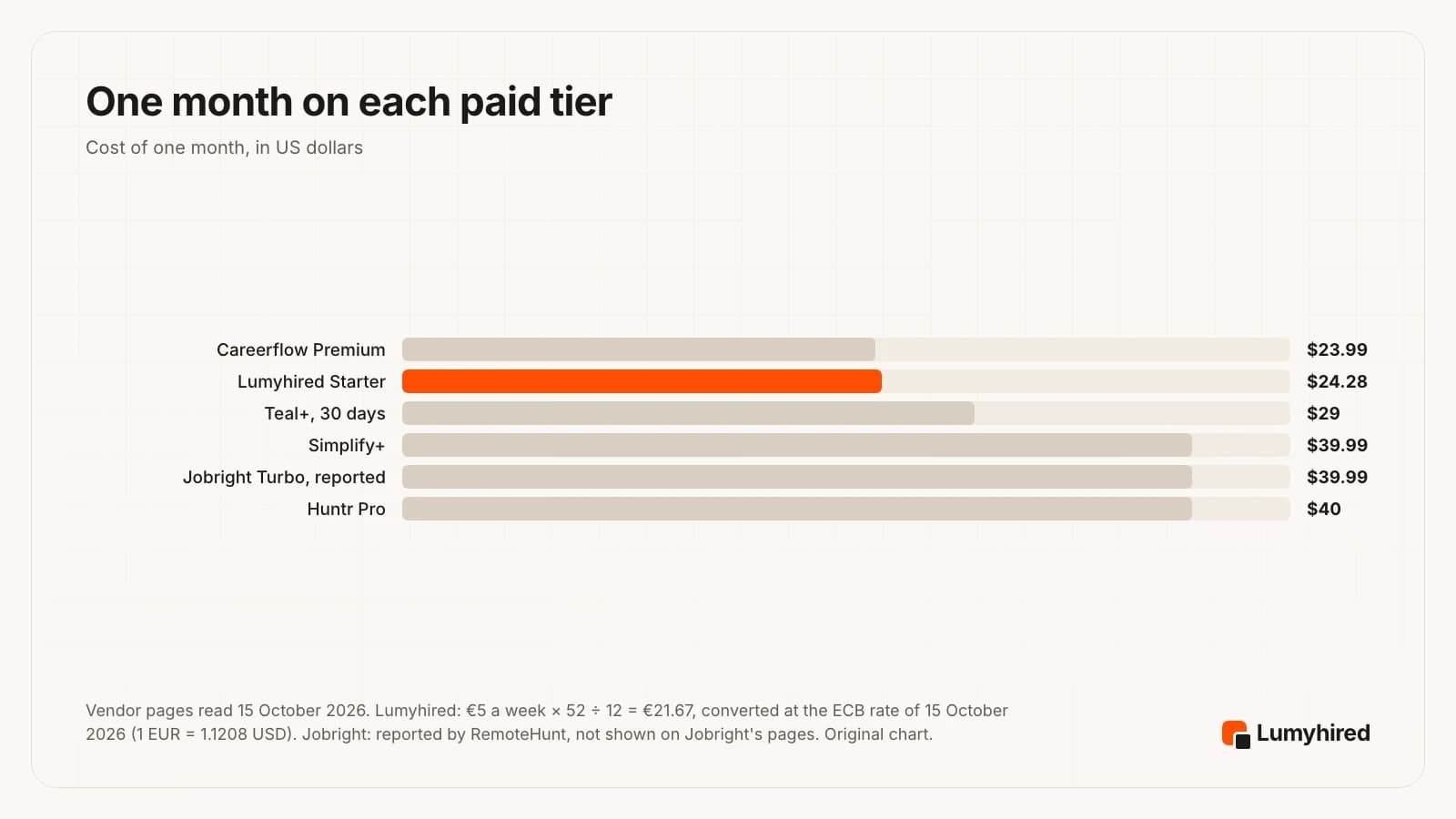
Longer commitments change the order. Teal+ at $79 for 90 days, Huntr Pro at $160 for 6 months (Huntr lists $26.66 a month) and Careerflow Premium at $172.99 a year (Careerflow lists $14.41 a month) all undercut their own monthly rates. Simplify+ at $89.99 for 3 months is about $30 a month. Weekly billing runs the other way: Simplify+ at $19.99 a week and Teal+ at $13 every 7 days both cost far more over a month than their monthly plans. Hiring Cafe and LinkedIn’s job search are free, and LinkedIn Premium Career’s price appears only after sign-in, so neither is in the chart.
Which Jobright alternative should you pick?
Pick Lumyhired when you want each resume tailored to the posting, a feed that hides anything older than 3 days by default, and no auto-apply, from €5 a week with no free plan.
Pick Simplify when you apply in the US and want free, unlimited autofill and tracking, with Simplify+ at $39.99 a month if you later want tailoring.
Pick Teal when your main need is keeping track of many applications and resume versions at no cost.
Pick Huntr when you want a couple of tailored resumes and a 100-job tracker free, then unlimited tailoring on the 6-month plan, where Huntr lists $26.66 a month.
Pick Hiring Cafe when you search outside the US, in France for example, or want detailed filters across employer career pages, for free.
Pick LinkedIn job search when recruiters in your field hire through LinkedIn and you want Easy Apply at no cost.
Pick Careerflow when your LinkedIn profile needs work alongside your applications, from $23.99 a month.
Stay on Jobright when you search in the US, the free tier’s daily limits do not bother you, and the H1B and applicant-count labels are what you use most.
Whichever you pick, the method for adapting a resume to one posting without inventing anything is in how to tailor your resume to a job, and the wider field of search tools is compared in the best AI tools to find a job.
Frequently asked questions
Is Jobright legit?
Is Jobright worth paying for?
How much does Jobright Turbo cost in 2026?
Does Jobright auto-apply to jobs?
Does Jobright work outside the US?
Jobright vs Lumyhired: which should I use?
Is there a free Jobright alternative?
Does Jobright use my resume to train AI?
Try a fresher feed with a resume written for each job
Lumyhired gathers postings from Indeed, LinkedIn and Glassdoor, employer career sites on Greenhouse, Lever, Ashby, Workable and Workday, France Travail and Welcome to the Jungle, among other sources, hides the ones older than 3 days by default, scores each against your resume, and tailors your master resume to the one you choose. You send the application, then track it on a kanban board with interview reminders and preparation. Before paying, the free ATS preview shows what a parser reads in your current resume, with no account. Plans are €5, €8 or €13 a week on the pricing page, cancel anytime, with a 3-day money-back guarantee and no free plan.
Sources
Every vendor page was read on 15 October 2026. Jobright’s job seeker price could not be verified on any Jobright page that day; the figure quoted comes from a competitor and is marked as such. The Reddit thread is cited as one user’s question. We could not open the Chrome Web Store listing for Jobright’s extension, so no install count or rating for it is quoted.
- Jobright, homepage, FAQ and logged-out job search, read 15 October 2026 (user, job and result figures are Jobright's own)
- Jobright, AI Agent page, read 15 October 2026
- Jobright, Job Autofill page, read 15 October 2026
- Jobright, Is Jobright Legit?, company blog, 18 June 2025 (Jobright's own account of its funding, users and price)
- Jobright, Privacy Policy, last updated 15 June 2026
- Trustpilot, Jobright reviews, read 15 October 2026 (3,612 reviews; the company invites customers to review)
- RemoteHunt, RemoteHunt vs Jobright, updated 27 September 2026 (RemoteHunt sells a competing job search tool; its Jobright price is attributed to unnamed reviews)
- r/csMajors, “Jobright using fake postings to scrape resumes?”, 27 September 2026 (a user's question, read with its replies on 15 October 2026)
- Simplify, Copilot page, read 15 October 2026
- Simplify, What's included in Simplify+, help centre, read 15 October 2026
- Teal, pricing page, read in a browser 15 October 2026
- Huntr, pricing page, read 15 October 2026
- Hiring Cafe, homepage, read 15 October 2026 (job counts are Hiring Cafe's own)
- LinkedIn, Premium Career compare plans page, read 15 October 2026
- Careerflow, Premium plans page, read 15 October 2026
- European Central Bank, euro reference rate for the US dollar, 15 October 2026 (1 EUR = 1.1208 USD)
Read next
- Best Auto Apply Tools in 2026
Seven auto apply tools compared on their own terms, with what Greenhouse measured about what mass applying actually buys now that so many candidates do it.
- Best AI for Resume Tailoring in 2026
Nine tailoring tools ranked on six criteria, from reading the full posting to keeping your facts, with prices read 18 September 2026 and a prompt that audits itself.
- How to Tailor Your Resume to a Job Description
A 15-minute method with three before and after bullets, an AI prompt that forbids invented facts, and Huntr's data: tailored resumes got interviews at 4.23% vs 2.07% in Q1 2026.
- How Many Jobs Should You Apply To?
The math behind the number: 0.5% of applications become offers, tailoring roughly doubles interview rates, and a weekly plan for each situation.