
AI Tools
Job application tracker: a template, the numbers to watch, and the apps worth using in 2026
A tracker earns its keep when it answers two questions: where your replies come from, and which resume gets interviews. This page gives you a ten-column template to paste into Google Sheets or Excel, the formulas that answer both questions, stage definitions, a weekly review, and a comparison of seven trackers with prices read on 17 September 2026.
Published 10 August 2026, updated 17 September 2026. Lumyhired publishes this page.
What is the best job application tracker in 2026?
Our pick is Lumyhired, because it keeps the whole loop in one place. It finds postings across 10 job boards, tailors your resume to each one, and tracks every job on a five-stage board (saved, applied, interview, offer, rejected) where each card carries the resume tailored for that posting. Plans start at €5 a week with a 3-day money-back guarantee. If you want to spend nothing, a ten-column spreadsheet or a free app tier comes next: on 17 September 2026 Teal's free plan included unlimited job tracking, Huntr's free plan tracked up to 100 jobs, and Simplify and Jobright both presented their trackers as free.
Whichever you use, record source and resume version. Huntr's 2025 data showed response rates of 11.3% through Google Jobs against 3.1% through LinkedIn, and its Q1 2026 data showed 4.23% of tailored applications reaching an interview against 2.07% untailored. Your own tracker is the only place those rates can be measured for your search.
Vendor pricing pages read 17 September 2026. The comparison is built from each vendor's public pages; no tool was used hands-on for it.
What to track in a job application tracker, and why
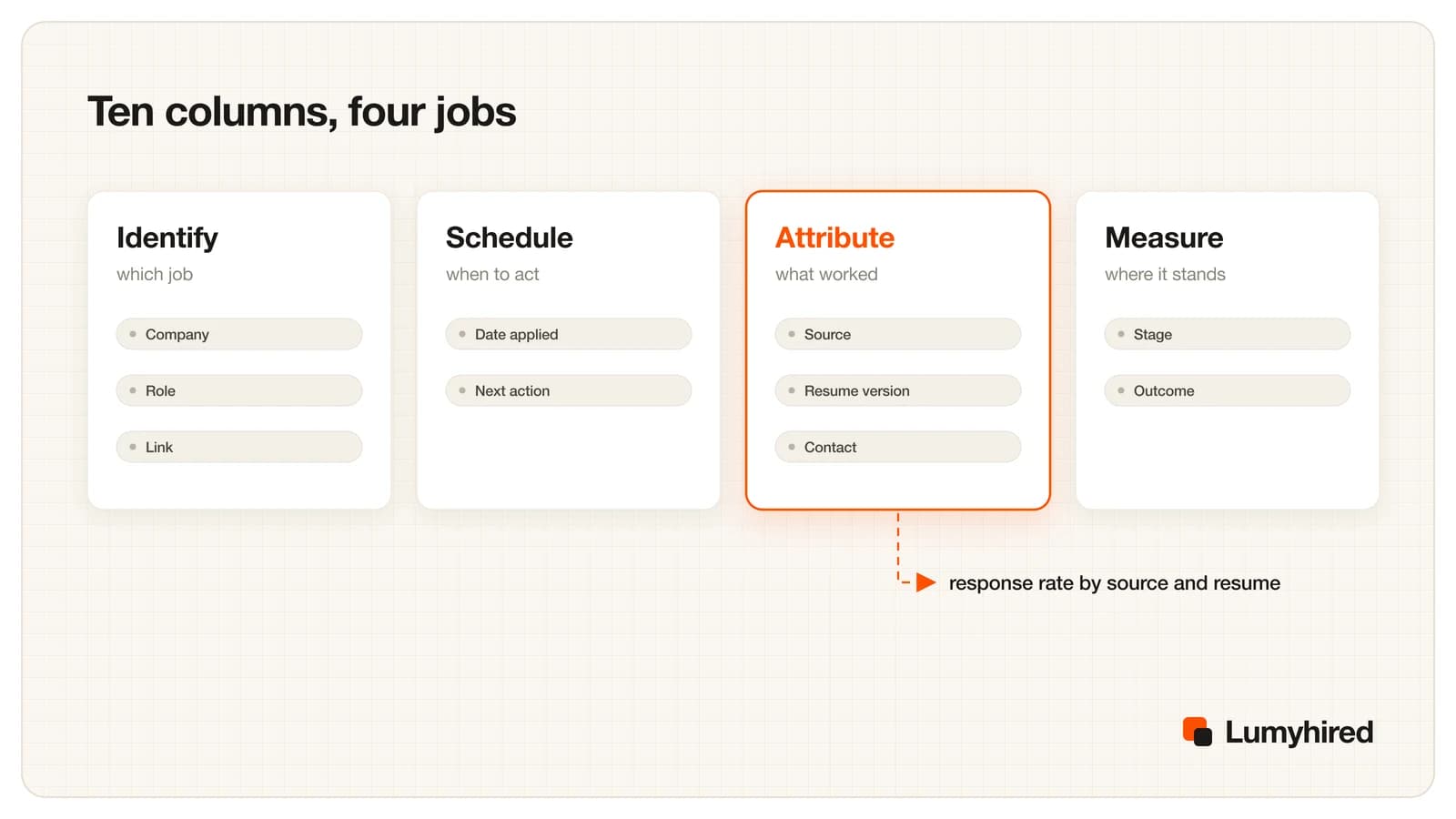
Most templates stop at company, role, date and status. That stops duplicate applications and tells you little else. Ten columns cover four jobs: identify the application, schedule the next step, attribute the result to a source and a resume, and measure where it ended.
| Column | Why it earns its place |
|---|---|
| A. Company | Stops you applying twice and lets you group roles at one employer. |
| B. Role | The exact title from the posting, so you can search your own list later. |
| C. Link | Postings get taken down. Save a copy of the description too if you can. |
| D. Date applied | Everything time-based (follow-ups, no reply) is counted from this date. |
| E. Source | Where you found and sent it. This is the column behind response rate per source. |
| F. Resume version | Which file you sent. This is the column behind interview rate per resume. |
| G. Contact / referral | Referred applications behave very differently, so they need to be visible. |
| H. Stage | The furthest stage reached. It never moves backwards. |
| I. Next action date | The day you do something next: follow up, prepare, or close it. |
| J. Outcome | Open, Offer accepted, Offer declined, Rejected, Withdrawn or No reply. |
Keep Stage and Outcome in separate columns. Stage records the furthest point an application reached and never goes backwards; Outcome records how it ended. If a rejection after a phone screen overwrites the stage with "Rejected", you lose the fact that this source and this resume got you a screen, which is exactly what the formulas below count.
Job application tracker template for Google Sheets or Excel
Select the table below from the first header to the last cell and paste it into cell A1 of an empty sheet: the columns land in A to J. The three rows are invented examples; delete them once you have your own. If the paste merges everything into one cell, copy the tab-separated header line under the table instead.
| Company | Role | Link | Date applied | Source | Resume version | Contact / referral | Stage | Next action date | Outcome |
|---|---|---|---|---|---|---|---|---|---|
| Acme Freight | Data Analyst | (posting URL) | 2026-09-01 | analyst-v2 | Applied | 2026-09-08 | Open | ||
| Northfield Health | Reporting Analyst | (posting URL) | 2026-09-02 | Careers page | analyst-v3 | Screen | 2026-09-10 | Open | |
| Blue Harbor Bank | BI Analyst | (posting URL) | 2026-09-03 | Referral | analyst-v3 | Sam (former manager) | Interviewing | 2026-09-12 | Open |
Template by Lumyhired. Company names and dates in the rows are invented examples.
Company Role Link Date applied Source Resume version Contact / referral Stage Next action date OutcomeThree settings to add once
- Freeze row 1 so the headers stay visible (View, then Freeze in Google Sheets, or Freeze Panes in Excel).
- Add drop-down lists with data validation. Stage: Saved, Applied, Screen, Interviewing, Offer. Outcome: Open, Offer accepted, Offer declined, Rejected, Withdrawn, No reply. Source: your own short list, such as LinkedIn, Indeed, Careers page, Referral, Recruiter.
- Keep the source list short. "LinkedIn" and "Linkedin jobs" count as two sources to a formula.
Formulas, written out
These use COUNTIFS, which works the same way in Google Sheets and in Excel. Put your summary block in columns L and M, to the right of the data.
Response rate for one source
Type the source name (for example LinkedIn) in L2, then in M2:
=IFERROR((COUNTIFS(E:E,L2,H:H,"Screen")+COUNTIFS(E:E,L2,H:H,"Interviewing")+COUNTIFS(E:E,L2,H:H,"Offer"))/COUNTIFS(E:E,L2,H:H,"<>Saved",H:H,"<>"),"")Counts every application from that source that reached a screen or later, divided by every application from that source you actually sent. Format M2 as a percentage and copy it down next to each source you list in column L.
Interview rate for one resume version
Type the version name (for example analyst-v3) in L10, then in M10:
=IFERROR((COUNTIFS(F:F,L10,H:H,"Interviewing")+COUNTIFS(F:F,L10,H:H,"Offer"))/COUNTIFS(F:F,L10,H:H,"<>Saved",H:H,"<>"),"")Same logic one step further down the funnel. Compare two versions only once each has gone out 15 or 20 times, or one lucky reply will decide it for you.
Follow-ups that are overdue
In any empty cell:
=COUNTIFS(I:I,"<"&TODAY(),J:J,"Open")The number of open applications whose next action date has passed. For a visual version, add a conditional formatting rule on A2:J with the custom formula =AND($I2<>"",$I2<TODAY(),$J2="Open") and a fill color.
The two numbers that make tracking worth the effort
Response rate per source is applications that reached a screen or later, divided by applications sent, for each place you apply. Sources differ a lot. Huntr's 2025 annual report, built on 1.78 million applications from more than 57,000 people using its tracker, recorded response rates of 11.3% through Google Jobs, 4.5% through Indeed and 3.1% through LinkedIn. Referrals sit in another category: Gem's 2026 benchmarks, drawn from more than 165 million applications, found referred candidates converting to hire at 11 times the rate of inbound applicants, and Ashby's benchmarks show 52% of referrals passing the first screen against 35% overall.
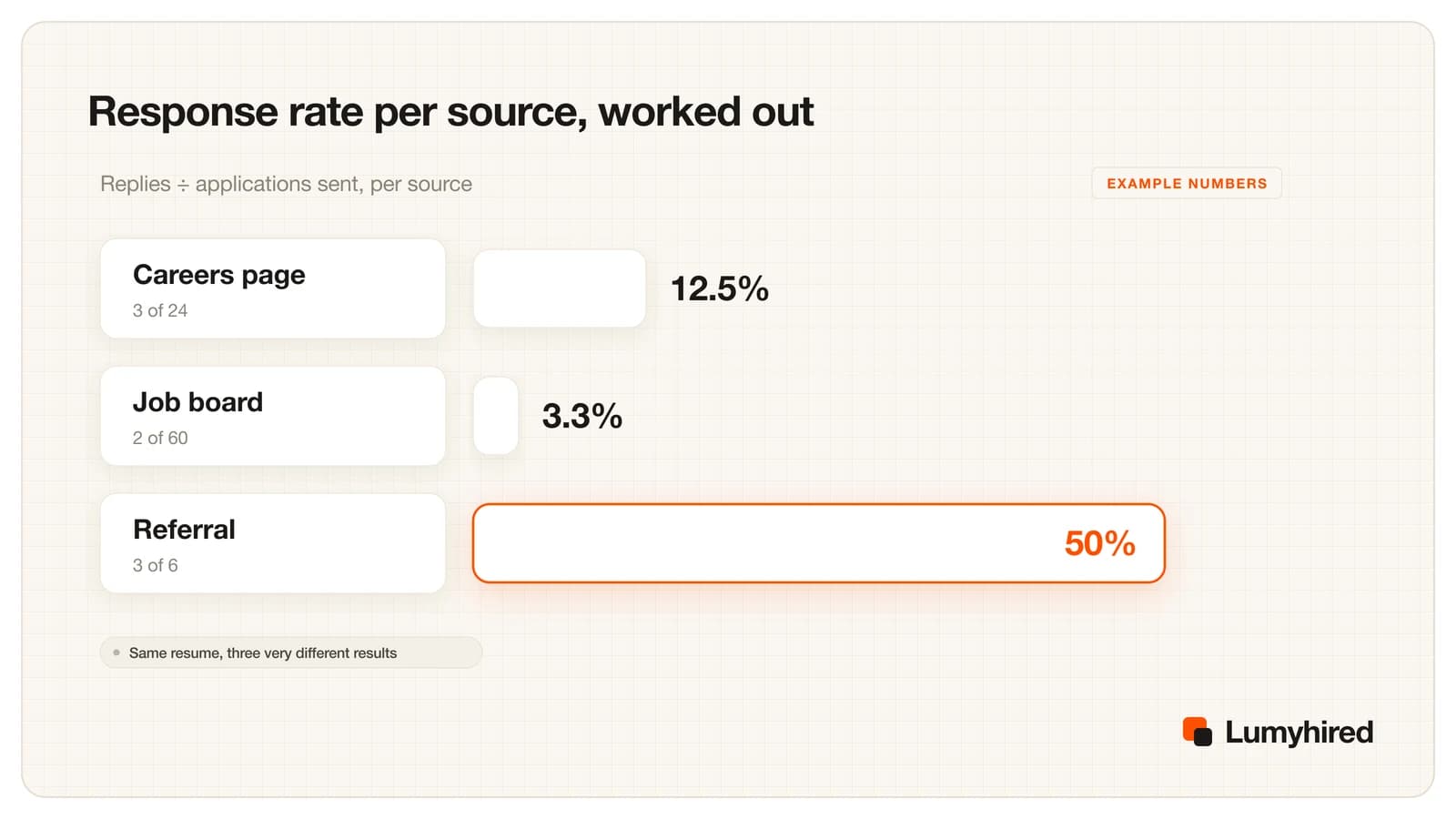
In the example above the job board produced the most applications and the fewest replies. Without a Source column that looks like bad luck; with one, it is a reason to move some of next week's effort to careers pages and to asking for referrals.
Interview rate per resume version is the same calculation on the Resume version column, counting applications that reached Interviewing or Offer. Huntr's Q1 2026 data, from 139,927 applications by 25,635 job seekers, put the interview rate at 4.23% with a tailored resume and 2.07% without. If your own numbers show no gap, the tailoring is probably too light; the method in tailoring a resume to a job description in 15 minutes shows what a real rewrite changes.
Two cautions. All of the figures above come from companies that sell hiring or job search software, and Huntr's users chose to use a tracker, which is not a random sample. And small numbers mislead: 1 reply from 4 applications is 25% and means almost nothing. Wait for 15 to 20 applications per source or per version before acting on a difference. To turn your own rates into a weekly volume, use the funnel math in how many jobs to apply to.
Job application stages, defined
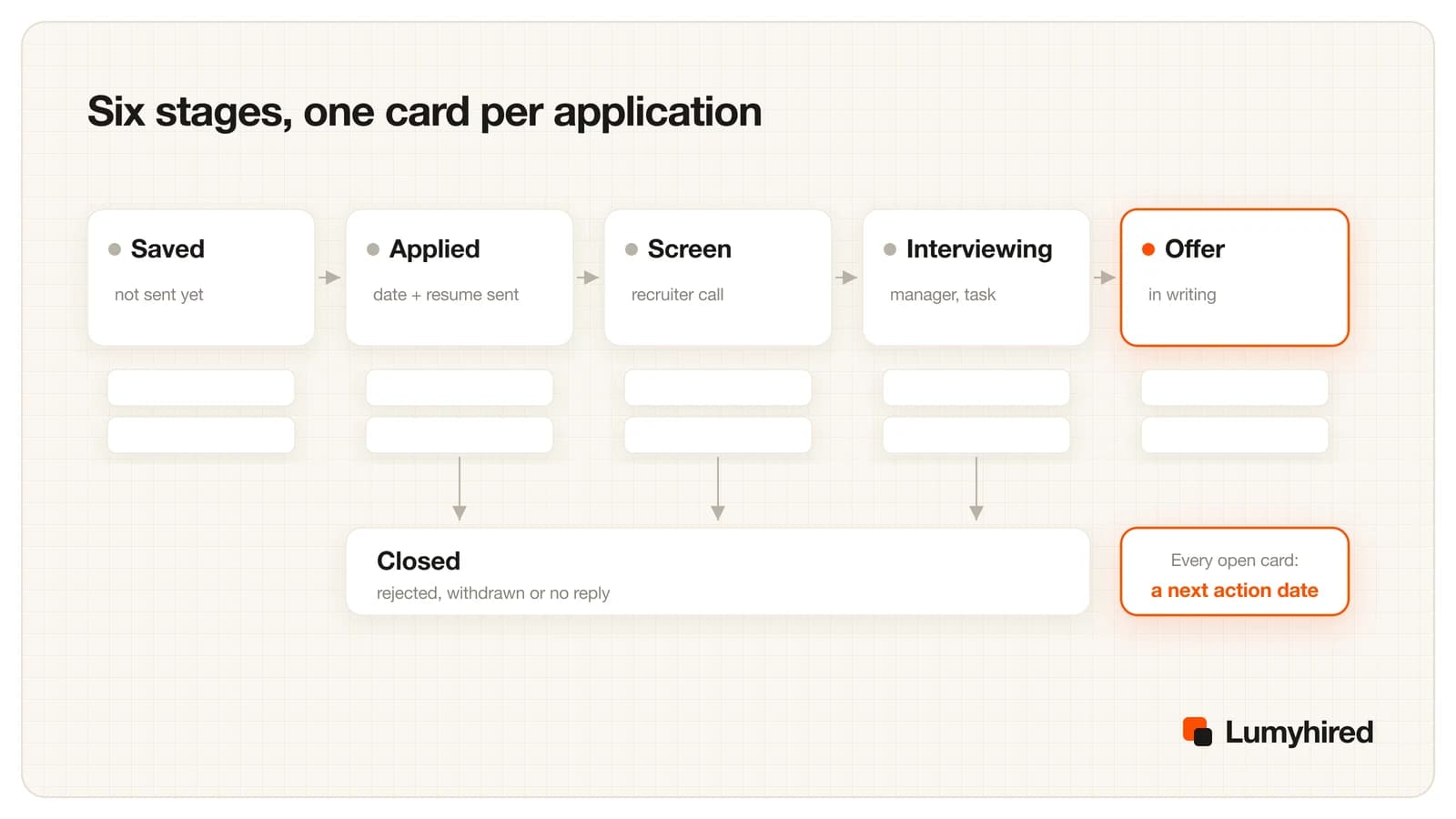
Stages only produce useful numbers if a row means the same thing every week. These are the definitions the formulas assume.
- Saved
- You found the posting and intend to apply. Nothing has been sent. Move to Applied the day you submit. Close as Withdrawn if you decide against it.
- Applied
- The application is submitted. Date applied, source and resume version are filled in. Moves to Screen when a person contacts you. Set the next action date 7 days out for a follow-up.
- Screen
- A recruiter or coordinator replied with a call, a questionnaire or an assessment. Moves to Interviewing when you are booked with the hiring manager or a panel.
- Interviewing
- At least one interview with the team that is hiring. Moves to Offer only when an offer exists in writing.
- Offer
- A written offer. Record the deadline as the next action date. Close with Offer accepted or Offer declined in the Outcome column.
- Closed (the Outcome column)
- Rejected, Withdrawn, No reply, Offer accepted or Offer declined. The Stage column keeps the furthest point reached. Our rule for No reply: one follow-up 7 days after applying, then close at 21 days of silence. Ashby's 2026 benchmarks put the time before a candidate is archived at about 6 days without an interview and about 21 days after one, so a reply after three weeks is rare.
Silence after an interview is common enough to plan for. In Greenhouse's 2025 survey of 2,200 people in the US, UK and Ireland, 63% said they had been left without news after an interview. A next action date on every open row is what turns that silence into a scheduled follow-up.
How to track job applications: a 20-minute weekly review
Log each application the moment you send it; that takes under a minute a row. Then block 20 minutes once a week, on the same day, for this sequence.
- Clear overdue actions (5 minutes). Filter on next action date before today and Outcome Open. Send the follow-ups, then set a new date on each row or close it.
- Close the silent ones (2 minutes). Anything applied 21 or more days ago with no reply gets Outcome No reply.
- Read the two rates (5 minutes). Check response rate per source and interview rate per resume version. Note any source with 20 or more applications and zero screens.
- Decide one change (3 minutes). One only: drop a source, shift applications toward the best one, or retire a resume version that trails the other after 20 sends.
- Plan next week (5 minutes). Add the postings you intend to send as Saved rows, with the source and resume version chosen before you apply.
If the review shows applications going out and no screens coming back from any source, the problem sits upstream of the tracker. The symptom-by-symptom check in why you are not getting interviews helps you tell a resume problem from a targeting problem, and the wider plan is laid out in how to get a job in 2026.
Best job tracker apps in 2026, compared on features and price
Ranked on four criteria, in this order: how much of the job search loop the tracker covers in one place (finding jobs, tailoring the resume, tracking the application with that resume attached), whether you can record source and resume version to calculate the two rates above, how much retyping it saves, and what it costs to track a whole search, free tier included. Every price and limit comes from the vendor's own page, read on 17 September 2026. We did not run the tools hands-on for this article.
| Tracker | Free tier for tracking | Paid plans | How jobs get in | Page read |
|---|---|---|---|---|
| Lumyhired | No free plan | Starter €5, Pro €8, Hunt €13 a week, cancel anytime, 3-day money-back guarantee | Jobs come in from its search across 10 boards. Each card holds a job and the resume tailored for it. Stages: saved, applied, interview, offer, rejected. | lumyhired.com/pricing |
| Google Sheets or Excel (this template) | Google Sheets is free with a Google account. No row limit a job search will reach. | None needed | You type each row. Every column, including source and resume version, is yours to define. | n/a |
| Teal | Unlimited job tracking, 10 AI resume bullet credits, 2 summaries, 2 cover letters, no credit card to start | Teal+ $13 every 7 days, $29 every 30 days, $79 every 90 days | Bookmark jobs, take notes and track statuses. Stores multiple resume versions in the same account. | tealhq.com/pricing |
| Simplify | Job tracker stated as free, with the autofill extension and job matches, which Simplify says it commits to keeping free | No public pricing page found for Simplify+ (simplify.jobs/pricing returned 404) | Saves applications you submit automatically, according to Simplify. Keeps notes, referrals and documents per job. | simplify.jobs/job-application-tracker |
| Huntr | Track up to 100 jobs, Chrome job clipper, unlimited application autofills, a small number of AI credits | Pro $40 a month, $90 every 3 months, $160 every 6 months | Clip postings from the browser into the board. | huntr.co/pricing |
| Notion (tracker template) | Free plan: unlimited pages and blocks for one person, 5 MB file uploads | Plus $10 per member a month | You type each entry. Custom properties work like spreadsheet columns. | notion.com/pricing |
| Jobright job tracker | Presented as a free online job tracker with no strict limit on saved or tracked jobs | Job seeker plan prices not shown on the tracker page | Jobs you apply to on Jobright are saved automatically. Outside jobs can be uploaded. Statuses: Applied, Interviewing, Offer Received, Rejected, Archived. | jobright.ai/tools/job-tracker |
Sources: Teal pricing page, Huntr pricing page, Simplify job application tracker page, Notion pricing page, Jobright job tracker page and Lumyhired pricing page, all read 17 September 2026. Prices in US dollars except Lumyhired (euros). Prices change; check the vendor page before paying.
- 1. Lumyhired. The whole loop in one place. Its search covers Indeed, LinkedIn, Glassdoor, France Travail, Remotive, Adzuna, hiring.cafe, startup.jobs, Gradcracker and UK Visa Jobs, and every job you keep becomes a card on a five-stage board (saved, applied, interview, offer, rejected) that carries the resume tailored for that posting, so the resume version column fills itself. Tailoring keeps your real facts: employers, dates and certifications are restored in code after the rewrite, and each version can be checked for ATS parsing. It works for English and French searches, France Travail included. Plans are Starter €5, Pro €8 and Hunt €13 a week, cancel anytime, with a 3-day money-back guarantee. Worth knowing: there is no free plan and no auto-apply, and the five stages are fixed.
- 2. A spreadsheet (this template). The best free option. Costs nothing, has no cap, and lets you define source and resume version as columns you control, so both formulas work on day one. The cost is typing each row by hand.
- 3. Teal, free plan. The most generous free tracking in this list: unlimited jobs, notes and statuses, and several resume versions in the same account. The AI credits on the free plan are one small batch, and Teal+ at $13 every 7 days adds up fast if you forget to cancel; the 90-day plan at $79 is the cheaper way to pay.
- 4. Simplify. The tracker is free, and Simplify says it saves the applications you submit automatically, which removes most of the retyping. Notes, referrals and documents sit on each job. We found no public price for Simplify+.
- 5. Huntr, free plan. A clean board with a clipper, capped at 100 tracked jobs, which a high-volume search can reach in a few weeks. Pro costs $40 a month. Huntr also publishes the job search data cited on this page.
- 6. Notion template. Free for one person and as flexible as a spreadsheet, with a board view on top. Formulas are less familiar than COUNTIFS, and nothing gets captured for you.
- 7. Jobright job tracker. Free, with no strict limit, and automatic for jobs you apply to inside Jobright. Jobs from elsewhere have to be uploaded, so it suits people who already search in Jobright's own feed.
If you are choosing a wider AI tool for the search itself, the comparison in the best AI tools to find a job in 2026 covers that decision.
Frequently asked questions
Is there a free job application tracker?
How do I make a job application tracker in Google Sheets?
What should a job application tracker include?
What is a good response rate for job applications?
When should I mark an application as no reply?
Is Teal's job tracker free?
Should I use a spreadsheet or an app to track job applications?
Where Lumyhired fits
Lumyhired tracks applications on a board where each card holds a job, usually one found through its multi-board search, and the resume version tailored for that posting, so the resume version column fills itself and you can see which tailored file went where. It does not apply for you and has no free plan. Weekly plans are Starter €5, Pro €8 and Hunt €13, cancel anytime, with a 3-day money-back guarantee, all on the pricing page. The ATS preview, which shows the text a parser extracts from your resume, runs in the browser without an account.
Sources
- Huntr, 2025 Annual Job Search Trends Report, December 2025 (vendor data). huntr.co
- Huntr, Job Search Trends Q1 2026, 2026 (vendor data). huntr.co
- Gem, key takeaways from the 2026 Recruiting Benchmarks report, December 2025. gem.com
- Ashby, Recruiting Operations Benchmarks, 2026. ashbyhq.com
- Greenhouse, 2025 Workforce and Hiring Report press release, 17 July 2025. prnewswire.com
- Teal, pricing page, read 17 September 2026. tealhq.com
- Huntr, pricing page, read 17 September 2026. huntr.co
- Simplify, job application tracker page, read 17 September 2026. simplify.jobs
- Jobright, job tracker tool page, read 17 September 2026. jobright.ai
- Notion, pricing page, read 17 September 2026. notion.com
Read next
- How Many Jobs Should You Apply To?
The math behind the number: 0.5% of applications become offers, tailoring roughly doubles interview rates, and a weekly plan for each situation.
- Why You're Not Getting Interviews in 2026
Diagnose it by symptom: no replies, rejections within minutes, screens with no interviews, interviews with no offers, or silence. A 10-minute test for each.
- How to Tailor Your Resume to a Job Description
A 15-minute method with three before and after bullets, an AI prompt that forbids invented facts, and Huntr's data: tailored resumes got interviews at 4.23% vs 2.07% in Q1 2026.