
Career Guides
LinkedIn Premium free trial: how to get it, avoid the charge, and the discounts that are real
LinkedIn offers eligible members a free Premium trial, usually one month, and it needs a credit card. To start it on a computer, click Me, then Settings & Privacy, Account preferences, and Upgrade for Free under Subscriptions & payments. To avoid being charged, cancel at least one day before the auto-renewal date shown in LinkedIn Admin Center. The only discount open to everyone is annual billing, which halves the monthly cost of Premium Career. LinkedIn publishes no public promo code and no student discount.
How do I get LinkedIn Premium for free?
Start the free trial if LinkedIn offers it to you: Me, Settings & Privacy, Account preferences, Upgrade for Free. You must enter a card, and the trial turns into a paid plan unless you cancel at least one day before the renewal date. If you cancelled a trial in the past 12 months, you will not get another. Outside the trial, Premium is free only through specific programs: 12 months for eligible US veterans and military spouses through partner nonprofits, or an offer link that LinkedIn or a connection sends you. Paying yearly saves up to 50%. Promo codes found on coupon sites are not issued by LinkedIn.
Published 27 November 2026 by Lumyhired, an AI job-hunt assistant that competes with Premium for job seekers’ money. Every LinkedIn, Apple and Google rule and price below was read on their own pages that day. Where two LinkedIn pages say different things, we quote both. Whether Premium is worth paying for after the trial is covered in our LinkedIn Premium cost and worth-it guide.
How long is the LinkedIn Premium free trial?
Usually one month, but LinkedIn will not promise it. Three of its own pages, all read on 27 November 2026, put it three ways:
- The free trial page (“Last updated: 9 months ago”): “Trial length may vary based on region or promotional terms.” The eligibility page repeats it.
- The auto-renewal page (“3 months ago”): the card you used “will automatically be charged one month from the date you signed up.”
- The page comparing free and Premium accounts (“2 days ago”): Premium subscriptions “may be available to try free for one month.”
Read together, one month is the default and anything else depends on the offer in front of you. A promotional link can carry a different length, and so can an offer in another region. The number that counts is the auto-renewal date LinkedIn shows for your own trial, under Purchases in LinkedIn Admin Center. Note it the day you start.
What the trial includes
The trial unlocks the full plan you pick, with nothing held back for paying members. LinkedIn’s trial page lists, for job seekers, who viewed your profile, InMail and insights on job postings. The Premium Career page, read the same day, details what that plan adds:
- 5 InMail credits a month to message people outside your network.
- Who’s viewed your profile for the past 365 days, and private browsing.
- Applicant insights on job posts. LinkedIn’s insights help page says they appear once a posting has at least three applicants, and show your rank as a percentage only if you are in the top 50%.
- Top Choice, which lets you flag up to three Easy Apply jobs a month as your top choice, per its help page. LinkedIn says the feature is available only to a select group of subscribers for now.
- LinkedIn Learning, which the Premium Career page puts at more than 25,000 courses.
One practical point: InMail credits arrive monthly, so a one-month trial gives you five. If messaging hiring managers is the reason you want Premium, write the list of people first and use the credits in the first week, while there is still time to see replies before you decide whether to pay.
How to start the LinkedIn Premium free trial
On a computer, LinkedIn’s redeem page (“Last updated: 9 months ago”) gives these steps:
- Click the Me icon at the top of your LinkedIn homepage.
- Select Settings & Privacy.
- Click Account preferences on the left.
- Under Subscriptions & payments, click Upgrade for Free.
- Pick the plan you want. For a job search, that is Premium Career.
- Follow the prompts, which ask for a payment method.
The “Try Premium” buttons across LinkedIn and its help pages, and the “Try Career for free” button on the Premium Career page, lead to LinkedIn’s Premium checkout. If the button says Upgrade instead of Try for free, or the checkout shows a price due today, LinkedIn has not offered you a trial. Stop there unless you mean to pay.
The card, and what counts as one
The trial page is direct: “You must enter a valid credit card to start the trial.” LinkedIn’s payment methods page widens that a little. It accepts credit, debit and prepaid cards on the main networks, PayPal on desktop, and Apple Pay and Google Pay for Premium on desktop and mobile web. It also warns that some prepaid cards “may not allow monthly recurring billing”, and that if a payment method fails on a recurring charge, LinkedIn “can automatically try another eligible payment method saved to your account.” If you keep a second card on file, the charge you meant to avoid can land on it.
Pick the plan before you start
You cannot switch for free once the trial runs. The eligibility page says that if you move to a different Premium plan during a trial, “you’ll lose the free trial benefits of the original plan”, billing starts the day you switch at the new plan’s price, and you cannot go back to recover the free days. The billing cycle page adds a second trap: choosing an annual subscription during a trial charges you immediately and “you’ll forfeit any remaining days of the free trial.”
For a job search the choice is usually Premium Career. Premium Business adds business insights; Sales Navigator and Recruiter Lite are tools for selling and hiring, with their own interfaces. Our plan-by-plan comparison covers what each one is for.
Who can get the free trial, and why you might not
“Not all members qualify for a free trial,” says the trial page, and eligibility “depends on several factors, including whether you’ve used a Premium trial before.” LinkedIn does not publish the full list. The rules it does state:
- One trial, then a 12-month wait after cancelling. “If you cancel a free Premium trial, you won’t be eligible to sign up for another free trial for at least 12 months.” The text says “at least”: twelve months is a floor, with no promise that a new trial appears on day 366.
- A used trial may block the next one. Members who are using or have used a free trial “may not be eligible for any further free Premium subscriptions.”
- Region and promotion. “Trial eligibility and duration may vary based on regional availability or promotional terms.”
- Not while you already pay. The promotional offers FAQ says an active subscriber who wants to use an offer has to cancel and wait for the billing cycle to end, which “may take up to 30 days”, then redeem it. Your old price is not kept.
- Sales Navigator has a written rule. Its pricing page says trials are open to members who are “not currently on any paid LinkedIn subscription (including Premium or Sales Navigator) and have not used a LinkedIn free trial in the past 365 days.” A Premium Career trial this year can therefore cost you a Sales Navigator trial, and the reverse is likely, though LinkedIn only writes it down for Sales Navigator.
If the trial is not offered, LinkedIn’s troubleshooting line is short: “You may have already used a free trial or not meet current eligibility criteria.” Support cannot grant one on request, as far as any page we read says. Creating a second LinkedIn account to get a fresh trial breaks LinkedIn’s User Agreement, in which members agree they “will only have one LinkedIn account”, and it splits your network and history across two profiles, a poor trade for a job search.
Starting the trial on an iPhone or Android phone
Where you click “Try Premium” decides who bills you, and who bills you decides how the trial ends. Inside the iPhone or iPad app, Apple takes the payment through your Apple Account; on iOS, LinkedIn’s payment page says, “purchases can only be managed through your Apple account.” In the Android app, a Google Play payment sheet means Google bills you. In any browser, phone or computer, LinkedIn bills you.
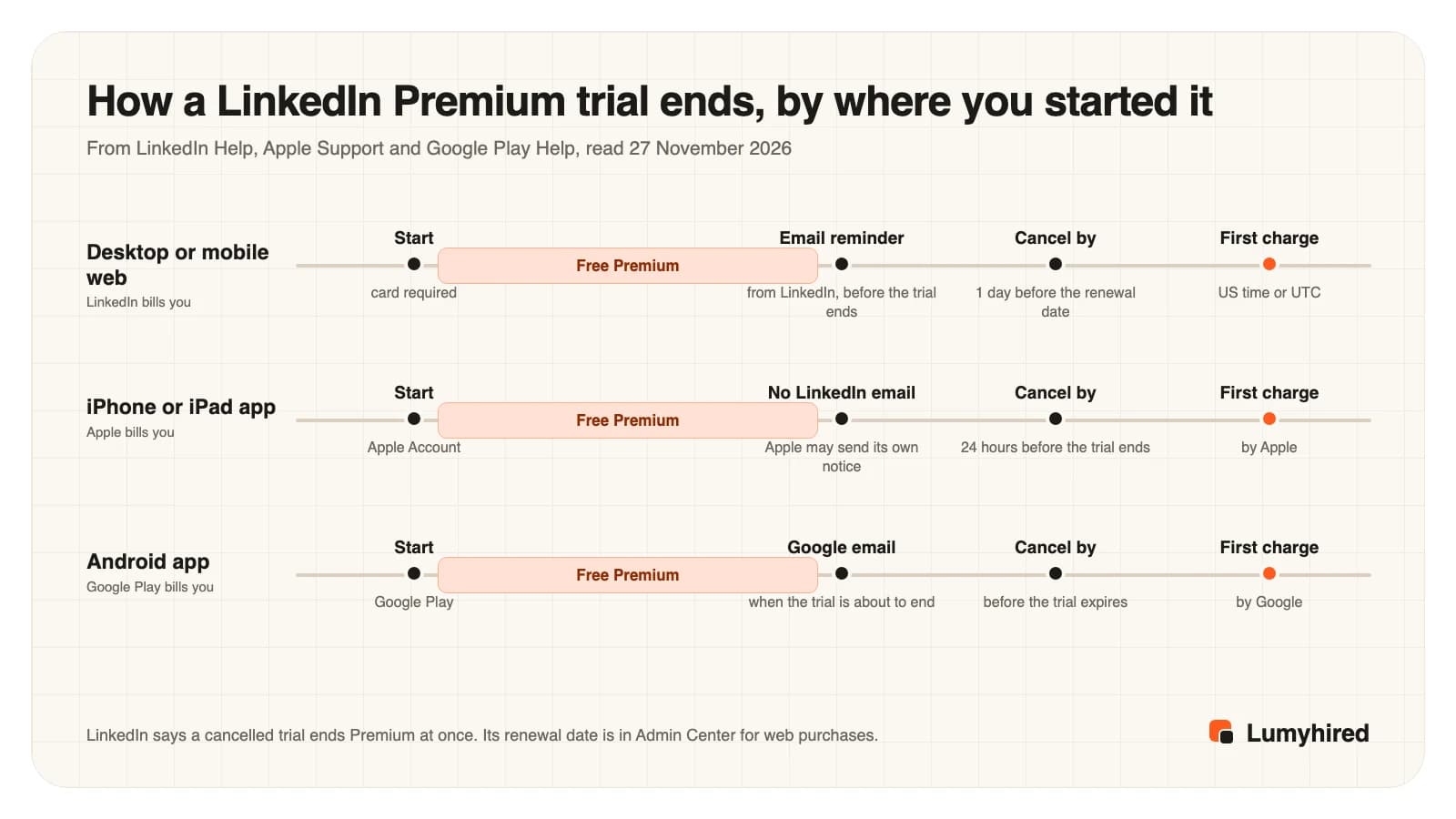
- Reminders. LinkedIn’s auto-renewal page: “If you purchased a subscription on your mobile device, you won’t receive an email reminder from LinkedIn prior to the auto-renewal of your subscription.” It adds that “Apple and Google may provide their own renewal notices.” Google Play’s subscription page says you will get an email when a trial is about to end.
- Deadline. Apple says to cancel a trial “at least 24 hours before the trial ends.” Google Play says to cancel “before the trial period expires.” LinkedIn asks for at least one day before the billing date.
- Annual upgrade. LinkedIn’s billing cycle page says the instant switch to annual “isn’t available for subscriptions purchased through Google Play or iOS App Store.”
- Refunds. The refund policy says “All iOS refunds must be issued by Apple.” For a forgotten trial charged through the iPhone app, LinkedIn cannot help.
Two pages that disagree on when a cancelled trial ends
LinkedIn’s trial, eligibility and expiration pages all say a cancelled trial ends on the spot: “If you cancel a Premium free trial, the trial will end immediately, and Premium access will stop right away.” Its cancellation FAQ, updated “3 months ago”, says something else: “You can cancel LinkedIn Premium (for example, subscription, promotion, or trial) at any time. After you cancel it, your plan will expire at the end of your current billing cycle.” Google Play, for trials it bills, says that when you cancel you keep access to the end of the current billing period.
Three pages against one, and the three are the ones written about trials, so plan for the strict reading: assume Premium stops the moment you cancel a trial started on LinkedIn. That means using the trial fully first and cancelling near the end, with a day to spare. If you were billed by Google Play and Premium stays on after you cancel, that is Google’s rule at work.
How to avoid being charged when the trial ends
The trial is a paid subscription with a delay. “At the end of the trial, your subscription will automatically convert to a paid plan unless you cancel before the trial ends,” says the trial page. A routine that works with every rule above:
- On day one, find the date. LinkedIn says you can see your “Premium free trial auto-renewal date on your LinkedIn Admin Center page.” For an Apple or Google trial, the date is in your Apple Account subscriptions or in Google Play subscriptions.
- Convert it to your time zone. Billing dates follow the moment the subscription was activated, “in local US time zones for US-based English-speaking members only. For all other countries or languages, this is in Universal Time Coordinated (UTC).” A member in Sydney or Mumbai who waits for the last evening can be charged before that evening starts.
- Set your own reminder two days before. Do not rely on LinkedIn’s email. It only exists for desktop purchases, and “If your email address is bounced or unconfirmed, you will not receive the reminder email.” LinkedIn lists the subject lines it may use, among them “Important notice about your LinkedIn Premium Free Trial” and “Maximize your Premium benefits”, which reads like marketing and is easy to ignore.
- Use the trial, then cancel with a day to spare. Because cancelling can end access at once, finish the InMail messages and the courses first.
- Check that it worked. The subscription under Purchases should show an end date and no next billing date. Take a screenshot.
The cancel steps themselves, in two lines: on a computer, Me, Premium features, Manage subscription, Purchases, your subscription, Cancel subscription, Confirm cancel. Apple and Google trials are cancelled in your Apple Account or Google Play subscriptions. Each path, with screens and edge cases, is in our guide to cancelling LinkedIn Premium.
If the first charge already went through
LinkedIn’s refund policy says Premium subscriptions “may be refundable within 7 days from the date the subscription is charged without Premium usage. A previous refund may affect your eligibility.” Cancel, stop using Premium, and use the Request a Refund link on that page within the week.
The European rule is less helpful after a trial than it looks. The policy grants EU citizens a full refund in the 14 days after the subscription begins, then adds: “if you signed up for a free trial, the period begins on the first day of your free trial, so there will be no fees paid as a refund.” With a one-month trial, those 14 days are over long before the first charge. The 7-day rule is the one that applies. The full refund table by country, with Apple’s and Google’s processes, is in the cancellation guide.
LinkedIn also says that if you missed an expired card, “make sure to update outdated billing information within five days after your renewal date” to avoid being moved to a Basic account. A failed payment is not a cancellation. Cancel properly even if the card on file has expired.
Is LinkedIn Premium free for students or job seekers?
No, beyond the trial. We read every LinkedIn Help page we could find on Premium pricing and offers on 27 November 2026, and none describes a student price, an .edu rate or a free Premium plan for people who are out of work.
Students
The one student offer LinkedIn documents is closed. A Help page titled “Microsoft M365 LinkedIn Premium Career Student promotional offer (no longer available)” says Microsoft gave a limited number of codes to eligible members in selected regions, and that “The promotion has ended, and new codes are no longer being issued.” Members who redeemed a code are told to ask Microsoft Support about it, since Microsoft manages those subscriptions. LinkedIn adds that Microsoft “may make other promotional offers available in the future.”
Coupon and student-deal sites also describe six months of Premium for Amazon Prime Student members. We could not confirm it: the 2022 LinkedIn blog post that announced it now redirects to the blog’s home page, and no LinkedIn Help page we found mentions it. If Amazon offers it to you, read the terms on Amazon’s own page.
Job seekers
The free trial is the job seeker’s route, and LinkedIn’s trial page frames it that way, listing “Job seekers” first among the people it serves. Beyond it, a promotional offer can come “from a member you’re connected to, or from LinkedIn”, per the promotional offers FAQ. LinkedIn does not say how often it sends them or to whom.
What a free account already gives a job seeker is more than people assume. LinkedIn’s account comparison page lists, for a basic account, searching and viewing profiles, requesting and giving recommendations, receiving InMail, and saving up to three searches with weekly alerts. LinkedIn’s AI-powered job search is open to every member, with filters such as Easy Apply, In my network and Under 10 applicants. The trial is worth taking when you have a specific use for InMail or applicant insights in the month it runs; without one, it mostly gives you a badge and a date to remember.
Free LinkedIn Premium for US veterans and military spouses
This is the one program where LinkedIn gives Premium away for a year. Its military community FAQ (“Last updated: 6 months ago”) describes “a complimentary 12-month subscription to LinkedIn Premium”, handed out through nonprofits that provide career services. The terms, as LinkedIn writes them:
- Who qualifies: veterans of the US Armed Forces, spouses of service members or veterans, and Active Duty service members “navigating near-term job transitions”. The nonprofit partners decide eligibility “in their sole discretion”.
- How you get it: by “actively participating in career services” with one of three partners, Student Veterans of America, Hire Heroes USA and Hiring Our Heroes. LinkedIn does not hand out the codes itself.
- Supply is limited: codes are “available on a first-come, first-served basis, and the program may reach capacity periodically.” If it is full, LinkedIn suggests checking back with the nonprofits.
- No active Premium: you must not have a Premium subscription when you redeem. If you are in a trial or a paid plan, cancel it and let it end first.
- Once, and it stops by itself: “This is a one-time, 12-month offer; after the promotional period ends, your subscription will terminate automatically.” Nothing renews into a paid plan, according to those terms.
LinkedIn’s veterans program page repeats the same terms and links to the three nonprofits. You do not need to add military status to your profile to qualify; LinkedIn says that information is optional and can be set privately in your demographic settings.
LinkedIn Premium discounts that exist: annual billing and Duo
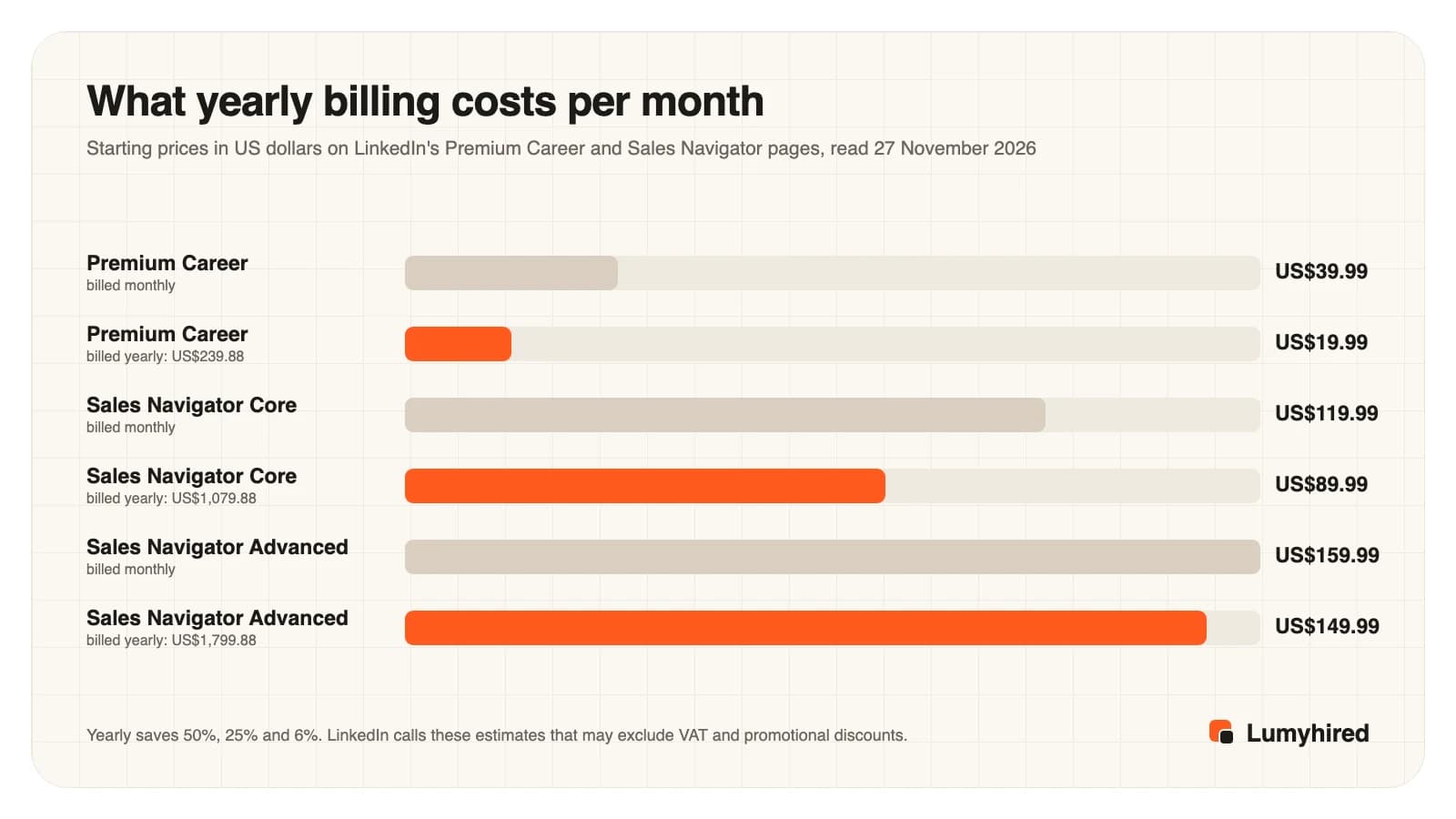
The discount anyone can take is paying for a year. LinkedIn’s billing cycle page (“Last updated: 1 week ago”) says “You can save up to 50% if you pay annually compared to paying monthly.” The prices LinkedIn printed on its product pages on 27 November 2026:
| Plan | Billed monthly | Billed yearly | Yearly, per month |
|---|---|---|---|
| Premium Career (USD) | US$39.99 | US$239.88 | US$19.99, LinkedIn says 50% less |
| Premium Career (EUR) | €29.98 | €179.88 | €14.99 |
| Premium Career (GBP) | £29.99 | £179.88 | £14.99 |
| Premium Career Duo (USD) | US$59.98 | US$359.88 | US$29.99 |
| Sales Navigator Core (USD) | US$119.99 | US$1,079.88 | US$89.99, LinkedIn says 25% less |
| Sales Navigator Advanced (USD) | US$159.99 | US$1,799.88 | US$149.99, LinkedIn says 6% less |
When annual billing is a bad deal
Half price only helps if you use the year. A job search that ends in month three leaves nine months paid, and the refund policy refunds unused months only in a few countries (Denmark, the Netherlands, and Germany except in the first year of an annual plan). Two months of Premium Career billed monthly cost US$79.98; the yearly plan costs US$239.88. The break-even sits at six months: six monthly payments come to US$239.94, six cents more than the year. If you cannot say you will use Premium for at least six months, pay monthly.
Quarterly billing, according to one page
LinkedIn’s subscription FAQ (“4 weeks ago”) lists “a monthly, quarterly, or annual billing cycle” and says the quarterly one is being rolled out gradually and “you might not have access to it at this time.” The billing cycle page, updated more recently (“1 week ago”), offers only “Monthly or Annual”. If your checkout shows a quarterly option, it may suit a search you expect to last a few months. No LinkedIn page we read gives its price.
The Duo option
LinkedIn describes Duo as a way for two people to “each have their own Premium Career license under one shared subscription ... at a lower combined price.” Its page lists Duo at US$59.98 a month or US$359.88 a year, under a heading that says “per license”. Read as the price for both people, that is US$29.99 each per month, or US$14.99 each per month billed yearly. The wording leaves room for doubt, so check the total on the checkout screen before you share a subscription.
Switching billing can cost you a promotion
If you are on a promotional price, read LinkedIn’s cancellation FAQ first: “If you change your billing frequency, upgrade, or downgrade while an active promotional offer is applied to your subscription, the offer will be forfeited and cannot be restored.” A discount you got by link can be worth more than the annual saving.
LinkedIn Premium discount codes: what they really are
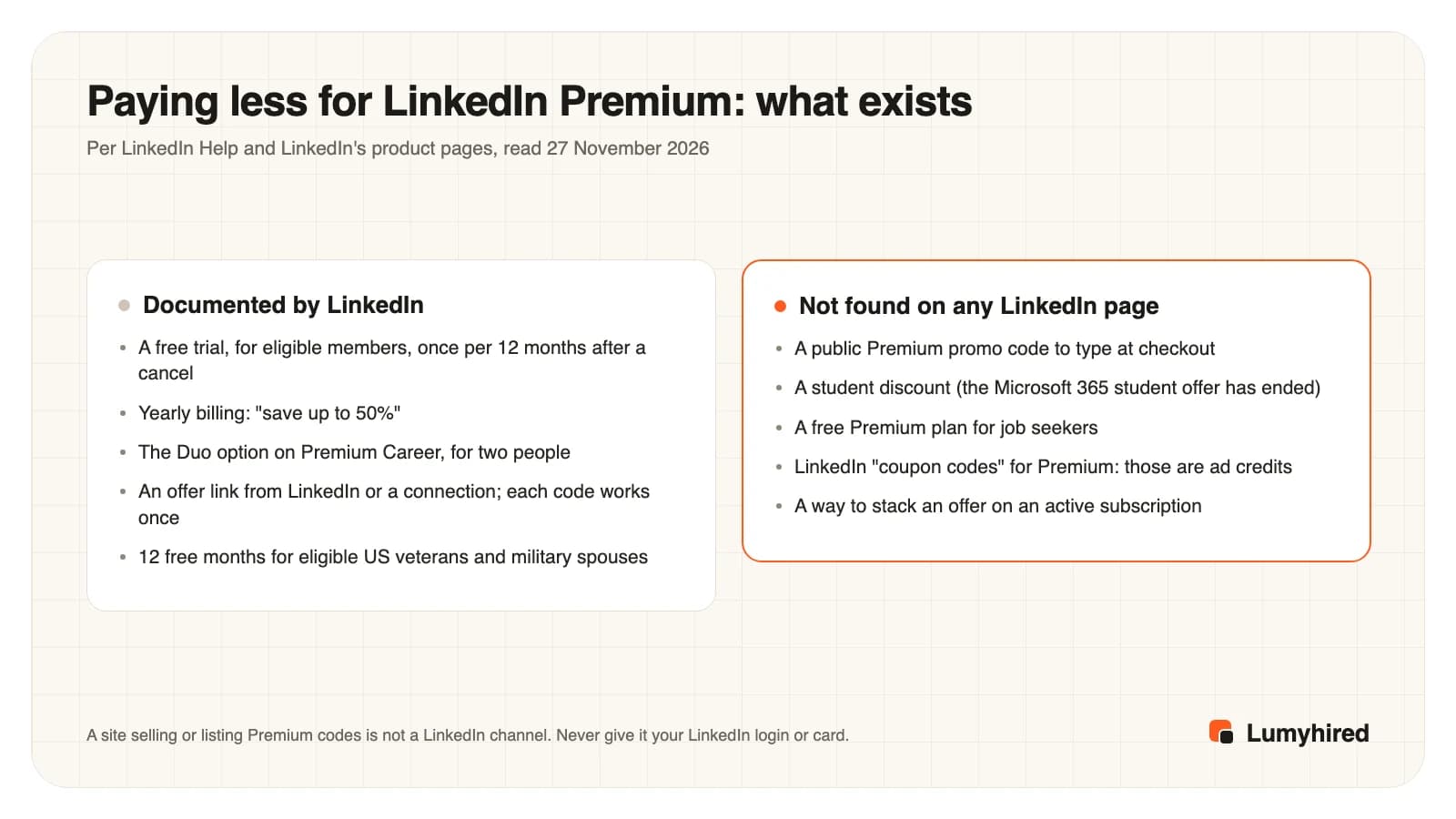
LinkedIn does not publish a Premium promo code, and its checkout is built around offers that reach you as a link. What its Help pages say about codes:
- Premium offers come as a link. The promotional offers FAQ says LinkedIn “offers promotional subscriptions to allow members to try LinkedIn Premium for free or at a discount”, sent by LinkedIn or by a connection. You redeem one “by clicking the associated link to activate it, or by copying and pasting the link into your browser.”
- Each code works once. “When you receive a promotional offer, it’ll include an offer code or link. Each offer code only works once.” A code posted on a public site has, at best, been used by the first reader who tried it.
- The price after the offer is hidden. To the question of what Premium costs when a promotion ends, LinkedIn answers: “You’ll need to wait for the promotion to end to view the price of the Premium subscription.” Put a reminder on the end date as you would for a trial.
- LinkedIn “coupon codes” are for ads. The Help page titled “Coupon codes and advertising credits FAQs” says coupon codes “can be used to secure advertising credits, which are used to buy LinkedIn advertising products”, redeemed in Campaign Manager. They do not apply to Premium. If you have not received one, LinkedIn says, “you don’t meet the marketing requirements for that offer.”
- The military codes are personal. The veterans offer “is not transferable and may not be sold, shared, or bartered.” A Premium code for sale is, by LinkedIn’s own terms, one it can revoke.
What coupon sites are selling you
Search “LinkedIn Premium discount code” and the results include coupon sites. Given what LinkedIn’s pages say, a code shown there can only be one of three things: the standard free trial page, which you can open yourself; a one-time offer someone else already redeemed; or a link that may earn the site a commission. None of that harms you on its own. The risk starts when a page asks for something LinkedIn would never need from a third party:
- Your LinkedIn email and password, to “apply the code to your account”.
- Card details entered anywhere other than LinkedIn’s own checkout, Apple or Google.
- A payment for a “shared” or “lifetime” Premium account.
- A browser extension that promises to find codes at checkout.
Real LinkedIn offers open on linkedin.com and finish in LinkedIn’s checkout, or in Apple’s or Google’s payment sheet. If the address bar shows another domain when you are asked to pay or sign in, close the tab.
Paying less for the job hunt itself
Premium is a LinkedIn tool, and its best features work on LinkedIn: InMail to people on LinkedIn, insights on LinkedIn-hosted jobs, a badge on a LinkedIn profile. If you send most of your applications elsewhere, to company career sites and other job boards, the trial month is a good time to check where your applications actually go before you pay for Premium.
That other half of the search is where Lumyhired works. We publish this page, so weigh what follows accordingly; each point is something you can check in the app.
- One job feed from more than 10 sources, among them France Travail, Welcome to the Jungle, Indeed and company career sites on Greenhouse, Lever and Ashby, with a match score from 0 to 100 on each job.
- One-click resume tailoring per job, with an ATS score so you see how an applicant tracking system reads it, and a cover letter generated from the job card.
- A Kanban tracker for every application, and interview prep for the jobs you reach.
What it does not do: it does not apply for you, it does not message recruiters the way InMail does, and LinkedIn postings are not in its feed. Its trial works differently from LinkedIn’s. Every new account gets 7 days of Pro free, with no card asked and nothing charged when it ends, so there is no date to watch. After that, plans are weekly at €5, €8 or €13 (about €21.67 a month on the cheapest), you can cancel any time, and the first 3 days are refundable. Details are on the pricing page.
Free options first, if you prefer: run your resume through the ATS resume checker, and see the free tools in our job search tools for new graduates comparison. And if you are deciding whether to keep Premium after the trial, the LinkedIn Premium worth-it guide weighs it case by case.
Frequently asked questions
How long is the LinkedIn Premium free trial?
Do I need a credit card for the LinkedIn Premium free trial?
Why am I not eligible for the LinkedIn Premium free trial?
Will LinkedIn remind me before the trial ends?
Is there a LinkedIn Premium student discount?
Is LinkedIn Premium free for veterans?
Is there a LinkedIn Premium promo code?
How much do you save with annual LinkedIn Premium?
Sources
Every page below was read on 27 November 2026, logged out, in English. LinkedIn Help shows relative update dates (“9 months ago”), reported as shown. The other LinkedIn pages quoted in the text (redeem steps, payment methods, applicant insights, Top Choice, AI job search, the cancellation FAQ, the veterans program, the User Agreement) are linked where they are cited. We found no public Premium promo code, no student discount and no fixed trial length on any LinkedIn page, so none is claimed.
- LinkedIn Help, LinkedIn Premium free trial, “Last updated: 9 months ago”, read 27 November 2026
- LinkedIn Help, LinkedIn free Premium trial eligibility, “Last updated: 9 months ago”, read 27 November 2026
- LinkedIn Help, Auto-renewals for Premium subscriptions after free trial, “Last updated: 3 months ago”, read 27 November 2026
- LinkedIn Help, Premium free trial expiration notification, “Last updated: 3 months ago”, read 27 November 2026
- LinkedIn Help, LinkedIn Premium subscription FAQ (billing cycles, refund summary, trial reminder), “Last updated: 4 weeks ago”, read 27 November 2026
- LinkedIn Help, Change your billing cycle (“save up to 50%”, annual upgrade during a trial), “Last updated: 1 week ago”, read 27 November 2026
- LinkedIn Help, LinkedIn refund policy, “Last updated: 1 month ago”, read 27 November 2026
- LinkedIn Help, LinkedIn Premium subscription promotional offers FAQ, “Last updated: 2 years ago”, read 27 November 2026
- LinkedIn Help, Coupon codes and advertising credits FAQs, “Last updated: 3 months ago”, read 27 November 2026
- LinkedIn Help, LinkedIn Premium for the U.S. military community FAQ, “Last updated: 6 months ago”, read 27 November 2026
- LinkedIn Help, Microsoft M365 LinkedIn Premium Career Student promotional offer (no longer available), “Last updated: 9 months ago”, read 27 November 2026
- LinkedIn Premium, Premium Career page and pricing FAQ (“Last updated: April 20, 2026 (pricing and plan details)”), read 27 November 2026
- LinkedIn Sales Solutions, Sales Navigator compare plans and pricing FAQ, read 27 November 2026
- Apple Support, Cancel a subscription from Apple (published 29 September 2026), read 27 November 2026
- Google Play Help, Subscribe to services or content (trials and renewals), read 27 November 2026
- Lumyhired plans, the 3-day refund window and the 7-day Pro offer: our own product, as shown on the pricing page on 27 November 2026.
Corrections: if you work at LinkedIn and an offer or price here has changed, write to us and we will update the page and its date.
Read next
- LinkedIn Premium 2027: Cost and Is It Worth It?
LinkedIn Premium cost plan by plan, who it is worth it for, free trial rules, discount codes and 6 cheaper alternatives, with a short note on cancelling.
- How to Cancel LinkedIn Premium and Get a Refund
Cancel LinkedIn Premium on desktop, iPhone or Android, stop a free trial before the charge, ask for a refund, and what you keep, read 26 November 2026.
- Best Job Search Tools for New Graduates in 2026
Seven tools ranked on turning coursework and internships into a posting's words, plus what each one really costs a student and when free access ends.
- Job Search Strategies 2026: Which Channels Get Interviews
Interview rates by job board and career page, referral vs cold application, five message templates and a 10-hour weekly plan built from 2026 data.